

A serial console can reveal a boot failure before networking or a display becomes available. It is also easy to wire incorrectly. Use the board’s documented debug UART, signal levels and serial settings before connecting a USB adapter.
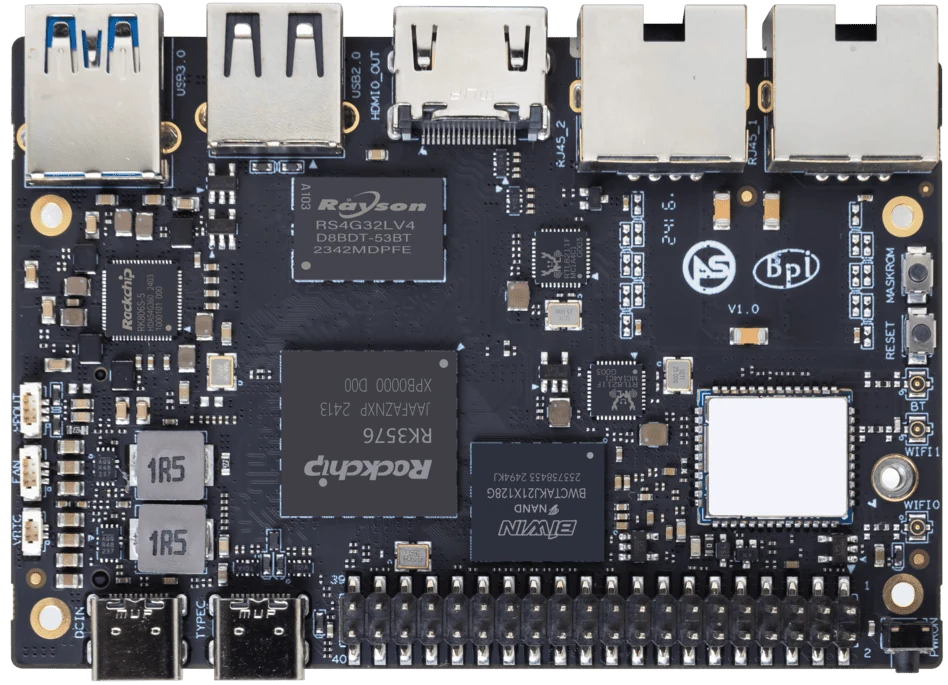
ArmSoM Sige5
Identify the debug connection
Find the debug pins and required voltage in the exact board manual. Match transmit, receive and ground correctly, and check whether the adapter’s power pin should remain disconnected. Capture the boot log from power-on. Avoid copying another board’s baud rate or connector order just because both use the same processor.
Capture the entire boot sequence
Set the documented serial parameters rather than assuming the terminal default. Start logging before applying board power. Distinguish boot-ROM silence, bootloader output and Linux startup messages. Unreadable output can be a serial configuration problem, while a clean log stopping at a consistent stage may identify a storage or driver issue.
Turn logs into useful support evidence
Record board revision, image, supply and connected peripherals. Share the relevant boot section with credentials and identifiers removed. Keep a known-good log from the same configuration for comparison. UART is a diagnostic tool; normal application serial ports may have different assignments and should be documented separately.
Match the choice to your requirements
Requirement or situation | What to evaluate | Decision detail |
Before wiring | Voltage and connector pinout | Use the board-specific reference. |
Before power-on | Terminal settings and log file | Capture early messages. |
Before sharing | Redact secrets and identifiers | Retain the relevant error context. |
Example design
Make a boot log useful to another engineer
Capture from power-on rather than beginning after the failure. Record the board revision, power supply, storage medium and image beside the log. If the console stops, note the last complete line and whether the board resets or remains powered. Avoid attaching an adapter whose voltage or pinout has not been checked. Remove credentials and private network information before sharing diagnostic output publicly.
Hardware and documentation
Sige5 · RK3576
RK3576, four Cortex-A72 and four Cortex-A53 cores, 6 TOPS NPU, dual Gigabit Ethernet and M.2 PCIe 2.1 x1.
Hardware documentation · Product details
Sige7s · RK3588S
RK3588S, 6 TOPS NPU, Gigabit Ethernet and removable eMMC. Dimensions: 85 × 56 × 17 mm. Disconnect power before replacing eMMC.
Hardware documentation · Product details
Frequently asked questions
Can I use any USB serial adapter?
Only one with compatible electrical levels and the required configuration.
Is no serial output proof that the board is defective?
No. Wiring, adapter, terminal settings, power and boot configuration must be checked.
Product information and support
Sources
Written by ArmSoM using the documentation below. Example designs are proposals, not measured customer installations.