Quad-core Linux computing
Four Cortex-A53 cores handle application logic, lightweight services and development tasks.
RK3528 · up to 2.0GHz
Compact board.
Connected possibilities.
Quad-core RK3528 compute, 2.5G + Gigabit Ethernet, WiFi 6 and 4K video in a compact single-board computer for networking, media and everyday Linux projects.
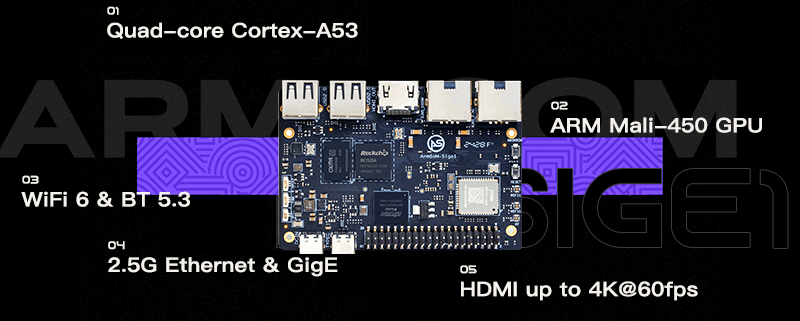
Networking, media and GPIO.
One board. Plenty to explore.
Combine wired networking, wireless connectivity and multimedia on a ready-to-use development board.
Four Cortex-A53 cores handle application logic, lightweight services and development tasks.
RK3528 · up to 2.0GHzConnect separate networks or build networking projects around a 2.5G port and a Gigabit port.
1 × 2.5GbE + 1 × Gigabit EthernetOnboard wireless connectivity keeps your project connected without a USB wireless adapter.
WiFi 6 · Bluetooth 5.3Hardware decoding supports up to 4K60 video, with HDMI output for monitors and media displays.
HDMI 2.0b · H.265 / H.264 / AVS2Use USB, a MicroSD card and the 40-pin header to build and extend your application.
USB 2.0 · OTG · 40-pin GPIOLPDDR4x memory and eMMC options support different application requirements. Check current options in the store.
Up to 4GB LPDDR4x · MicroSD expansionOfficial product images and hardware references from the ArmSoM documentation.
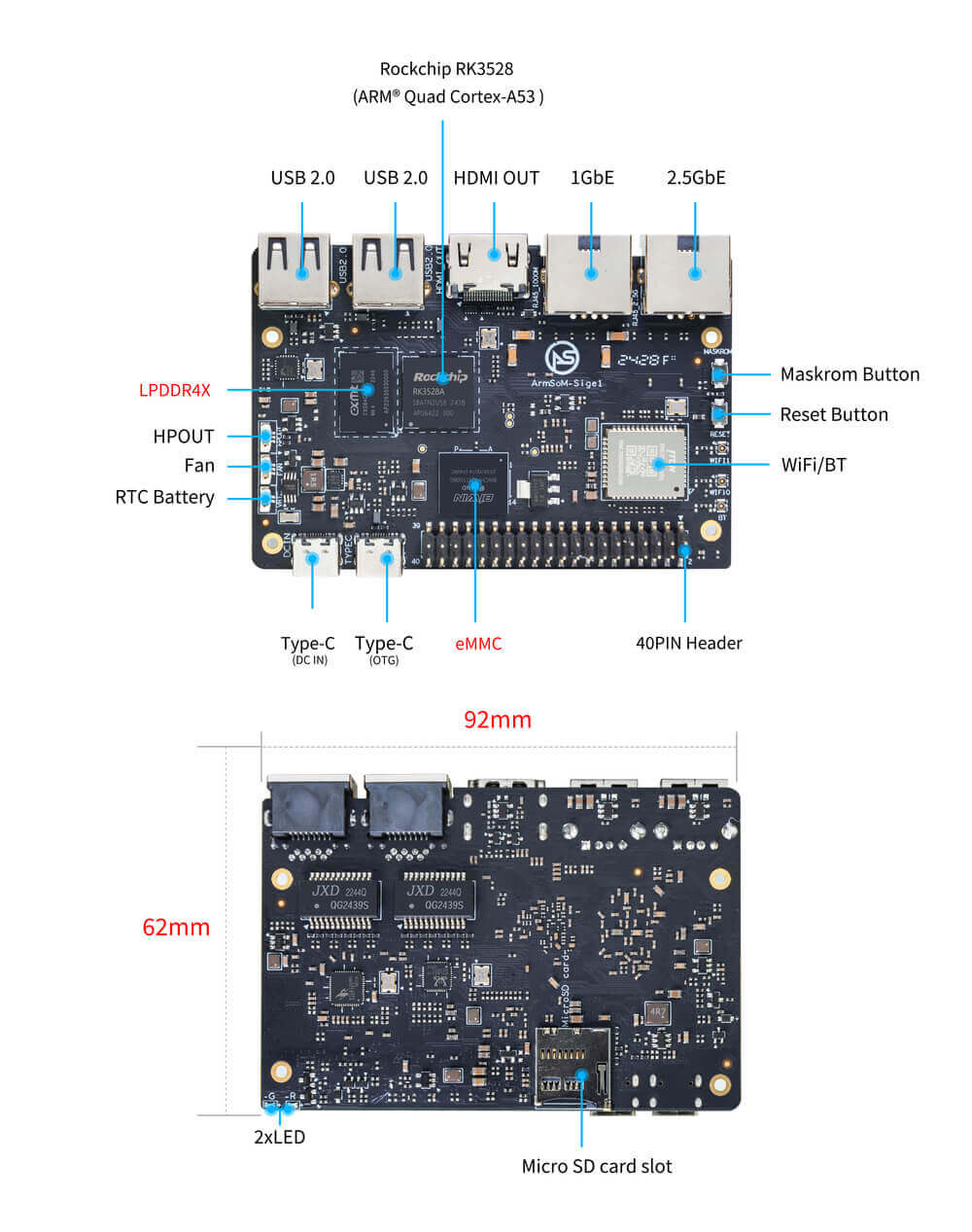
See the Ethernet ports, power input, GPIO, storage and wireless module.
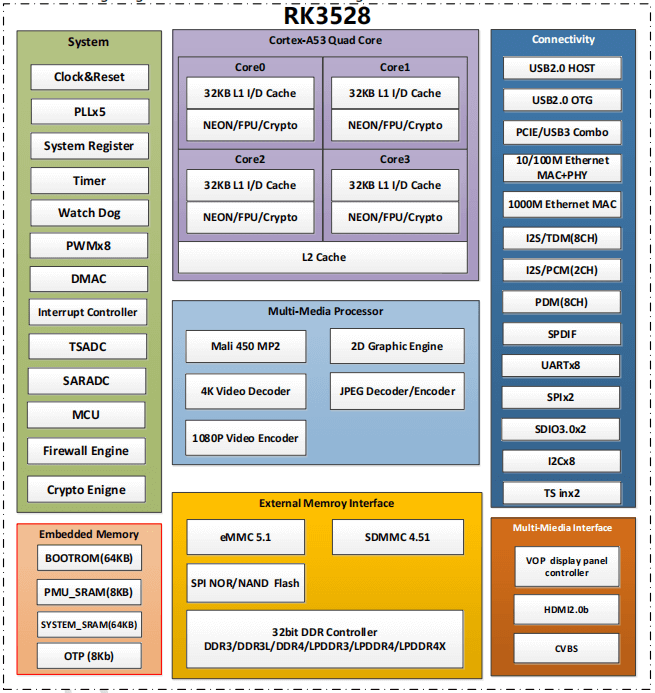
SoC-level architecture reference; board interfaces are listed separately.
Select an image to open the full-resolution view.
A foundation for media and connected devices.
The RK3528 combines a quad-core application processor with hardware video decoding and graphics for compact Linux and multimedia systems.
Sige1 brings that platform onto a board with two Ethernet ports, WiFi 6 and familiar peripheral connections, so you can focus on your application.
Explore the hardware specifications ↗Keep high-speed wired links and wireless access on the same compact board.
Alongside a separate Gigabit Ethernet port
Use the two Ethernet ports for separate network segments or connected-device projects.
Connect through onboard WiFi 6 and Bluetooth for supported wireless peripherals.
Start with a documented Linux image and validate the networking features your application needs.
Port link rates describe hardware capabilities. Actual throughput depends on software, storage, traffic and network configuration.
Plug in a display, connect your network and start exploring peripheral development.
One high-speed wired port
A second independent port
Onboard SYN43752 module
Up to 4K60 output
Host peripheral connections
USB 2.0 data / programming
UART / SPI / I²C / I²S / PWM
System and data storage
A flexible foundation for developers and embedded product teams.
Explore lightweight routing, network services and connected-device development.
Build a media player or information display around hardware video decoding.
Develop compact Linux services for local dashboards and everyday automation.
Connect sensors and peripherals while learning embedded Linux and GPIO.
A practical overview for product selection and development.
| Specification | ArmSoM Sige1 |
|---|---|
| Processor | Rockchip RK3528 |
| CPU | Quad-core Cortex-A53, up to 2.0GHz |
| GPU | Arm Mali-450 |
| Memory | LPDDR4x, documented options up to 4GB; see store for current configurations |
| Storage | Onboard eMMC options and MicroSD expansion; capacity depends on configuration |
| Networking | 1 × 2.5G Ethernet + 1 × Gigabit Ethernet |
| Wireless | SYN43752 WiFi 6 (802.11a/b/g/n/ac/ax) + Bluetooth 5.3 |
| Video decoding | Up to 4K60, including H.265 / H.264 / AVS2 |
| Video encoding | Up to 1080p60 H.264 / H.265 |
| Display | 1 × HDMI 2.0b, up to 4K60 |
| USB | 2 × USB 2.0 host + 1 × USB Type-C 2.0 OTG |
| Expansion | 40-pin GPIO: UART / SPI / I²C / I²S / PWM and power |
| Audio | HDMI audio and headphone output |
| Other connections | 5V fan connector and RTC battery connector |
| Power | DC IN Type-C; recommended 5V/2.5A or 12V/2A (non-PD) |
| Buttons | Reset and Maskrom |
| Dimensions / weight | 92 × 62 × 14.6mm / 38.9g |
| Operating temperature | 0°C to 80°C |
| PCB | 6-layer design |
Documented hardware options are shown here. Check the store for available configurations and the product documentation for detailed interface support.
Hardware files, system images and source code, all within reach.
Specifications, interfaces & pin definitions
Tools and steps for system installation
Sige family setup and interface guide
Official Sige1 download folder
Schematics and hardware resources
ArmSoM Rockchip kernel repository
Official and community image availability varies. Use the current documentation to check versions and supported peripherals.
Sige1 is a complete RK3528 single-board computer with network and display ports. AIM7 is an RK3588 system-on-module that requires a carrier board. Sige1 does not have the dedicated AI NPU featured on AIM7.
Use the Type-C connector marked DC IN. The other Type-C connector serves OTG data and programming. Follow the documented 5V/2.5A or 12V/2A power recommendations.
The board has one 2.5G Ethernet port and one Gigabit Ethernet port. Configure each interface in your operating system and validate your intended network setup.
The documentation describes multiple memory and storage configurations, with LPDDR4x up to 4GB. The live store is the source for currently available combinations; no fixed price or stock is shown on this overview page.
The Sige1 documentation links to official and community system images. Use the Sige family getting-started guide and the flashing guide to install the image for your board.
Explore available configurations or talk to us about your development and integration needs.