

Remote access is convenient until an update removes it. A recoverable ArmSoM deployment needs backups of application data and a separate route to restore the system. Test both before placing a device somewhere difficult to reach.
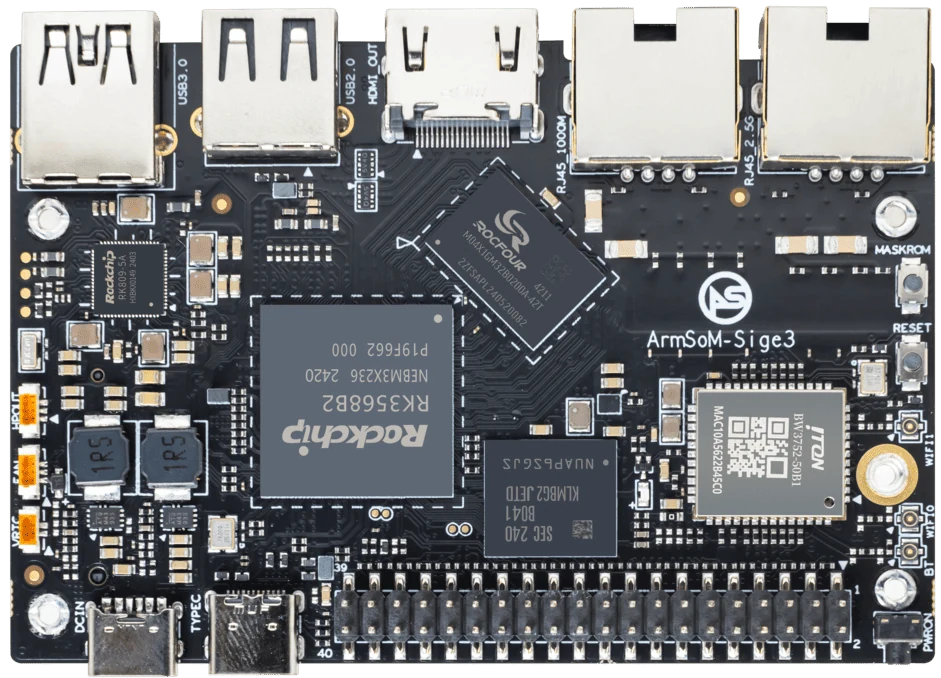
ArmSoM Sige3
Back up what cannot be recreated
Separate reproducible software from device-specific configuration and user data. Store backups away from the device and verify that they can be read. Rebuild a spare system from the documented image, then restore its data. This exposes missing credentials, packages or steps while the original device is still available.
Back up the state that matters
For Sige3 or Sige5, save application configuration, persistent data and a reproducible image reference. Use database-aware backups where required. Store a copy away from the device and test restoration onto spare storage. A backup that has never been restored is an unproven recovery asset. Protect secrets in the backup as carefully as on the live system.
Define the no-network procedure
Provide local staff with an approved power and storage recovery procedure. Keep serial access instructions and a known-good image available to the responsible engineer. Test an interrupted update and document rollback. Monitor available storage and service health so degradation can be addressed before the only remote connection is lost.
Match the choice to your requirements
Requirement or situation | What to evaluate | Decision detail |
Access | Authentication and network path | Re-test after reboot. |
Data | Versioned backup and restore | Use a spare target. |
Recovery | Local contact and known-good image | Practise loss of remote access. |
Example design
Write a recovery card for the installer
A short recovery record should identify the device, normal access method, backup location and local fallback. Keep sensitive credentials in an appropriate secure store rather than in a public article or image. Rehearse recovery from a second computer using the written instructions. If only the original developer can regain access, the procedure is incomplete even if SSH normally works.
Hardware and documentation
Sige3 · RK3568B2
RK3568B2 with a 2.5GbE port and a separate Gigabit Ethernet port. Consult the revision-specific manual for expansion and boot support.
Hardware documentation · Product details
Sige5 · RK3576
RK3576, four Cortex-A72 and four Cortex-A53 cores, 6 TOPS NPU, dual Gigabit Ethernet and M.2 PCIe 2.1 x1.
Hardware documentation · Product details
Frequently asked questions
Is an SD-card image enough for backup?
It may help restore a system, but application-consistent data backups and separately managed credentials can still be necessary.
Product information and support
Sources
Written by ArmSoM using the documentation below. Example designs are proposals, not measured customer installations.