

To move a Linux application from Raspberry Pi Compute Module 5 (CM5) to ArmSoM CM7s, start with a CM7s-compatible Debian or Ubuntu image, recreate the application's dependencies and compare its outputs on both systems. Raspberry Pi boot files, device trees and hardware drivers need platform-specific replacements.
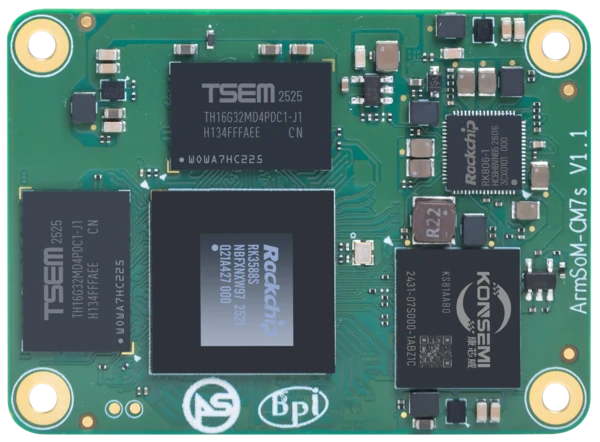
ArmSoM CM7s v1.1. Photograph: ArmSoM product media. Confirm the revision of the supplied module.
The amount of work depends on what the application touches. A network service with ordinary file storage may need mostly packaging and testing. A camera terminal using GPIO, hardware video processing and a custom panel has more platform dependencies, even if its main application is written in Python.
Choose a working CM7s system image first
The CM7s-IO image section lists Debian 12 Bookworm and Ubuntu 22.04 LTS. For the example here, use a CM7s-IO Debian 12 image; the same application check can also be run on Ubuntu 22.04. Save the exact download filename and its SHA-256 checksum with the results. The documentation links to a product download folder, so the OS name alone does not identify a particular image build.
Version references for a small Python application
Layer | Reference | Check on the actual image |
CM7s-IO Debian image | Debian 12 Bookworm; ArmSoM's camera example is documented for Debian 12 / Linux 6.1 | Image filename and checksum, OS release, full kernel version and loaded board model |
Debian Python | The Bookworm python3 package uses Python 3.11 | The installed interpreter and SQLite library versions; a vendor image can include package changes |
Ubuntu alternative | The Jammy python3 package uses Python 3.10 | Use an Ubuntu image intended for CM7s-IO, then repeat the same checks |
Replay example below | Python 3.10 or later; json and sqlite3 from the standard library | No pip packages, GPIO library, camera driver or NPU runtime is required for this application-only check |
Before installing the application, confirm stable booting, storage access, networking and recovery. If a peripheral fails on the clean image, solving that problem first avoids confusing a board-support issue with an application regression.
Capture the system you are testing
Run these read-only commands in a terminal on the CM7s system and keep the output with your image filename. A missing command or module identifies a dependency to resolve; it is not a successful check.
cat /etc/os-release
uname -r
uname -m
dpkg --print-architecture
python3 --version
python3 -c 'import sqlite3; print("SQLite", sqlite3.sqlite_version)'
if [ -r /proc/device-tree/model ]; then
  tr -d '\000' < /proc/device-tree/model
  printf '\n'
fi
For a 64-bit Arm image, the kernel architecture should read aarch64 and Debian's package architecture should read arm64. Record what the board reports rather than filling a test sheet from a distribution's advertised version.
Inventory the application beyond its source code
Collect service definitions, configuration files, package versions, database schema, scheduled jobs and the installation process. Include small helper programs and native libraries. Those are often less visible than the main repository but just as necessary to reproduce the product.
What usually transfers, and what needs a platform review
Application layer | Migration approach |
Business logic and web assets | Move the source and run its existing functional checks |
Python, Node.js or native dependencies | Recreate versions and confirm target-architecture packages or rebuild requirements |
Databases and persistent files | Use a verified backup, restore and schema-migration process |
GPIO, buses and device paths | Map to the CM7s carrier, kernel configuration and exposed interfaces |
Camera, display and acceleration | Validate the target driver, API and runtime with representative input |
Boot, updates and recovery | Use the target platform's supported workflow and test failure recovery |
Also capture the behavior the customer depends on: how quickly the interface becomes usable after power-on, what happens when the network disappears and whether an interrupted job resumes. These make better migration targets than a screenshot of the application starting successfully.
ARM64 helps with packaging, but does not settle compatibility
Both platforms can run 64-bit Arm software, yet a binary still depends on its operating-system libraries, ABI and linked components. A package built for one release may require library versions that are absent on another. Rebuilding from source or creating a target-specific package is often cleaner than copying an entire filesystem.
For interpreted applications, recreate the environment from a dependency lock file where available. Some packages contain native extensions, so “written in Python” does not necessarily mean every installed file is portable. Run the project's tests after installation and compare output against the original system.
Try an application-only migration with a fixed input
A sensor gateway often parses readings, stores them and applies a rule. The following small replay checks that part of the application without connecting a sensor. It uses four fixed temperatures in thousandths of a degree Celsius and an in-memory SQLite database, so it does not modify an existing database.
Run the same block on the original Raspberry Pi system and on CM7s. Python's standard-library sqlite3 module must be installed.
python3 - <<'PY'
import json
import sqlite3
import sys

if sys.version_info < (3, 10):
    raise SystemExit("This example requires Python 3.10 or later")

readings = [23400, 25100, 24100, 26000]
db = sqlite3.connect(":memory:")
db.execute("CREATE TABLE readings (value INTEGER NOT NULL)")
db.executemany("INSERT INTO readings VALUES (?)", [(v,) for v in readings])
count, mean, alerts = db.execute(
    "SELECT COUNT(*), AVG(value), SUM(value >= 25000) FROM readings"
).fetchone()
result = {"samples": count, "mean_mC": mean, "alerts": alerts}
expected = {"samples": 4, "mean_mC": 24650.0, "alerts": 2}
print(json.dumps(result, sort_keys=True))
if result != expected:
    raise SystemExit("Replay failed: compare input and dependency versions")
db.close()
print("Replay passed")
PY
The expected output is {"alerts": 2, "mean_mC": 24650.0, "samples": 4}, followed by Replay passed. This checks the database query and alert rule. It does not test the sensor connection, persistent-storage durability or processing speed.
Next replace the fixed list with a recorded input from your application and compare its known outputs. Preserve the dependency versions and input file with each result. Only reconnect GPIO, serial devices or cameras after this part behaves correctly.
Containers keep part of the environment consistent
An ARM64 container can preserve many userspace dependencies, but it still shares the host kernel. Camera devices, GPIO access, graphics and NPU runtimes depend on the host and the devices made available to the container. Confirm the image architecture and required permissions rather than treating a container as a substitute for board support.
Replace hardware assumptions explicitly
A Raspberry Pi header number, a device-tree overlay name or a fixed camera device path should be treated as a platform dependency. Map the application requirement to the CM7s carrier first, then adapt the code or configuration. The CM7s-IO header does not by itself establish compatibility with every Raspberry Pi accessory.
Keep application logic separate from hardware access where possible. For example, a service can request “set the alarm output” through a small hardware layer instead of carrying a pin number throughout the codebase. That makes the new mapping easier to inspect and test.
For media workloads, confirm the actual capture format, resolution and timing. A camera that appears in the device list has not yet proven it can provide the required image stream continuously. Check the display and recording path at the same time if the product uses them together.
A concrete CM7s camera dependency
ArmSoM's Debian 12 / Linux 6.1 camera instructions use /boot/uEnv/uEnvarmsom-cm7s-io.txt and CM7s-IO overlays for IMX219 and OV13850. That is a board-specific configuration path, not a Raspberry Pi overlay name. Follow that procedure only for the matching image and sensor; a different image may configure overlays elsewhere.
Use the documentation's v4l2-ctl --list-devices and media-topology checks to find the ISP output on the running system. Device numbers can change when cameras are enabled or disabled. Do not hard-code /dev/video22 merely because it appears in a two-camera example.
Target OS image → Dependencies → Application → Peripheral integration → Recovery test
A staged application migration keeps failures associated with a specific layer.
Use a small, repeatable acceptance run
Choose a representative task and save its inputs. For a kiosk, that could be a fixed screen sequence with network interruptions. For a sensor gateway, it could be a replay of recorded messages with known outputs. Compare results before trying to improve speed.
Then measure startup time, memory use, task latency and CPU load on the target image. Run long enough to expose persistent memory growth and thermal changes. If the original product has a response-time requirement, carry that requirement over unchanged so a migration result remains comparable.
Finish with deployment behavior. Install an update, restore data and exercise the recovery procedure on a test unit. Verify that an operator can identify the software version and collect useful logs without a development environment. A working recovery path is part of a usable product.
Linux migration questions
Can I flash my Raspberry Pi OS image onto CM7s?
It is not a supported migration path. Use an image intended for CM7s and the selected carrier, then install the application and restore compatible data.
Will the application automatically use the CM7s NPU?
No. NPU execution needs a supported model conversion and runtime integration. Moving an existing CPU inference program onto the new board does not automatically redirect its operations. See the CM7s edge AI evaluation guide.
What information helps ArmSoM assess migration effort?
Share the image filename, captured versions, dependency list, peripheral requirements and expected application outputs. Use the CM7s platform overview and module options to identify the hardware under evaluation. The CM7s versus Raspberry Pi CM5 comparison puts that migration effort back into the product selection decision.
Selection guidance based on manufacturer documentation. No comparative hardware benchmark was performed for these articles.