

ArmSoM CM7s combines the RK3588S processor with an integrated 6 TOPS NPU. Use the RKNN-Toolkit2 path to evaluate supported models on this module. For a Raspberry Pi Compute Module 5 (CM5) project, compare the converted model's accuracy and full application latency with the existing implementation before changing platforms.
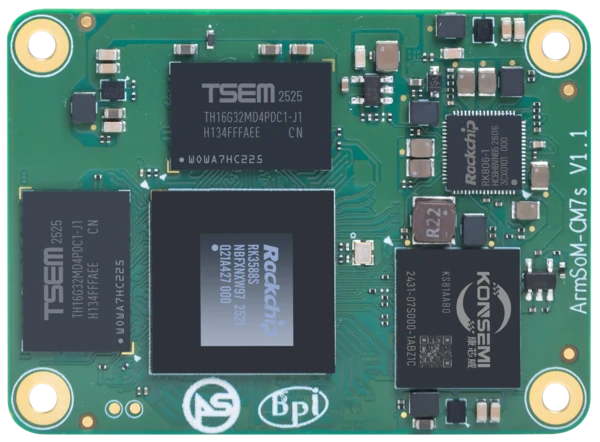
ArmSoM CM7s v1.1. Photograph: ArmSoM product media. Confirm the revision of the supplied module.
A vision product has more work to do than execute a neural network. It must acquire an image, resize or convert it, run inference, interpret the results and deliver a response. Network services, storage and a user interface may be active at the same time. Choosing a module around that complete workload gives a more realistic answer than comparing accelerator labels.
What an integrated NPU changes
When a supported model runs on the RK3588S NPU, the application can use a dedicated inference resource within the module. That is an architectural option for a compact vision terminal or inspection device. Raspberry Pi projects can also perform inference on the CPU or use a suitable external accelerator; compare the complete alternatives your application could actually deploy.
CM7s also provides CPU and graphics resources for surrounding tasks. Its four Cortex-A76 and four Cortex-A55 cores can host the application, while the Mali-G610 GPU supports graphics workloads through the appropriate software stack. None of those resources removes the need to profile data movement and application scheduling. CM7s processor and accelerator specifications.
Start with the RKNN-Toolkit2 path for RK3588S
Rockchip's RKNN-Toolkit2 project lists RK3588 series support. It separates model conversion and evaluation on a development computer from deployment through a board-side runtime. The appropriate runtime, driver and conversion tool versions need to work together. Official RKNN-Toolkit2 repository.
Use the documentation for the selected release to check model format, operators, input shapes and quantization options. A network described as “supported” still needs validation with your exported model and preprocessing. Custom operators or a changed export path can alter the result.
Rockchip's RKNN Model Zoo provides examples that can help establish a working toolchain. Choose an example whose target platform and task match the evaluation. A successful example run proves that example path; it does not certify every model in the same family.
Use a versioned MobileNet example to check the toolchain
A small image classifier is a manageable first check. The recipe here follows RKNN Model Zoo v2.5.0 MobileNet and RKNN-Toolkit2 v2.5.0. It uses the RK3588-series target name rk3588 for this RK3588S evaluation. It is a source-checked recipe, not a recorded CM7s benchmark.
Keep the conversion and board environment together
Part | Reference for this recipe | Record before running |
Development computer | Linux environment supported by RKNN-Toolkit2 v2.5.0 | Python version, installed toolkit version and required package versions from that release's installation guide |
Example repository | RKNN Model Zoo v2.5.0; commit 837db8e99281 | Full commit from git and any local changes |
Model and input | mobilenetv2-12.onnx, the example's bell.jpg and calibration samples | File hashes, quantization mode and exported RKNN file |
CM7s system | 64-bit Arm Linux with a working RKNPU driver and compatible runtime | Image filename, kernel, NPU driver and runtime API versions reported by the board/demo |
Install the host dependencies using the v2.5.0 installation documentation. The board image may contain an older driver or runtime; confirm a supported combination before deployment. A new conversion package alone does not update the board's kernel driver.
Convert on the development computer
In a fresh working directory, fetch the pinned example and its model. Run conversion from the example's Python directory so its relative dataset and label paths resolve.
git clone --branch v2.5.0 --depth 1 https://github.com/airockchip/rknn_model_zoo.git
cd rknn_model_zoo/examples/mobilenet/model
bash download_model.sh
cd ../python
python mobilenet.py --model ../model/mobilenetv2-12.onnx \
  --target rk3588 --dtype i8 --output_path ../model/mobilenet_v2.rknn
The explicit output filename matters: the v2.5.0 CMake installation rule copies mobilenet_v2.rknn. Some README commands use a different filename. Keep conversion, packaging and the board command consistent.
Without a device-test flag, this Python example also performs a host-side simulated run. A successful host result does not confirm that CM7s can load the model. Keep the conversion log, resolve any errors and check that the expected RKNN file exists.
Build and run the Linux demo
Use the Linux compiler setup in the Model Zoo build guide. From the Python directory used above, return to the repository root and build for 64-bit Arm:
cd ../../..
git rev-parse HEAD
./build-linux.sh -t rk3588 -a aarch64 -d mobilenet
The output is install/rk3588_linux_aarch64/rknn_mobilenet_demo/. Transfer that complete directory, including its model and lib subdirectories, into a writable evaluation folder on CM7s using SCP or your normal deployment method. Confirm the board's driver/runtime compatibility before running it.
In that copied demo directory on CM7s, run:
LD_LIBRARY_PATH=./lib ./rknn_mobilenet_demo \
  model/mobilenet_v2.rknn model/bell.jpg
This selects the demo's bundled libraries for this process. It does not replace system libraries. Capture the reported runtime and driver versions, model information, exit status and classification output.
Check outputs before measuring speed
The vendor's bell-image reference places a bell-related class first in the top-five classification output. Scores can vary with toolchain and driver versions. Confirm that the image, label file and model belong to the same example, then compare the full output; an exact decimal score is not a universal pass criterion.
What each result tells you
Observation | Meaning | Next check |
Exported file exists, host simulation works | The conversion and host example path completed | Load and run the same file on CM7s |
Runtime initialization or model loading fails | The board deployment is not validated | Inspect the target, model/runtime/driver combination and complete error log |
Board demo completes with plausible top-five labels | This classifier path works on the recorded configuration | Evaluate the application's own model and held-out inputs |
Application meets accuracy and sustained timing targets | The tested workload is a candidate for deployment | Qualify peripherals, thermal behavior, updates and recovery on the final carrier |
Preserve the accuracy baseline
Before conversion, save representative inputs and the original model's outputs. Use the same preprocessing rules during evaluation: channel order, normalization, input size and crop or resize behavior. A mismatch here can look like a model-conversion problem even when inference itself is functioning correctly.
If the workflow uses quantization, choose calibration data that represents the product's operating conditions. For a camera product, include the lighting, distances and object sizes that matter to the customer. Keep a separate evaluation set so calibration and acceptance do not use the same evidence.
Define the metric in application terms. A defect detector may care about missed defects at a specified false-alarm rate. A counter may care about the number of correct events over a recorded sequence. Compare that metric before and after conversion rather than relying only on the model's ability to produce a tensor.
Measure camera-to-result latency
Capture → Preprocess → NPU inference → Postprocess → Display or event
A vision pipeline. Timing boundaries should follow the result the user actually receives.
Timestamp the image acquisition and the delivered result. Also record the individual stages so a slow result can be traced to its cause. Inference time alone excludes waiting for a frame, color conversion, buffer copies and output processing.
Illustrative latency budget: a hypothetical 100ms requirement, not a CM7s benchmark
Stage | Example allocation | What to investigate if it is exceeded |
Acquisition and queueing | 25ms | Sensor timing, buffering and stale frames |
Preprocessing | 15ms | Image conversion, resizing and copies |
Inference | 35ms | Model, runtime settings and data transfer |
Postprocessing and delivery | 15ms | Result filtering, rendering or message delivery |
Timing margin | 10ms | Variation under simultaneous load |
This example shows why a faster inference stage may not fix the whole application. If old frames wait in a queue, a high throughput figure can coexist with a late response. Decide whether the product needs every frame processed or the most recent frame processed promptly, then design the buffering accordingly.
Test the application with its other work running
Once the isolated model works, add the display, event storage, network traffic and other required services. Measure latency distribution and dropped or skipped inputs over a sustained run. Note the enclosure, cooling, image version, model revision and input resolution so the result can be reproduced.
Include the situations that make a product difficult: a storage flush, a connection interruption, a model reload or a user switching screens. Watch memory during those transitions. The CM7s capacity guide can help plan buffers and concurrent services.
Decide whether the migration pays for itself
CM7s becomes a stronger candidate when the model meets its accuracy target on the NPU and the full application meets timing and thermal requirements on a suitable carrier. Include the cost of carrier changes, model integration and software maintenance in that decision.
If a working Raspberry Pi implementation already meets the requirements, compare against that measured baseline. If it uses an external accelerator, include that device's cost, power and integration effort. Neither a CPU core count nor a TOPS number captures the cost of the finished product.
AI evaluation questions
Does 6 TOPS specify the number of camera streams?
No. The stream count depends on the model, input resolution, frame rate, preprocessing, memory use and other application work. Establish it with the intended pipeline.
Can every ONNX model run on the NPU?
No universal compatibility follows from the file format. Check the exported graph against the selected toolchain and validate conversion, output accuracy and deployment.
What should an evaluation request include?
Provide the model format, input dimensions, target accuracy metric, desired response time and camera requirements. Add the image, toolkit, driver and runtime versions used in the evaluation. Review the CM7s overview and module options, then use the CM7s versus Raspberry Pi CM5 comparison to weigh the result against carrier and software migration work.
Selection guidance based on manufacturer documentation. No comparative hardware benchmark was performed for these articles.