

A headless Linux board still needs a service interface. SSH is useful while networking works; recovery becomes harder when a failed update or configuration change cuts that connection. Plan remote administration and a physical recovery route together.
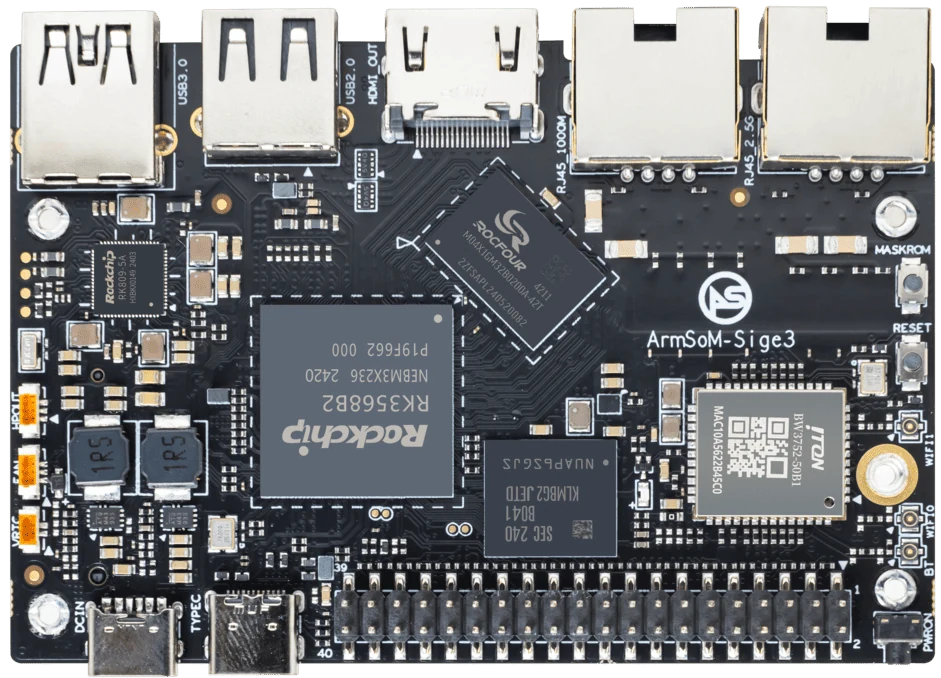
ArmSoM Sige3
Keep a route back into the device
Document how to reach the system after its normal network configuration fails. Depending on the board, that may involve a supported serial console, recovery mode or replaceable boot medium. Test the procedure with the application stopped and with the network unavailable. Store device credentials separately from the reusable system image.
Test loss of connectivity deliberately
Verify behaviour after a network cable is removed, DHCP changes, the service crashes and the system reboots. Save logs that survive the failure being investigated. Make the device discoverable through an approved network method rather than exposing an unauthenticated management port to the internet. A successful first login is only the start of a serviceability test.
Match the choice to your requirements
Requirement or situation | What to evaluate | Decision detail |
Normal maintenance | SSH with managed credentials | Keep access separate from the application account. |
Network failure | Local serial or documented fallback | Confirm electrical compatibility before connecting. |
Unbootable image | Known-good recovery media | Test restore without relying on the broken system. |
Example design
Recover a device after its network settings change
A headless service may appear dead after a router or address change even though the application is running. Prepare a documented way to discover the address and a physical recovery connection before installation. Test with the normal network unavailable. Recovery access should not depend on the same service or credentials whose failure caused the problem. Save the working image and the network configuration with the deployment record.
Hardware and documentation
Sige1 · RK3528
RK3528 single-board computer. Use the Sige1 hardware guide and matching image for setup.
Hardware documentation · Product details
Sige3 · RK3568B2
RK3568B2 with a 2.5GbE port and a separate Gigabit Ethernet port. Consult the revision-specific manual for expansion and boot support.
Hardware documentation · Product details
Sige5 · RK3576
RK3576, four Cortex-A72 and four Cortex-A53 cores, 6 TOPS NPU, dual Gigabit Ethernet and M.2 PCIe 2.1 x1.
Hardware documentation · Product details
Frequently asked questions
Does headless mean no display is ever needed?
No. It means normal operation does not require one; recovery arrangements still need planning.
Product information and support
Sources
Written by ArmSoM using the documentation below. Example designs are proposals, not measured customer installations.