

To reduce Android boot time on a Rockchip board, measure the delay from power-on to a usable application, then use serial logs, Android boot events and traces to locate the slowest stage. Change one component at a time and repeat the same test. A shorter boot animation or an earlier framework milestone does not, by itself, prove that the product is ready sooner.
This workflow is intended for engineers developing Android terminals, kiosks and embedded products with ArmSoM hardware such as the RK3576-based CM5, RK3588S-based CM7s and RK3588-based Sige7. Use the Android image and SDK branch for the exact board and carrier. The diagnostic commands below are examples for a development system; no ArmSoM boot-time benchmark is claimed.
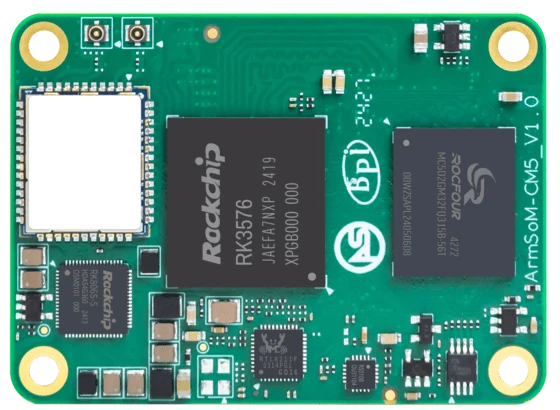
ArmSoM CM5, an RK3576 compute module. Record the module revision, carrier board and Android image when comparing boot measurements. Photograph: ArmSoM.
Define what “Android has booted” means for your product
A digital-signage player is ready when it can show its scheduled content. An industrial HMI may also need touch input and a controller connection. Agree on that acceptance point before comparing firmware builds.
Measurement | What it establishes | What to record |
Power-on to usable application | The delay a customer experiences | A consistent power-on trigger and a visible or instrumented application-ready event |
Framework screen-enable event | A milestone in Android's display startup | The event value and its definition in the target SDK; separately verify the first usable frame |
Boot-animation exit | When the animation stops | Animation completion plus launcher or application readiness |
A vendor “Boot is finished” log | A marker chosen by that firmware | The component that emits it, its time origin and whether it matches the acceptance point |
Keep cold boots after a complete power removal separate from software reboots. Record first boot after flashing, factory reset or an update as separate cases, because initialization and cache creation can change the workload. Keep the board, storage, display, connected peripherals and installed applications the same between comparisons.
Capture a baseline before changing the Rockchip Android SDK
Save the board and carrier revision, RAM and storage configuration, image filename, Android version, kernel version, and system/vendor build fingerprints. Also record whether the image is a user or userdebug build. These details help distinguish a code regression from a different software or hardware configuration.
With an authorized ADB connection, the following commands save diagnostic information to the development computer. Collect the logs promptly after the measured boot, before the circular buffers overwrite early messages.
adb shell getprop > build-properties.txt
adb shell uname -a > kernel-version.txt
adb logcat -b events -d > boot-events.txt
adb logcat -b all -d > boot-all.txt
The Android logcat documentation explains buffer selection and output options. Available logs and permissions depend on the build. Do not treat a missing event as proof that its operation took no time.
Start serial capture before power-on to see bootloader and early kernel activity that ordinary Android logcat collection misses. Use the board manual's debug-UART pins, voltage level and baud rate. For an end-to-end measurement, a video that includes the power trigger and application response can complement the software logs.
Read boot_progress events without mixing clocks
Search the saved event log for boot_progress_. Android's event definitions distinguish runtime startup, Zygote preload, SystemServer startup and framework readiness. In particular, boot_progress_start denotes runtime startup; it is not the moment power is applied or Linux init starts.
Marker or pair | Diagnostic use |
boot_progress_start | Locate Android Runtime startup in the boot sequence |
boot_progress_preload_start / boot_progress_preload_end | Measure the recorded Zygote preload interval |
boot_progress_system_run | Locate SystemServer startup |
boot_progress_pms_start / boot_progress_pms_ready | Examine the Package Manager startup interval |
boot_progress_ams_ready | Locate the Activity Manager readiness milestone |
boot_progress_enable_screen | Locate the framework screen-enable milestone; confirm actual display and application readiness separately |
Use marker values from the same boot and the same time base when subtracting timestamps. Keep wall-clock log prefixes separate from elapsed-time values in event payloads. Check the target branch's definitions and call sites: vendor modifications and Android releases can change what is recorded. The historical AOSP event definitions document the distinction, and Android 12 ZygoteInit shows preload logging in its implementation.
For illustration only, a preload start value of 4,200 ms and an end value of 7,600 ms give a 3,400 ms interval. That calculation is not a measured ArmSoM result. It also does not mean removing that interval would shorten total boot by exactly 3.4 seconds: other work may overlap or become the next bottleneck.
If events identify a long interval but do not explain it, capture scheduling, storage and service activity. Follow the target build's tracing support and Perfetto's Android tracing guidance; a trace started after ADB becomes available cannot reconstruct earlier activity. AOSP also documents bootchart and boot-time tracing. Its older device examples are useful references, not performance promises for a current Rockchip board.
Investigate the stage that actually delays startup
Shader compilation and persistent caches
A long animation accompanied by shader-compilation messages deserves investigation. Compare the first boot with later boots and determine whether graphics caches persist as intended. Check the actual SurfaceFlinger and graphics-driver branch before changing a property copied from another SDK.
Deferred compilation can move work to the first application or scene that needs it. After a change, measure first-frame latency and interaction as well as boot time. If the logs do not show expensive shader work, disabling a shader-preload option has no demonstrated target.
Zygote preload and first application launch
A large preload interval makes Zygote worth tracing. AOSP contains lazy-preload paths, but their presence does not establish that removing class or resource preloading is safe for every Rockchip firmware. Review how the selected branch starts its primary and secondary Zygotes.
Validate application launch, WebView startup and memory behavior after a preload change. For a kiosk, moving several seconds from system boot into the kiosk application's first launch may leave the customer's waiting time unchanged.
Storage reads and readahead
When traces show tasks waiting for storage, identify the files being read and when they are needed. Evaluate an SDK-specific readahead change against that access pattern. Capture a new profile when the image or application set changes; an old profile may no longer describe startup.
Keep storage type, capacity and free space consistent in the comparison. Record CPU activity and I/O wait together so an apparent storage bottleneck is not confused with compilation or a service waiting on another process.
HAL and vendor-service initialization
Long sensor or vendor-service initialization can delay dependent services. Inspect the trace for synchronous reads, calibration work or repeated waits. If nonessential work moves to a background thread, define which callers must still wait for valid data and how failures are reported.
A service returning sooner is only useful if its consumers still behave correctly. Test the affected sensor, display or peripheral immediately after boot, including missing or invalid configuration data. Avoid applying a generic asynchronous patch without reviewing those dependencies.
SELinux policy compilation after an image merge
A system/vendor update can change the policy inputs. Android compares hashes before using a precompiled SELinux policy; mismatches can send startup through on-device compilation. Check boot logs and rebuild matching policy artifacts through the SDK's supported image-merge process. Keep SELinux enforcement enabled.
The AOSP policy-build documentation describes the precompiled-policy checks. Verify the final merged image, because a successful compilation of an individual partition does not prove that the shipped partitions match.
Compressed APEX and first-boot work
If a regression appears mainly after flashing, reset or an update, examine apexd activity. Compressed APEX packages can require decompression before activation. AOSP documents the PRODUCT_COMPRESSED_APEX build flag and the associated activation process in its APEX reference.
Compare compression choices only after measuring that stage. Account for the larger image, partition capacity and update behavior if compression is disabled. Report first-boot and routine-boot results separately; a first-boot saving should not be advertised as a saving on every restart.
Validate a change on the actual ArmSoM product
Run several repetitions for each boot mode, retaining every result. A practical initial check uses at least three repetitions before and after a change, with more runs when the spread is large. Record the median and range, the relevant stage duration, total application-ready time and any functional regression.
Keep each experiment attributable to one change. Then test the combined image, since individual savings may overlap. Repeat the final acceptance run with production logging settings and tracing disabled. Check first application launch, touch, networking and the peripherals the product needs immediately after startup.
For hardware selection and matching software resources:
ArmSoM CM5 uses RK3576. Its documentation links Android 14 resources and the CM5-IO carrier information.
ArmSoM CM7s uses RK3588S. Check its module and carrier documentation for the hardware revision and matching development resources.
ArmSoM Sige7 is an RK3588 single-board computer. Its documentation lists an Android 12 image and board-specific setup information.
These are development options, not a boot-speed ranking. Processor choice alone does not determine startup time, and a patch for one board's image is not automatically compatible with another. If you are still selecting a platform, the ArmSoM Android SBC selection guide covers the questions to resolve before buying.
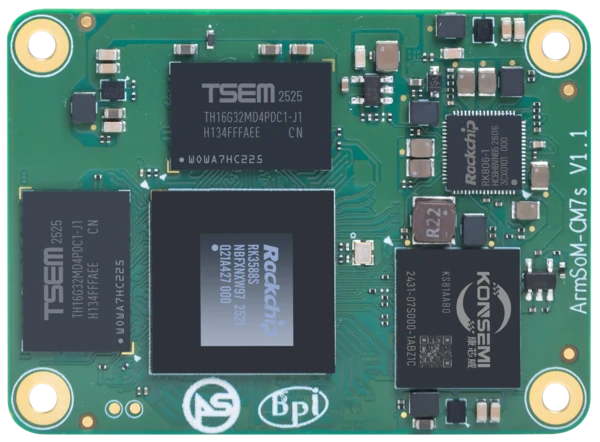
ArmSoM CM7s RK3588S compute module, photographed revision v1.1. Match the delivered module, carrier and software release when planning Android validation. Photograph: ArmSoM.
Frequently asked questions
Why is Android first boot slower than later boots?
First boot can perform initialization, package preparation and cache generation that later boots reuse. Logs are needed to identify the work on a particular image. Keep first boot after flashing or reset separate from ordinary cold-boot and reboot measurements.
Can removing the boot animation fix slow startup?
It may change what the user sees or remove an animation tail. It does not establish that services and the application became ready sooner. Measure the same application-ready endpoint before and after the change.
Does a faster Rockchip processor guarantee faster Android boot?
No. Storage behavior, driver waits, SDK configuration, package preparation and application initialization can dominate startup. Compare complete boards with equivalent software and the same acceptance criteria.
What should I send ArmSoM for an Android boot-time enquiry?
Include the board and carrier revision, image version, boot mode, measured start and finish points, repeated timings, and relevant serial and Android logs. Identify the application and peripherals that must be ready. Use the ArmSoM contact page to discuss the project and share an appropriately redacted diagnostic package.
Source and implementation notes
Technical background includes the supplied article “Android 开机优化实战:先分解时间,再谈优化” by RK软件开发-吴工, dated November 21, 2026, together with the Android and ArmSoM references linked above. Its device-specific patches and measured savings are not presented here as tested ArmSoM results. Validate each change against the source branch and release requirements of the product being shipped.