

RK3568, RK3572 and RK3576 suit different embedded designs. Start with RK3568 when its established interface set matches an existing product. Consider RK3572 for a compact design with local AI and multimedia requirements. Evaluate RK3576 when more performance-oriented CPU cores, camera processing or display flexibility matter.
For ArmSoM developers, those paths lead to Sige3, the planned Zero5, and Sige5 or CM5. The decision should come from the connections and software your product needs, followed by measurements on the actual board.
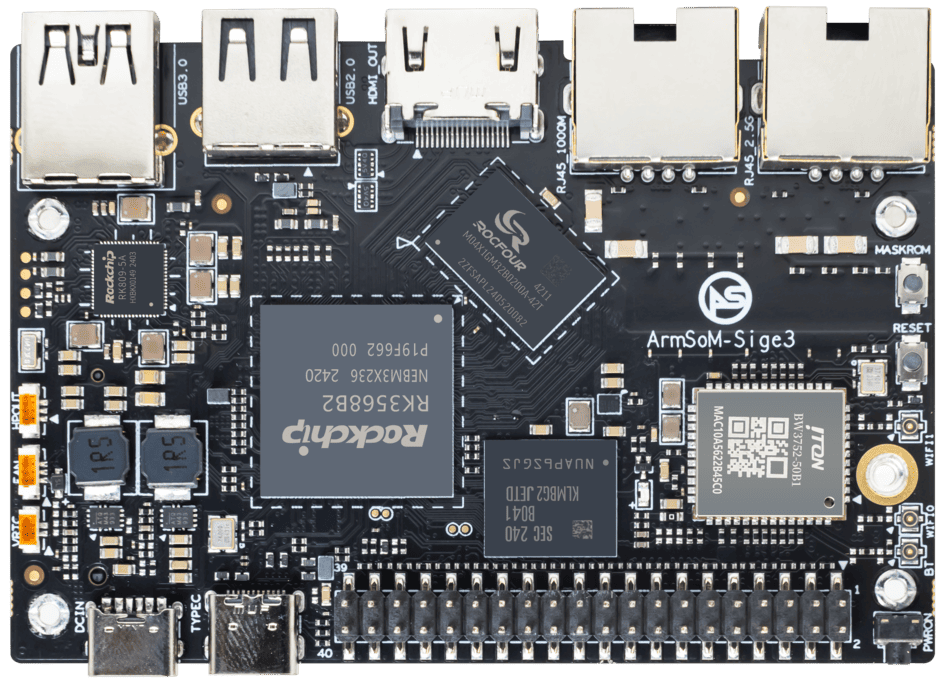
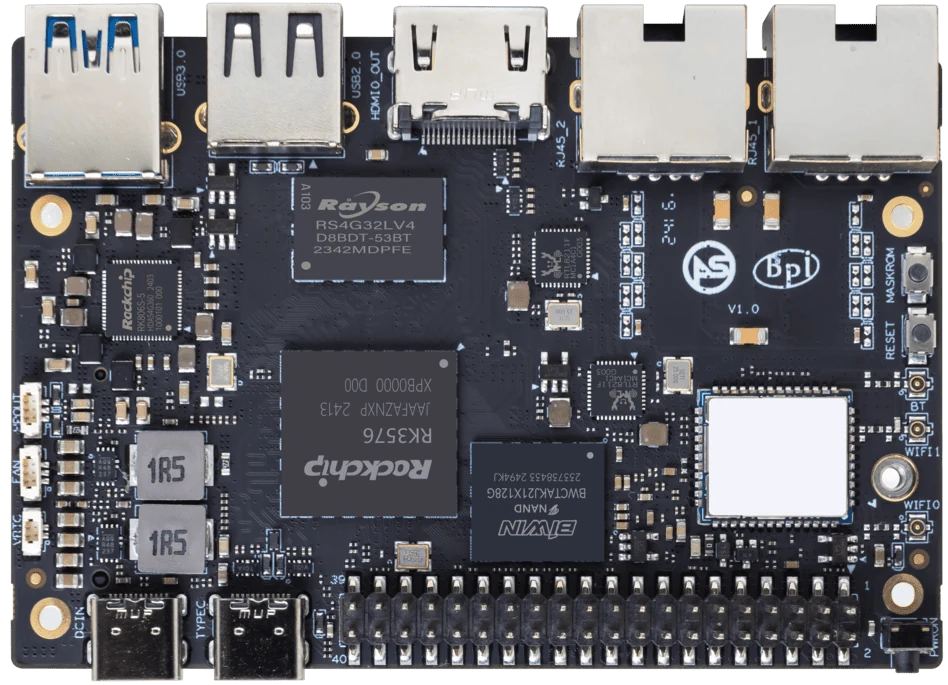
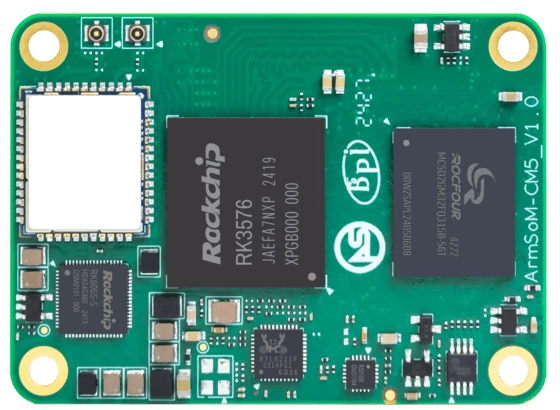
Real ArmSoM product photographs. Images are fitted in full for viewing and are not shown at the same physical scale.
The differences that affect a board choice
The table below separates processor capabilities from ArmSoM board choices. It is a selection reference, not a benchmark ranking. CPU frequency, enabled interfaces and software support depend on the hardware revision and system image.
Decision point | RK3568 | RK3572 | RK3576 |
CPU layout | 4× Cortex-A55 | 2× Cortex-A73 + 6× Cortex-A53 | 4× Cortex-A72 + 4× Cortex-A53 |
Process | 22 nm | 8 nm | 8 nm |
Published NPU rating | 1 TOPS | 4 TOPS INT8, with a sparsity footnote | 6 TOPS |
GPU | Mali-G52 | Mali-G310V2 MC1 | Mali-G52 MC3 |
Interface detail worth checking | Native LVDS; PCIe 3.0 capability | PCIe 2.1 / SATA / USB resource sharing | DisplayPort and multiple display paths; shared high-speed interfaces |
ArmSoM route | Sige3 SBC | Zero5, currently a concept preview | Sige5 SBC or CM5 compute module |
Processor references: RK3568 specifications, RK3572 Datasheet V1.1, and RK3576 specifications. Process and board mapping are also documented in ArmSoM's Sige-series reference. TOPS figures do not establish relative application speed.
CPU and AI: evaluate the work your application actually does
Eight cores can describe two different layouts
RK3572 and RK3576 both have eight CPU cores, but their arrangements differ. A project running several CPU-heavy services should be tested with those services active together. A project with one demanding task and lighter background work may behave differently. Core count alone cannot tell you which will finish your workload first.
RK3568 remains a candidate when the application already works within a quad-core budget. Moving to another platform also means validating the boot process, drivers, application image and peripherals again. Keep that engineering cost in the comparison.
Read the conditions behind 1, 4 and 6 TOPS
Rockchip's RK3572 V1.1 datasheet attaches a sparsity footnote to its 4 TOPS INT8 figure. It also lists W4A16 and multiple integer and floating-point formats. These details matter when choosing a model conversion and inference path; they do not mean an arbitrary model will run efficiently or fit in memory. See the NPU section of the datasheet.
Before choosing a board for vision or local AI, record four things: whether the model converts, the accuracy after conversion, end-to-end latency, and sustained memory use. Include capture, preprocessing and postprocessing in the timing. Comparing only the NPU's arithmetic rating misses the time spent elsewhere in the application.
Displays, video and storage can change the answer
Start with the panel and camera already specified
If a product must keep an LVDS panel, RK3568 deserves a close look: native LVDS appears in its published interface list. The RK3572 and RK3576 specifications reviewed here do not list native LVDS. A bridge may be possible, but adds component, driver and validation work. This is a chip-level distinction; an SBC must still route the required signals to an accessible connector.
For a video product, write capture, decoding, encoding and display requirements separately. An 8K decoding capability does not establish an 8K display output, and neither proves that a camera can record at that resolution. For example, the RK3572 V1.1 datasheet lists H.264/H.265 encoding up to 4K at 40 fps. Do not turn that into a 4K60 recording promise. Check the codec and display sections independently.
A newer chip does not guarantee a faster SSD connection
ArmSoM's board documentation gives a useful example: Sige3 exposes an M.2 PCIe 3.0 ×2 connection, while Sige5 documents PCIe 2.1 with one lane. That does not settle overall NAS performance, but it does make the storage path worth examining before assuming the newer platform is faster for every task. Sige3 hardware reference; Sige5 hardware reference.
Check shared PHY resources as well. PCIe, SATA and USB entries in a processor table can describe alternative functions of the same resource. Draw the required connections, then confirm the board's supported combination. Adding every listed interface together is not a valid port count.
Which ArmSoM platform fits your project?
Sige3: begin with the interfaces you already need
Sige3 is an RK3568B2 single-board computer. Its documented hardware includes M.2 storage, HDMI, a 2.5 GbE port and a Gigabit Ethernet port. That makes it worth evaluating for a networked controller, storage-oriented prototype or embedded application whose CPU and AI requirements fit the platform. Review Sige3's connectors and supported images before committing to the enclosure or software stack.
Zero5: explore a compact RK3572 direction
ArmSoM plans Zero5 around RK3572, with a 65 × 30 mm target footprint. It is intended for developers exploring compact Linux and edge-AI designs. The current illustration is a proposed layout: connectors, memory configurations, operating-system images and availability remain to be finalized. Read the Zero5 concept introduction.
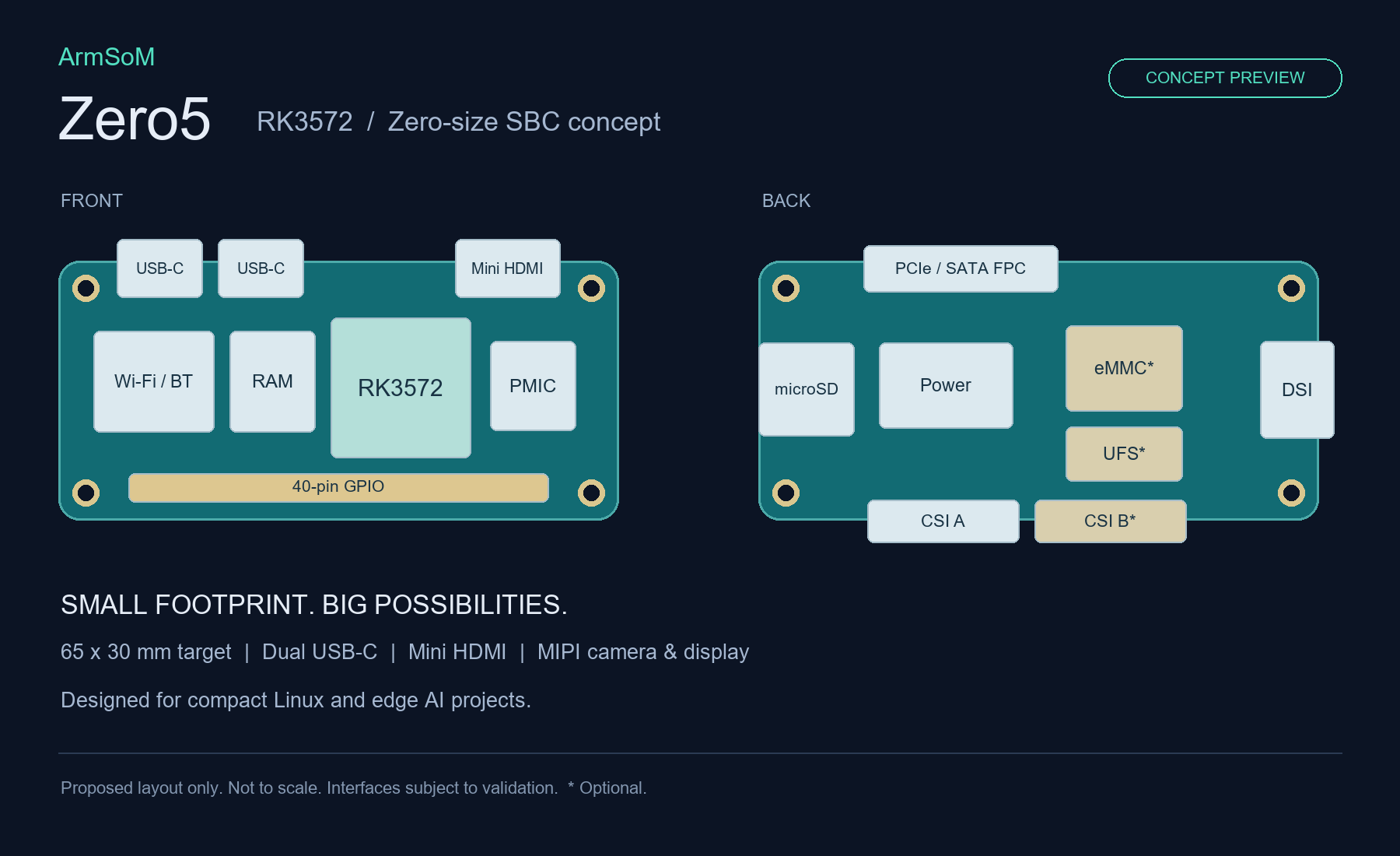
ArmSoM Zero5 concept preview. This is a proposed layout, not a photograph or a final specification. Items marked * are optional; interfaces remain subject to validation.
Sige5 or CM5: choose an SBC or a custom carrier
Sige5 and CM5 use RK3576. Sige5 gives developers a complete SBC for testing peripherals and applications. CM5 is a compute module for designs that need their own carrier board, connector arrangement or mechanical integration. Sige5 documentation and CM5 documentation describe those two routes.
Using the same processor does not make the boards interchangeable. For CM5, check the module revision, power design and carrier pin assignments. For Sige5, verify that the exposed connectors meet the project requirements before adding adapter boards.
A short selection process that catches expensive mistakes
01Define the workload
02Map the interfaces
03Validate the software
04Measure on the board
Suggested evaluation workflow; no performance results are implied.
List the fixed requirements. Include the existing panel, camera sensor, network ports, storage, enclosure and power source.
Map each requirement to a board connection. Mark any shared interface, bridge or custom carrier work.
Choose the software baseline. Record the image, kernel, graphics and NPU runtime versions needed by the application.
Run the complete workload. Measure latency, memory, storage throughput and temperature with all required services active.
Check procurement details. Confirm the exact board revision, configuration, lead time and support requirements with the supplier.
As an example, a panel controller that must retain LVDS should investigate the display path first. A camera device should begin with sensor support and model conversion. A storage appliance should start with simultaneous network and SSD transfers. Each project can produce a different choice from the same three processors.
Frequently asked questions
Is RK3572 a replacement for RK3568?
It can be a candidate for a new design or a redesign, but it is not an assumed pin-compatible replacement. Compare interfaces, memory, power design and software support. An RK3568 product using native LVDS or PCIe 3.0 may require a different solution when moving to RK3572.
Is RK3576 always faster than RK3572?
That requires workload measurements. Their CPU layouts, GPUs and NPU implementations differ. A published TOPS value or the number of large CPU cores cannot determine complete application latency, power consumption or responsiveness on its own.
Can all the listed PCIe, SATA and USB interfaces work together?
Do not assume so. Some functions share PHY or pin resources. Check the processor's multiplexing tables, then the selected board's connector routing and supported configuration.
Which ArmSoM board should I evaluate first?
Start with Sige3 for an RK3568 SBC, Sige5 for an RK3576 SBC, or CM5 when you need a compute module and carrier. Track Zero5 for the planned compact RK3572 option; confirm its final specification and availability before scheduling a build.
Have a board requirement to work through?
Send the required interfaces, software stack, mechanical constraints and expected volume to sales@armsom.org. Those details help narrow the choice more effectively than a headline performance figure.
Sources and further reading
Reviewed 17 November 2026. Manufacturer specifications describe processor capabilities; board features and software must be checked against the selected revision.