

A small embedded device can ask a surprising amount of its processor. It may need to capture a camera feed, run an AI model, update a display, communicate with sensors and keep a network connection alive. All of that has to fit inside a practical power budget and a small enclosure.
That is the design problem behind ArmSoM Zero5, an upcoming compact single-board computer that ArmSoM plans to introduce using the Rockchip RK3572. Its eight-core CPU, integrated NPU and media engines offer a foundation for compact edge devices. The important question is how those resources work together in a real application.
In our A733 deep dive, we explored the thinking behind Sige6. Here, we take the same practical approach to RK3572 and the compact board direction ArmSoM has already outlined.
01 / The challenge: useful AI in a smaller device
Consider a small inspection camera or an interactive terminal. The AI model is only one part of the system. Images must arrive, be resized and converted, pass through inference, and produce a useful result. Meanwhile, the application still needs logging, networking and a responsive interface.
Three questions matter when choosing the hardware:
Can it sustain the complete workload? A fast inference result is less useful if image preparation or data transfer becomes the bottleneck.
Can it fit the enclosure and power supply? Connectors, memory, peripherals and cooling all consume space.
Can developers deploy and maintain it? Drivers, model conversion and reproducible software matter long after the first demo.
Our view is that RK3572 deserves attention at this intersection: compact hardware, heterogeneous compute and local AI processing.
02 / Eight CPU cores, with different jobs to do
RK3572 uses an 8nm process and combines two Cortex-A73 cores with six Cortex-A53 cores. Rockchip positions it for mid-range AIoT devices. See the official RK3572 announcement.
The architecture gives software a mix of performance-oriented and efficiency-oriented CPU resources. A possible application split is to reserve responsiveness for time-sensitive processing while background services handle housekeeping. Actual scheduling depends on the operating system, workload and power policy.
The CPU also has dedicated engines alongside it. The NPU handles supported neural-network operations; graphics, image and video hardware can take on appropriate media tasks. Getting those engines into the application pipeline is often more valuable than treating every task as CPU work.
RK3572 at a glance — chip capabilities, not a final ArmSoM board specification
Resource | Published specification | Why it matters |
CPU | 2× Cortex-A73 + 6× Cortex-A53 | Application processing and concurrent services |
NPU | 4 TOPS INT8, with sparsity | Acceleration for compatible AI models |
Memory controller | LPDDR4/4X and LPDDR5/5X | Memory options for different product designs |
Graphics and imaging | Mali-G310 GPU; 12MP-class ISP | Interfaces, camera processing and visual applications |
Media | Hardware video decode and encode | Media processing alongside application logic |
Technical reference: Rockchip RK3572 Datasheet V1.0, pages 7–13. Available memory, connectors and supported modes depend on the board and its software.
03 / What does a 4 TOPS NPU mean for a project?
The RK3572 datasheet specifies 4 TOPS at INT8 with a sparsity qualification. That qualification matters: this is a peak compute rating under particular conditions, rather than a universal frame rate for any model. The NPU also supports several integer and floating-point formats, including W4A16 operations. These capabilities are documented on page 13 of the datasheet.
For developers, sensible evaluation targets include compact object detection, visual classification and selected local audio or language tasks. Suitability depends on the model, memory needs, supported operators and required response time.
A useful test measures the whole path: camera capture, image preparation, inference and the application's response. Record accuracy and sustained latency as well as throughput. A stable result in the intended enclosure tells you more about a product than a peak TOPS figure alone.
04 / The software detail to know: RKNN3
Rockchip's public RKNN3 SDK explicitly lists RK3572. It provides PC-side model conversion, an on-board C/C++ runtime and a Python inference interface. On RK3572, the NPU is integrated into the SoC and runs models directly on the board.
RKNN3-Toolkit is incompatible with RKNN-Toolkit and RKNN-Toolkit2. Existing Rockchip projects should therefore plan a model-conversion and runtime validation step instead of assuming that an older compiled model will transfer unchanged. This distinction is stated in the official SDK notes.
Our suggested starting point is one representative model and a small set of real inputs. Convert it for the target, check output accuracy, then integrate capture and application logic. Only after that should you scale up the workload.
05 / Memory and media are part of the AI story
RK3572 supports LPDDR4/4X and LPDDR5/5X memory, with storage interfaces including eMMC 5.1 and UFS 2.0. The datasheet also describes a 12MP-class image signal processor and dedicated media hardware. These are chip-level building blocks, from which a board designer selects a practical combination.
This matters because a vision application moves data as well as processing it. Camera buffers, model weights and intermediate results all use memory. Image scaling and format conversion can affect the time left for inference and application work.
For a compact board, interface selection becomes an important design decision. Every external connector competes for space, routing and power. A useful board exposes the connections its target projects need, with software that makes them usable.
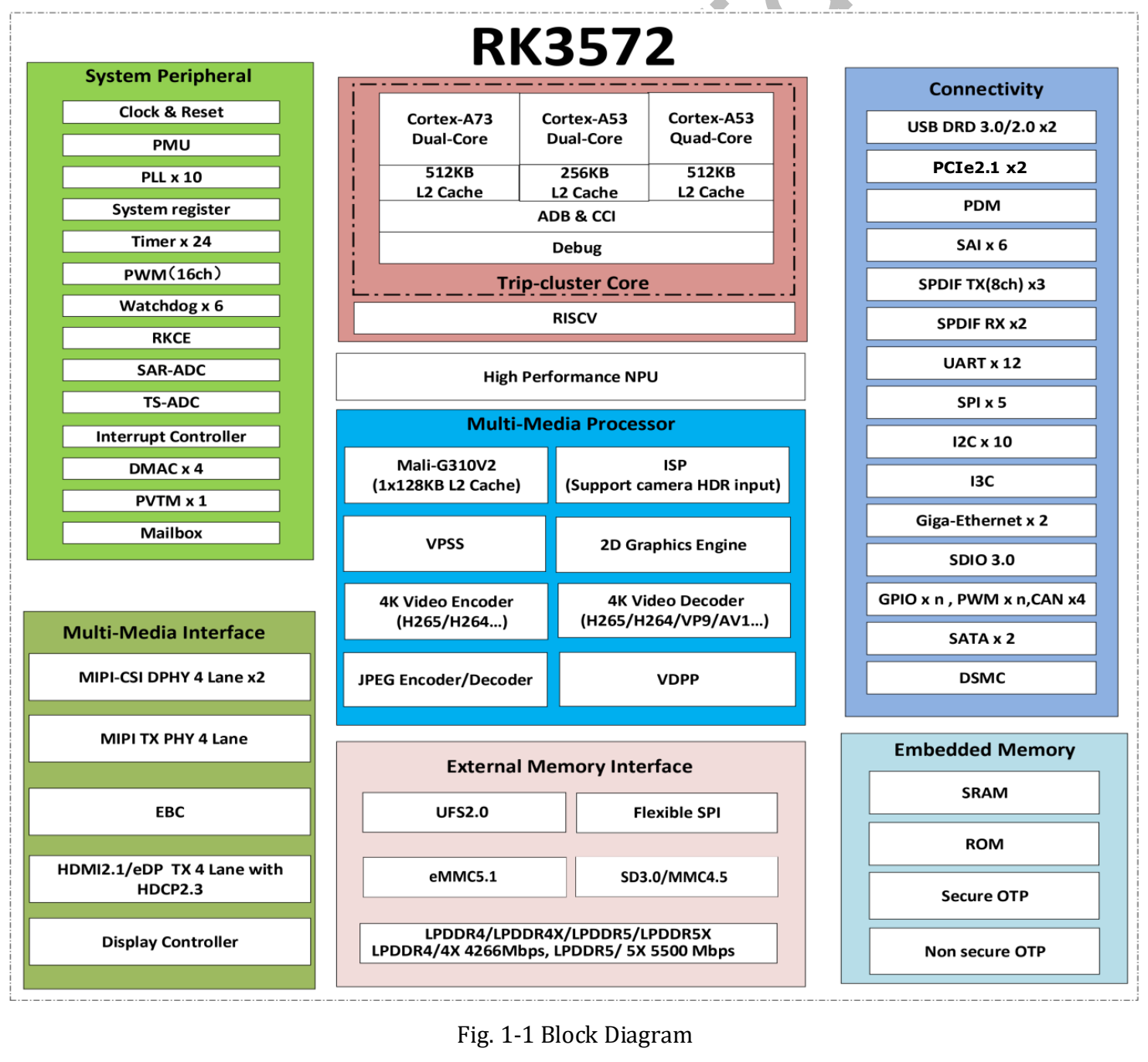
Rockchip RK3572 block diagram, Datasheet V1.0, page 23. Diagram © Rockchip Electronics Co., Ltd. Controller capabilities do not imply that every interface will appear on an ArmSoM board.
06 / Power figures need context
Rockchip reports 670mW during 1080p video playback on a test device configured with 8GB LPDDR5 and 128GB UFS. The display and touch panel were removed, and Wi-Fi and Bluetooth were switched off. Those conditions accompany the measurement in the official announcement.
This makes efficiency an interesting evaluation topic, but it is not a whole-board power promise. A camera, wireless connection, USB device and power-conversion losses change the system budget. A sustained AI workload is also different from video playback.
For an embedded design, measure idle operation, the intended workload and sustained load with the actual peripherals attached. That is the basis for selecting a power supply, enclosure and cooling arrangement.
07 / Introducing the ArmSoM Zero5 concept
ArmSoM plans to launch Zero5, a compact SBC powered by Rockchip RK3572. Building on our earlier Zero-form-factor product preview, we can now share the product name and proposed layout. Zero5 targets compact Linux and edge-AI projects, with a 65 × 30 mm board-size target.
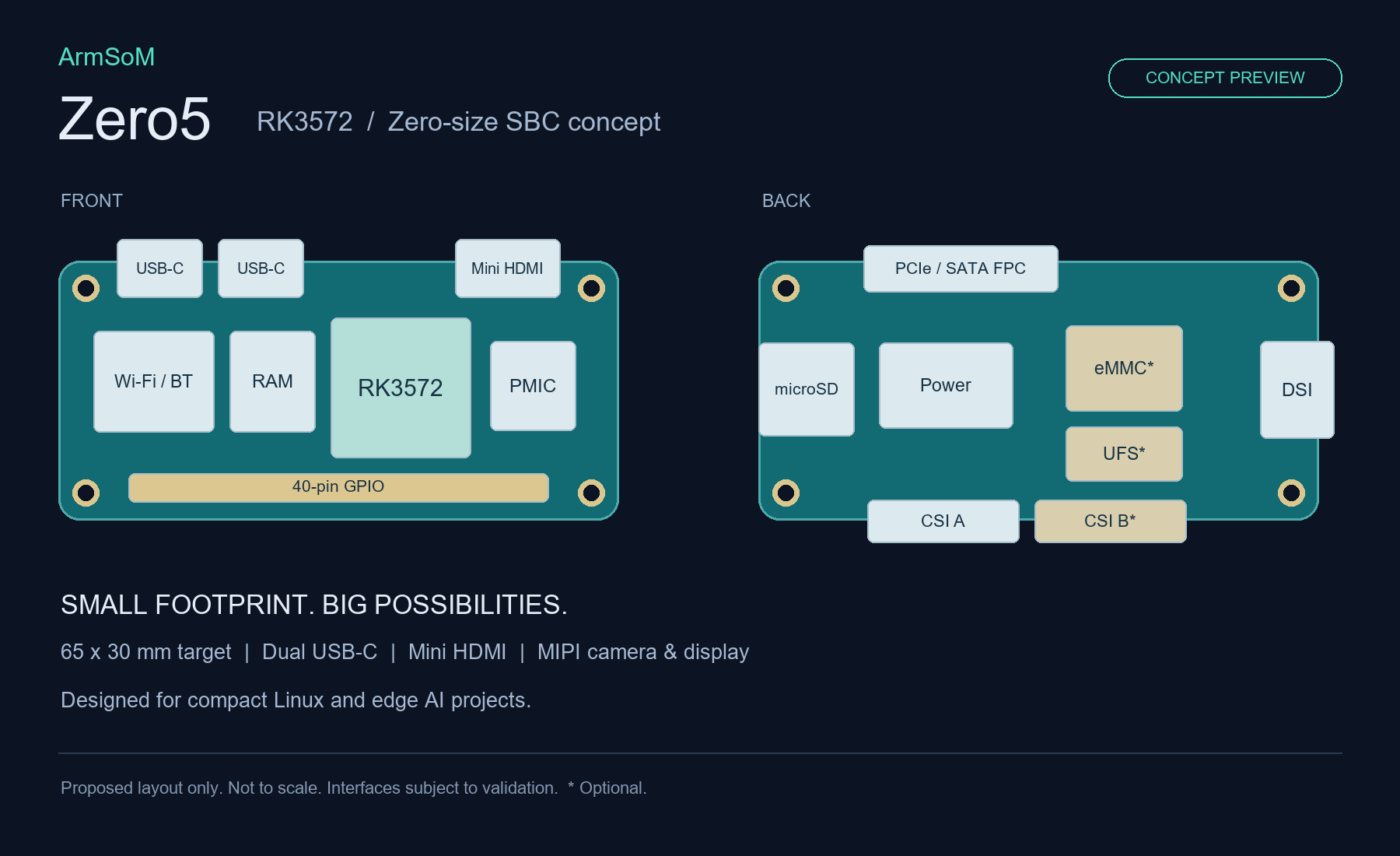
ArmSoM Zero5 concept preview. Proposed layout only, not to scale. The 65 × 30 mm size is a target; interfaces are subject to validation. Items marked with an asterisk are optional.
The concept places two USB-C connectors, Mini HDMI and a 40-pin GPIO header on the front, alongside the RK3572, memory, power management and Wi-Fi/Bluetooth blocks. The back illustrates microSD, a PCIe/SATA FPC connection, a MIPI DSI display connection and CSI camera connections. The second CSI connection, eMMC and UFS are marked as optional; the illustration does not promise that every option will be populated together.
We see an opportunity to bring local processing into projects where board area is a real constraint: a small inspection node, an interactive device or a space-limited prototype. The combination of CPU, NPU and media engines is what makes RK3572 relevant to those designs.
Zero5 is currently presented as a concept preview. Final dimensions, memory and storage configurations, connector functions, software support, price and release date will be confirmed in the product announcement. The Zero-style format and 40-pin header do not by themselves establish Raspberry Pi pin, accessory or software compatibility.
Our focus is a practical development platform: the connections, software and documentation needed to turn a compact processor into a working device.
Frequently asked questions
Can I reuse an RKNN-Toolkit2 model on RK3572?
Plan to validate conversion and deployment with RKNN3. Rockchip documents the toolkits as incompatible; reuse of source models still depends on supported operators and conversion results.
Does 4 TOPS guarantee real-time camera inference?
No. It is the datasheet's sparse INT8 peak rating. Model choice, resolution, preprocessing and the rest of the application determine sustained frame rate.
When will ArmSoM Zero5 be available?
ArmSoM plans to introduce Zero5 with the RK3572. This concept preview does not announce a release date, price or pre-orders. Follow ArmSoM's official updates for final specifications and ordering information.
What would you build with ArmSoM Zero5?
Tell us about your application, camera or display requirements, AI model and enclosure constraints. Specific requirements help shape a more useful platform.
Discuss your project with ArmSoM →
Further reading: RK3572 datasheet guide and download · Official RKNN3 SDK · ArmSoM documentation