

ArmSoM CM7s puts RK3588S, up to 32GB of documented memory configurations and eMMC options up to 256GB in a 55 × 40 mm module. Its storage range and compact outline make it a relevant Radxa CM5 alternative for custom embedded products. Compare the carrier circuitry and exact module revision before selecting a configuration.
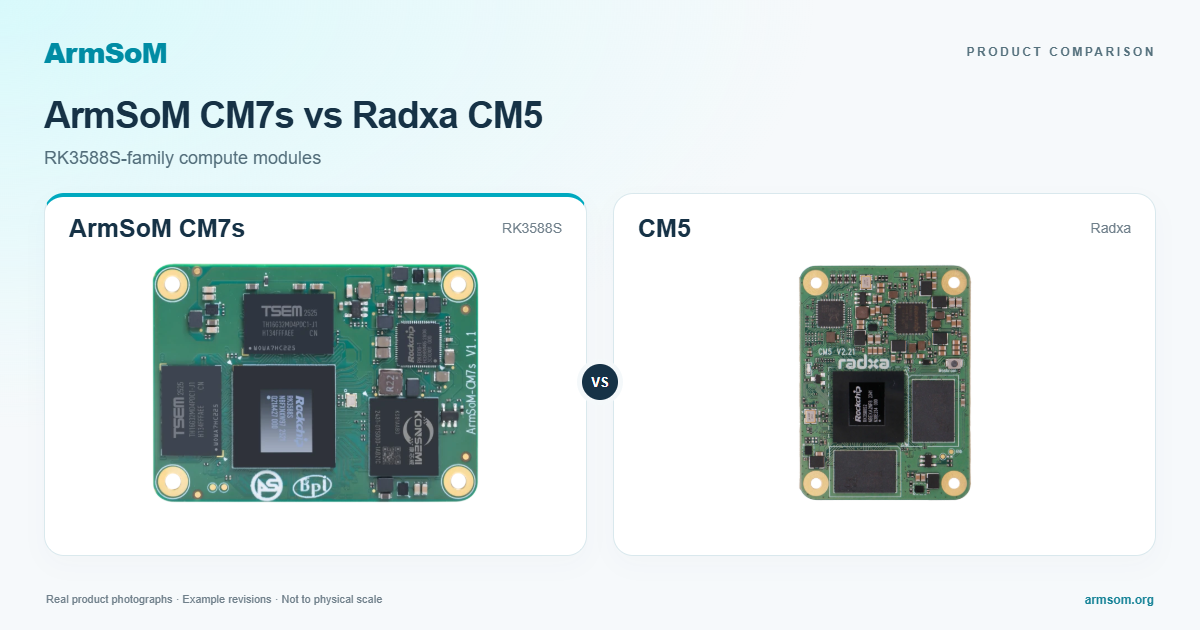
Product photographs: ArmSoM; Radxa. Example hardware revisions are shown independently fitted, not to physical scale. The comparison does not imply a partnership between the brands.
Specifications at a glance
Design question | ArmSoM CM7s | Radxa CM5 |
SoC | RK3588S | RK3588S2, standard CM5 |
Footprint | 55 × 40 mm | 56 × 41 mm |
Connectors | 3 × 100-pin B2B | 3 × 100-pin B2B |
Memory ceiling in documentation | Up to 32GB | Up to 32GB |
eMMC options in documentation | Up to 256GB | Up to 128GB |
Ethernet integration | RGMII signal path; review carrier circuitry | Onboard Gigabit Ethernet PHY |
Similar connector counts can hide different designs
These modules look like close alternatives on a shortlist: related Rockchip processors, eight CPU cores, a Mali-G610 GPU and a nominal 6 TOPS NPU. Both use three 100-pin board-to-board connectors. None of those similarities is sufficient to certify a module swap.
The footprint differs, and signals may occupy different pins even when a connector has the same number of contacts. Check connector orientation, mating height, mounting holes and electrical assignments before placing either module on an existing carrier. A mechanical fit alone does not protect against an incorrect power connection.
Where ArmSoM CM7s has a documented advantage
A larger listed onboard-storage option
ArmSoM lists CM7s eMMC configurations through 256GB. Radxa's current CM5 page lists up to 128GB. If the product needs a large local model collection, offline content or application data on the module, the CM7s option is worth quoting. Listed capacity is not a stock guarantee; confirm the actual configuration and delivery terms.
A larger eMMC device does not establish a write-endurance advantage. Logging-heavy products should still specify write workload, retention, recovery and backup requirements. Compare the actual storage component and operating conditions when reliability depends on them.
A slightly smaller outline
CM7s uses a 55 × 40 mm outline. That may help a constrained carrier layout, but the surrounding component keep-outs and cooling assembly can outweigh a millimetre of board size. Use the relevant mechanical drawings before treating the smaller outline as an enclosure saving.
Ethernet circuitry and carrier design
The Radxa CM5 specification lists an onboard Gigabit Ethernet PHY. The CM7s interface guide describes RGMII and its relationship to multiplexed SDIO signals. These are different levels of integration, not interchangeable descriptions of an RJ45 socket.
For a new carrier, determine where the PHY, magnetics and Ethernet connector belong. Radxa's onboard PHY may reduce the circuitry that needs to be implemented on the carrier. For CM7s, follow the documented reference design and selected signal mapping. The appropriate choice depends on the carrier architecture.
Storage and display functions share resources
CM7s exposes high-speed groups with alternate PCIe, SATA and USB functions. HDMI and eDP are also alternatives in a documented signal group. Adding every listed function together would overstate what the final product can use at once. Make an allocation table showing which function each group will serve.
Apply the same discipline to Radxa CM5. Its specification also identifies shared PCIe, SATA and USB resources. For a design needing an SSD, high-speed USB and several displays, ask for a supported simultaneous-use combination rather than a collection of individual maximums.
Confirm the supplied hardware revision
ArmSoM's public guide flags CN2 pins 2 and 4 on CM7s v1.1 and describes a planned correction in v1.2. Do not assume a planned revision has shipped. Confirm the supplied revision and whether the product uses those pins before approving a carrier or a production order.
For software migration, start with the CM7s image and device tree for the intended carrier. Bring over the application, then validate display, storage, networking and inference. Discuss the required RAM and eMMC configuration with ArmSoM and use that configuration for the production sample.
Frequently asked questions
Is CM7s a pin-compatible replacement for Radxa CM5?
Universal pin compatibility has not been established. Verify the exact module and carrier revisions before connecting them.
Is Radxa CM5 Lite covered here?
No. The Lite version uses RK3582 and has different capabilities. The table compares standard Radxa CM5.
Evaluate ArmSoM CM7s for your product
Send ArmSoM your required RAM, storage, interfaces, operating system and expected volume. Start with the product and hardware guide below to discuss an appropriate sample configuration.
Sources and comparison method
Published by ArmSoM. This selection guide compares documented hardware features; it is not a head-to-head benchmark. References reviewed on 23 November 2026. Confirm the supplied revision, configuration and software support when ordering.