

ArmSoM CM5 gives teams a documented RK3576 development route using selected CM4-format carriers, two 100-pin connectors and onboard Wi-Fi 6. When comparing it with Radxa CM4, focus on the carrier, required interfaces and hardware revision. The shared 55 × 40 mm footprint alone does not establish interchangeable pinouts.
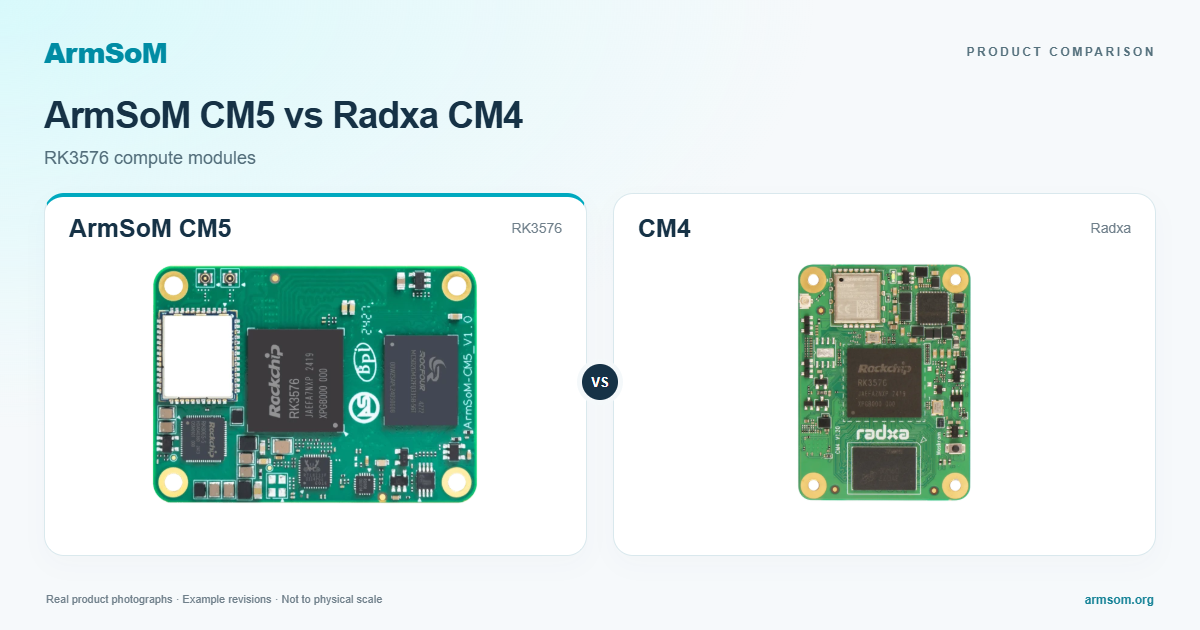
Product photographs: ArmSoM; Radxa. Example hardware revisions are shown independently fitted, not to physical scale. The comparison does not imply a partnership between the brands.
Specifications at a glance
Design question | ArmSoM CM5 | Radxa CM4 |
Processor | RK3576 | RK3576 / RK3576J variants |
Footprint | 55 × 40 mm | 55 × 40 mm |
CPU / NPU | 4 × A72 + 4 × A53; 6 TOPS | 4 × A72 + 4 × A53; 6 TOPS |
Module connectors | 2 × 100-pin B2B | 3 × 100-pin B2B |
Memory | v1.3 LPDDR5; planned v2.0 LPDDR4/4x | LPDDR4X |
Wireless | Wi-Fi 6 + Bluetooth 5.3 | Wi-Fi 6 + Bluetooth 5.4 variants |
Operating-temperature specification | 0°C to 80°C in CM5 guide | RK3576J option: −40°C to 85°C |
The model names hide a useful comparison
ArmSoM CM5 and Radxa CM4 both use the RK3576 platform. The numbers in their names do not identify different processor generations, and neither is Raspberry Pi Compute Module 4 or 5. For an embedded product, compare the module specification and carrier interfaces before looking at the name.
Their common CPU and nominal NPU rating give a similar starting point for application software. The engineering work differs at the board boundary: memory revision, connector allocation, power and the way peripherals reach the carrier. That is where a meaningful procurement comparison begins.
ArmSoM's strongest case: a defined CM4-format migration path
The CM5 documentation describes use with a Raspberry Pi CM4 baseboard and explains important display limits. This gives teams with an existing CM4-style carrier a concrete starting point for a compatibility review. It does not establish that every carrier or peripheral works without changes.
ArmSoM CM5 uses two 100-pin connectors, while Radxa documents three for its CM4. The third connector can carry useful additional signals, but it also means the module designs should not be treated as identical. Create a pin-by-pin matrix for the specific carrier. Record supply rails, boot controls, signal voltage, connector height and functions actually used by the product.
Specify the CM5 memory revision in the quotation
CM5 v1.3 uses LPDDR5. The planned v2.0 uses LPDDR4/4x; confirm release status and the available capacities with ArmSoM rather than assuming that every listed revision is currently shipping. Include the agreed module revision in the quotation and carrier qualification record.
Industrial variants and storage requirements
Radxa publishes an RK3576J industrial option with a stated −40°C to 85°C operating range. If that temperature requirement is mandatory, evaluate that exact variant rather than comparing it with an unspecified commercial module. The Radxa product page also documents UFS support and additional interface choices worth assessing for storage-heavy designs.
The CM5 guide lists a 0°C to 80°C operating range. For either module, qualify the carrier, storage, wireless components and enclosure against the actual environment. A required industrial-temperature range should be part of the enquiry from the outset.
Evaluate one complete design, not an interface wish list
Consider a networked display controller with one HDMI output, one camera and local inference. Start by checking those three paths simultaneously on the development carrier. For ArmSoM CM5, the documentation notes one HDMI and one DSI rather than the two of each available on Raspberry Pi CM4. Additional high-speed functions also depend on routing and multiplexing.
Install a matching RK3576 image, run the actual application and exercise storage, Ethernet and camera together. Check startup, recovery and update behaviour. The same Linux distribution name on two download pages does not imply matching drivers or an interchangeable image.
Make the purchase decision explicit
Start the CM5 evaluation with the documented carrier route, required RAM and storage, and the interfaces the product will use. Send that configuration to ArmSoM along with the temperature requirement and expected volume. The result should be a specific module-and-carrier proposal, including any design changes needed.
Frequently asked questions
Can Radxa CM4 and ArmSoM CM5 use the same carrier?
That requires a carrier-specific pinout and power review. Their footprints match, but connector count and signal allocation differ.
Which CM5 memory specification should a buyer use?
CM5 v1.3 uses LPDDR5. The planned v2.0 uses LPDDR4/4x; confirm release status, capacity and the supplied revision with ArmSoM before ordering.
Evaluate ArmSoM CM5 for your product
Send ArmSoM your required RAM, storage, interfaces, operating system and expected volume. Start with the product and hardware guide below to discuss an appropriate sample configuration.
Sources and comparison method
Published by ArmSoM. This selection guide compares documented hardware features; it is not a head-to-head benchmark. References reviewed on 23 November 2026. Confirm the supplied revision, configuration and software support when ordering.