

ArmSoM confirms CM7s as a replacement option for Orange Pi CM5. Both use RK3588S and a 55 × 40 mm format with three 100-pin connectors. For an existing product, the remaining question is which carrier, module revision and software configuration the replacement will use.
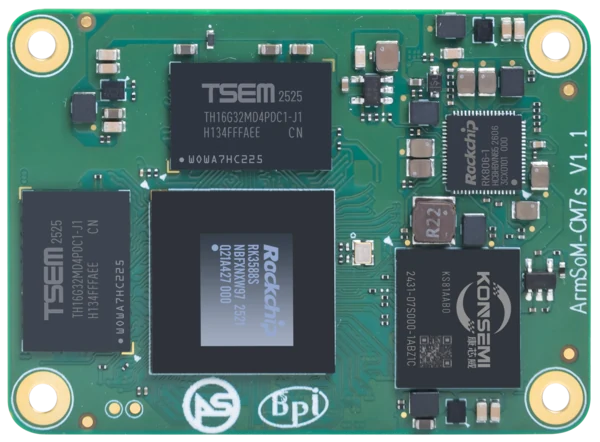
ArmSoM CM7s
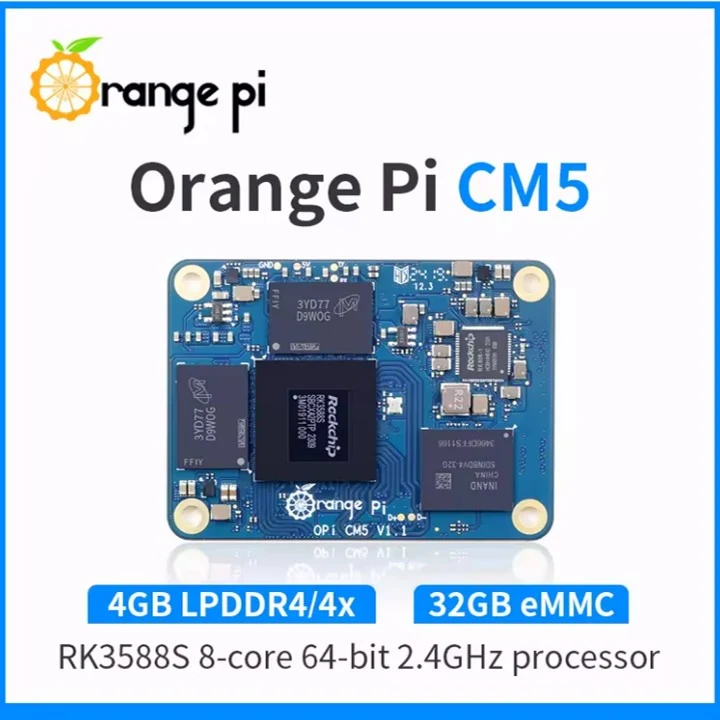
Orange Pi CM5 Photo: Orange Pi / Arduitronics product listing
Images identify the boards and are not to physical scale. Pictured configurations and included accessories may differ.
Documented platform comparison
Decision point | Orange Pi CM5 | ArmSoM CM7s |
Processor | RK3588S, per manufacturer manual | RK3588S |
Module format | 55 × 40 mm; three 100-pin connectors | 55 × 40 mm; three 100-pin connectors |
Replacement position | Source module in this migration | Replacement option confirmed by ArmSoM |
Exact validated carrier/image | Not supplied for this article | Not supplied for this article |
Revision concern | Check the delivered Orange Pi module and carrier | Resolve documented CM7s v1.1 CN2 pin limitation |
Platform references: Orange Pi CM5 manufacturer manual (PDF, mirror); CM7s documentation. Board revision, purchased configuration and software support must be checked separately.
Define the replacement configuration
Record the carrier model, module revision, supply, boot medium and software image. List the interfaces the product uses and record a result for each one. ArmSoM’s replacement statement does not establish universal carrier or image interchangeability; the exact validated carrier and image were not supplied for this article.
Resolve revisions before applying power
The CM7s documentation identifies CN2 pins 2 and 4 as unavailable on v1.1 and describes a correction for v1.2. Check the delivered module marking against its released documentation. Find out whether the carrier uses those pins and whether the replacement needs wiring or configuration changes before applying power.
Test the interfaces used by the product
After confirming power and boot, test the Ethernet, USB, display, camera, audio and expansion paths your application uses. Record the image and results for each interface, including limitations and untested functions. Keep the original Orange Pi configuration available for rollback. A desktop boot is one result in that record, not approval of the whole carrier.
Match the choice to your requirements
Requirement or situation | What to evaluate | Decision detail |
Replacement positioning | Confirmed by ArmSoM | Confirm the carrier, revision and image for your installation. |
CM7s revision | Record the delivered version | Resolve the documented v1.1 pin limitation. |
Carrier and software scope | Attach a named test matrix | Do not assume an Orange Pi OS image transfers unchanged. |
Move the application onto a CM7s image
Start with supported CM7s software and restore the application and data above it. Check hardware-dependent libraries and accelerated media separately. Reusing an Orange Pi boot image needs explicit validation, even when the processor and connector arrangement look familiar.
Example design
Turn replacement positioning into a usable compatibility record
For an Orange Pi CM5 customer, the most valuable document is a short record naming the carrier PCB revision, the CM7s revision, the image checksum and each exercised interface. Add any cable, boot-setting or device-tree changes. A named configuration can be reproduced by another engineer; an unqualified statement that a module works cannot. Until that record is available, describe CM7s as an ArmSoM-confirmed replacement option and invite the customer to share the carrier details.
Define what “alternative” means for your project
A new product can choose a different carrier, enclosure and operating system. An existing deployed product may need to preserve all three. These are different engineering scopes, even if both purchasing requests ask for an alternative compute module.
Write down the non-negotiable requirements before comparing options. Include carrier revision, connector locations, enclosure clearances, power input, camera models, displays and any external certification constraints. Separate these from preferences that can change during redesign.
If the carrier can change, compare complete development kits first. If it must remain, a detailed pin and electrical review becomes the first gate. Do not order a production batch based on module dimensions or connector count.
Build a replacement matrix
Requirement | What to compare | Pass condition |
Power | Input rails, sequencing, enable and reset | Startup and load behavior meet the design limits |
Carrier signals | Pin assignment, voltage and multiplexing | Every connected function has a valid mapping |
Storage and network | Interfaces, boot method and drivers | The intended devices work concurrently |
Camera and display | Lane routing, control signals and software | The real sensor and panel pass application tests |
Serviceability | Recovery, updates and diagnostics | A technician can recover the finished device |
Mark an unknown item as unresolved. This makes the remaining work visible and prevents assumptions from becoming purchasing specifications. A connector that can mate is only one row in the matrix.
Test the difficult peripheral first
Identify the function most likely to block migration. It might be a custom display timing, a camera sensor driver, an unusual USB device or an application tied to a particular acceleration library. Prove that function before spending time polishing the user interface.
After individual checks, run a combined test. Attach the real camera and display, write data to the intended storage and exercise the network. Watch for resource sharing, power instability and thermal effects that do not appear during isolated demonstrations.
Turn the evaluation into a purchasing decision
Compare complete configurations, including module, carrier changes, cooling and software work. Ask for current availability and commercial terms for the exact part configuration. Historical web pricing is not a substitute for a project quotation.
A useful handover contains the approved hardware revisions, software release, remaining limitations and test results. Send your existing carrier documentation and must-have functions to ArmSoM to discuss whether CM7s fits the project or whether a different module is a better starting point.
Revision check: The current CM7s documentation flags CN2 pins 2 and 4 on v1.1 as non-functional and describes a correction planned for v1.2. Confirm the revision supplied and its pinout before completing a carrier review.
Additional references
Hardware and documentation
CM7s · RK3588S
RK3588S, 6 TOPS NPU, 55 × 40 mm and three 100-pin connectors. ArmSoM offers CM7s as an Orange Pi CM5 replacement option; confirm the exact carrier, revision and software combination.
Hardware documentation · Product details
Frequently asked questions
Can CM7s replace Orange Pi CM5?
ArmSoM confirms it as a replacement option. Exact carrier, revision, software and peripheral coverage must be checked for your installation.
Is it a universal drop-in replacement?
Universal carrier and image compatibility is not established. Check your exact carrier, module revision, image and required interfaces with ArmSoM.
Product information and support
Sources
Written by ArmSoM using the documentation below. Example designs are proposals, not measured customer installations. Comparisons use published specifications, not head-to-head benchmarks.