8-core application compute
The RK3576 processor runs your Linux applications, services and embedded development tools.
4 × Cortex-A72 up to 2.2GHz + 4 × Cortex-A53 up to 1.8GHz
Build at the edge.
Keep your options open.
Octa-core RK3576 compute and 6 TOPS AI, paired with dual Gigabit Ethernet, WiFi 6 and NVMe expansion for connected prototypes and embedded applications.
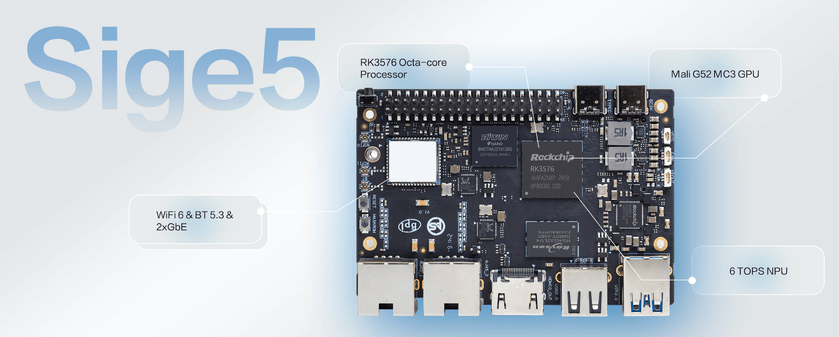
Application compute and practical I/O.
A compact board for your next build.
Combine application processing, network connections and expansion in one development platform.
The RK3576 processor runs your Linux applications, services and embedded development tools.
4 × Cortex-A72 up to 2.2GHz + 4 × Cortex-A53 up to 1.8GHzUse the Rockchip NPU toolchain to convert supported models and validate inference on the target board.
6 TOPS · integrated NPUConnect separate network segments or develop data and control services using the onboard Ethernet ports.
2 × Gigabit EthernetUse the M.2 Key M connection for NVMe storage alongside onboard eMMC and a MicroSD card.
M.2 Key M · PCIe 2.1 ×1Develop a desktop, media application or information display with the documented hardware video resources.
4K display applicationsOnboard wireless, USB and the 40-pin header provide familiar connections for development and peripherals.
WiFi 6 + Bluetooth 5.3 (SYN43752)Official board views and processor architecture references from the product documentation.
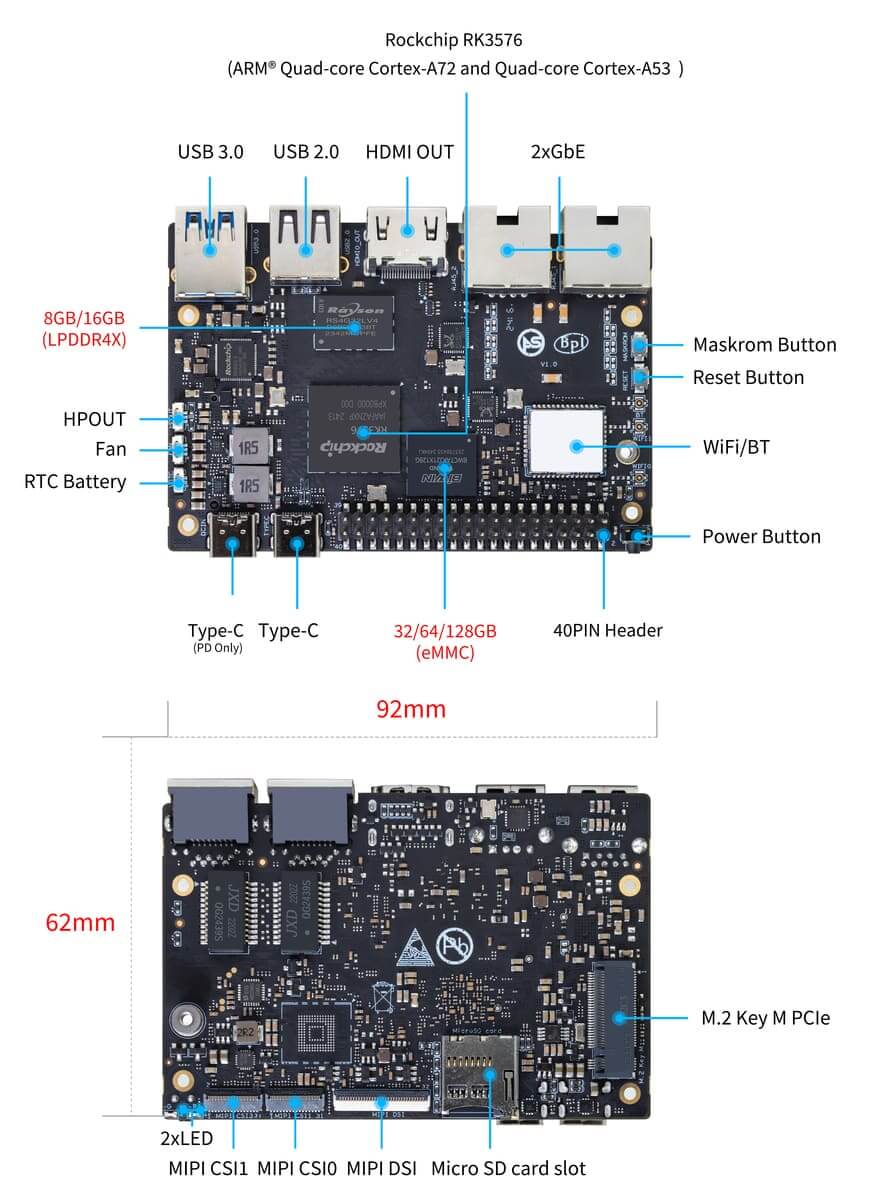
Locate the network ports, storage, power input and expansion headers.
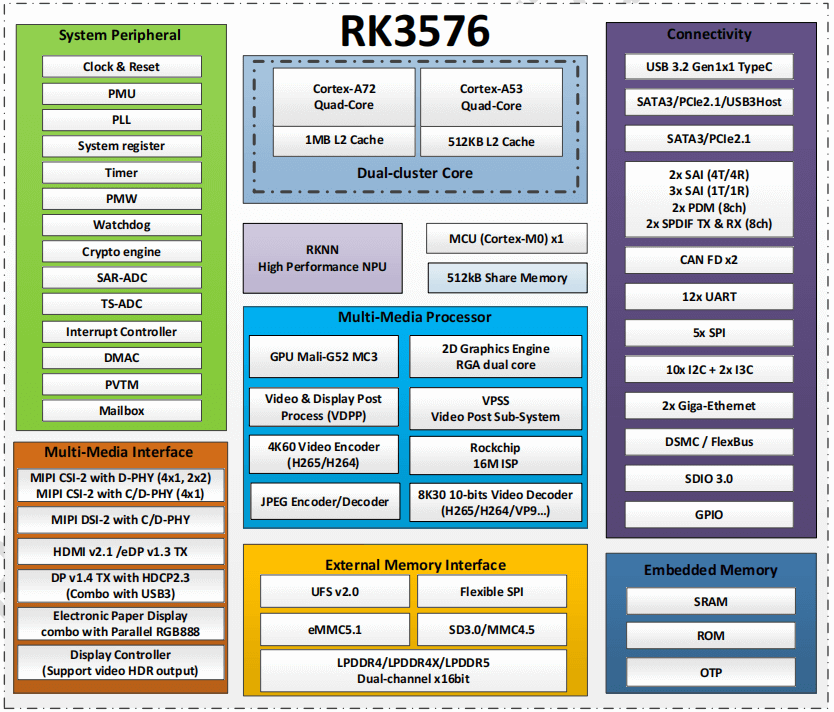
SoC-level reference. Check the board specifications for the interfaces physically exposed.
Select an image to open the full-resolution view.
Application processing with dedicated media and AI resources.
Sige5 combines the RK3576 application processor with onboard memory, storage interfaces and wired and wireless connectivity.
Use the CPU for application logic and dedicated media or inference hardware where supported by your software. Choose a documented operating-system image, then validate your peripherals and workload.
Explore the hardware specifications ↗Develop an on-device inference workflow with the Rockchip RKNN toolchain.
Integrated NPU · INT8 compute
Check model format and operator compatibility with the target Rockchip NPU.
Use the matching RKNN tools to convert, quantize and check the model.
Run inference on the board and test latency, accuracy and thermal behavior.
NPU compute capability is not an application benchmark. Results depend on model, precision, software and cooling.
Network, storage, displays and peripheral development on a compact SBC.
Dual Gigabit
Onboard wireless
NVMe storage expansion
4K display output
Peripheral and programming I/O
UART / SPI / I²C / I²S / PWM
System and data storage
Cooling and clock connections
A flexible starting point for developers, makers and embedded product teams.
Combine local processing, network data and supported AI inference.
Develop a desktop, media player or information display with hardware video processing.
Build connected-device services and storage-backed local applications.
Bring up sensors, peripherals and software before product integration.
Use this overview for selection and the full documentation for design-level details.
| Specification | ArmSoM Sige5 |
|---|---|
| Processor | RK3576 · 8nm |
| CPU | 4 × Cortex-A72 up to 2.2GHz + 4 × Cortex-A53 up to 1.8GHz |
| GPU | Mali-G52 MC3 |
| NPU | 6 TOPS (INT8) |
| Memory | LPDDR4x options up to 16GB; see store for available configurations |
| Storage | 32GB / 64GB / 128GB eMMC options; MicroSD and M.2 NVMe expansion |
| NVMe expansion | M.2 Key M · PCIe 2.1 ×1 |
| Wired networking | 2 × Gigabit Ethernet |
| Wireless | WiFi 6 + Bluetooth 5.3 (SYN43752) |
| Video decoding | Up to 8K30 or 4K120; H.264 / H.265 / VP9 / AV1 / AVS2 |
| Video encoding | Up to 4K60 H.264 / H.265 and JPEG |
| Display outputs | HDMI 2.1 up to 4K120; MIPI DSI up to 2K60; DP 1.4 up to 4K120 |
| USB | USB host and Type-C OTG; consult board revision and image documentation |
| Expansion | 40-pin GPIO: UART / SPI / I²C / I²S / PWM; pin and voltage verification required |
| Other connections | Fan and RTC battery connectors; headphone and HDMI audio |
| Power | Dedicated Type-C power input; follow the Sige family power guide |
| Dimensions / weight | 92 × 62 × 14.6mm / 43g |
| Operating temperature | 0°C to 80°C |
| PCB | 8-layer PCB |
Board revisions and software images can affect interface modes. Current memory/storage options are listed in the store; check the product documentation before integration.
Hardware files, system images and source code, all within reach.
Specifications and pin definitions
Sige family setup and interface guide
Official and community download links
Schematics and board resources
ArmSoM Rockchip kernel repository
Prepare and install a system image
Operating-system versions and supported peripherals vary by image. Use the current product documentation to choose a release.
Sige5 uses the Rockchip RK3576 with 4 × Cortex-A72 up to 2.2GHz + 4 × Cortex-A53 up to 1.8GHz. It is a complete single-board computer, with onboard network and display connections.
Yes. The documented storage interfaces include onboard eMMC, MicroSD and M.2 Key M · PCIe 2.1 ×1. Check mechanical clearance, SSD compatibility and system support before installation.
Use the dedicated power input identified in the hardware diagram. The other Type-C connector serves data or OTG functions. Follow the Sige family power guide.
The 40-pin header exposes familiar peripheral signals. Check the exact pin assignment, voltage, driver and device-tree configuration before attaching an accessory.
The documented NPU capability is 6 TOPS. Use the matching Rockchip toolchain and image for supported models, then validate model accuracy and real application performance.
Explore available options or talk to us about your embedded application.