Application + control processing
The RK3506J combines three Cortex-A7 cores with a Cortex-M0 for an embedded software platform.
3 × Cortex-A7 + Cortex-M0
Small module.
Built for your control system.
A compact RK3506J compute module with triple Cortex-A7 cores, a Cortex-M0, DDR3L memory and MIPI DSI for industrial control, HMI and custom embedded products.

Core module for custom products.
CM1-IO for development and evaluation.
Start with the module, evaluate with the kit, then develop the carrier board your application needs.
The RK3506J combines three Cortex-A7 cores with a Cortex-M0 for an embedded software platform.
3 × Cortex-A7 + Cortex-M0DDR3L memory and NAND flash options suit compact Linux applications and product-specific images.
256 / 512MB DDR3L · NAND optionsConnect through the module’s MIPI DSI interface and use the integrated 2D engine for graphics acceleration.
2-lane MIPI DSI · 2D graphicsThe 40-pin and 44-pin headers expose the module’s signals for application-specific expansion.
UART / SPI / I²C / CAN / FlexbusThe carrier adds network ports, USB host, wireless and audio to the development kit.
CM1 module + CM1-IO carrierThe documented operating temperature range supports industrial product planning. Validate cooling and enclosure conditions for your application.
−40°C to +85°COfficial product images and hardware references from the ArmSoM documentation.
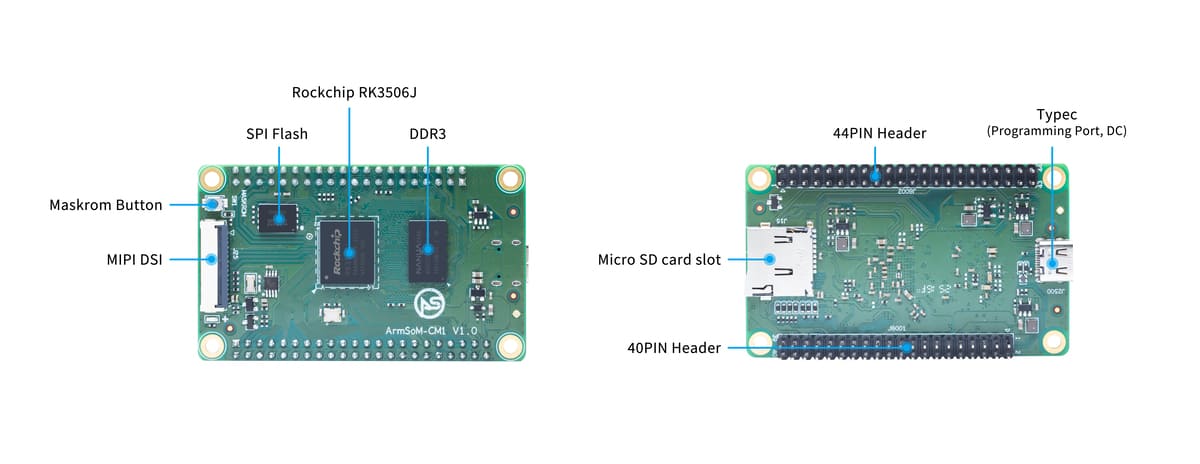
70 × 42mm module with memory, storage, MIPI DSI and expansion headers.
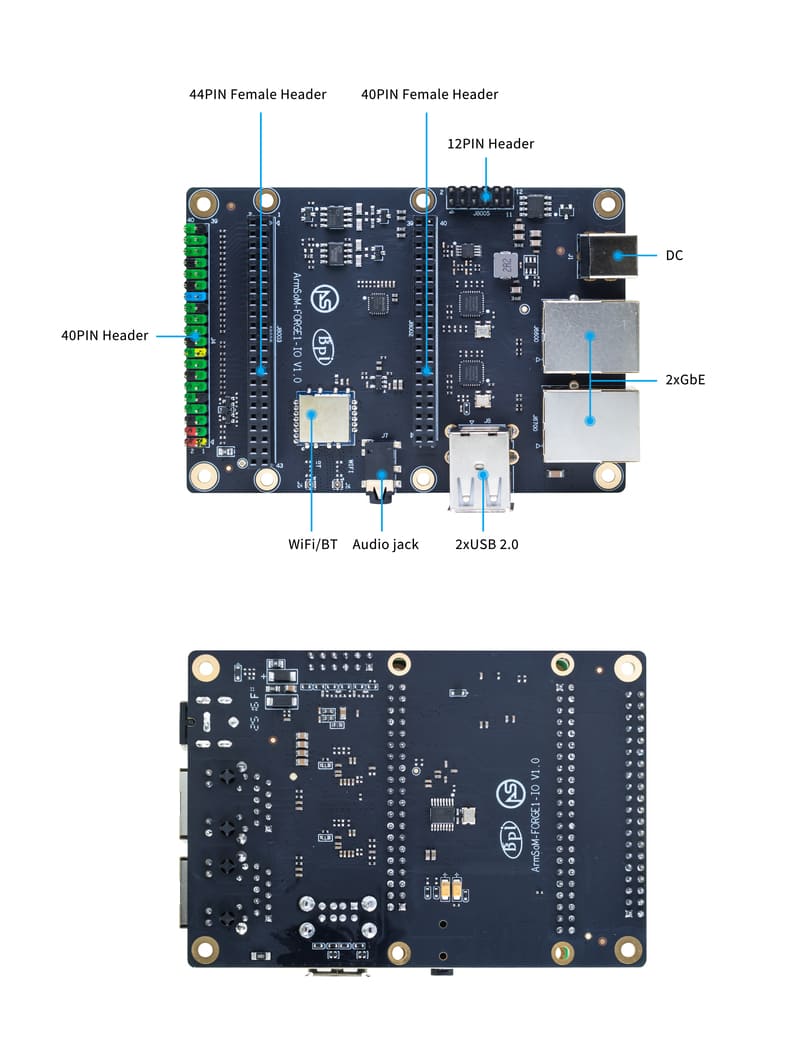
Network, USB, wireless and audio connections belong to the carrier board.
Select an image to open the full-resolution view.
Application compute with embedded control resources.
CM1 brings the RK3506J processor, memory and storage onto a compact module, with onboard Type-C power/programming and MicroSD expansion.
Use the Buildroot-based software resources for your application. The documentation also describes heterogeneous AMP, RT-Thread and real-time development resources; support depends on your chosen SDK configuration.
Explore the hardware specifications ↗Keep the compute module and carrier-board features clear throughout your design.
CM1 compute module footprint
Use the kit’s Ethernet, USB, WiFi and audio to bring up your software.
Review header definitions and multiplexing before designing the carrier board.
Build around the core module and validate power, display and peripheral support on your hardware.
Dual Ethernet, WiFi and USB host ports described for the CM1-IO kit are carrier-board features, not ports installed on the standalone CM1 module.
The module provides the foundation; CM1-IO brings the evaluation connections.
Core-module signal expansion
Module: 2 lanes, 1.5Gbps
Module power & programming
Module storage expansion
CM1-IO carrier only
CM1-IO carrier only
CM1-IO carrier only
CM1-IO 12-pin expansion
Map the RK3506J architecture to the module header definitions, then plan how your carrier will route display, control and communication signals.
The diagram describes the SoC architecture. Use the board pin definitions to identify the signals exposed by this product.
View hardware documentation ↗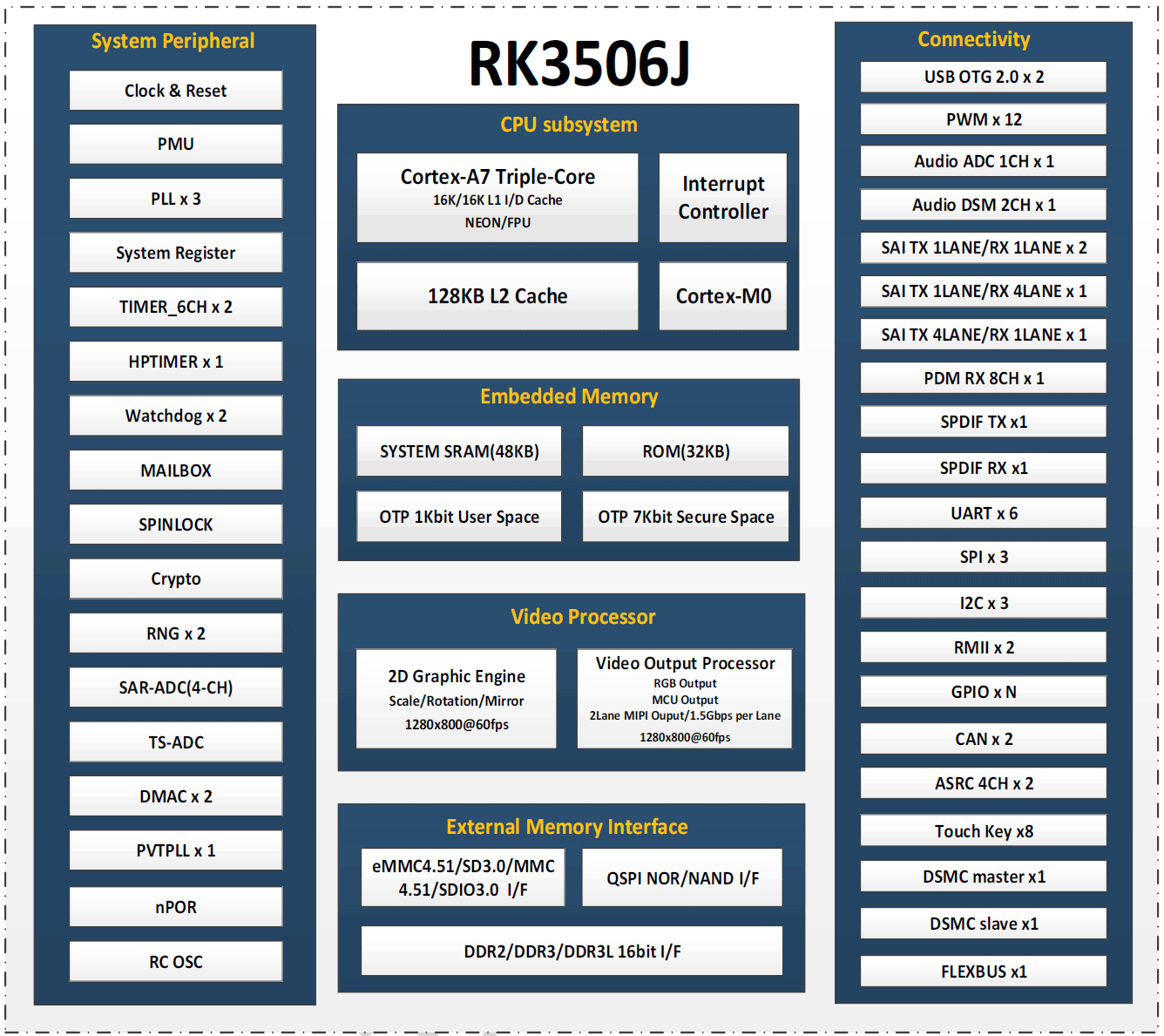
A flexible foundation for developers and embedded product teams.
Develop a focused operator interface with MIPI DSI and lightweight graphics.
Build custom control software around Linux and the RK3506J peripheral resources.
Integrate a display, application logic and device connectivity on your own carrier.
Evaluate network and bus interfaces with the CM1-IO kit before integration.
These specifications describe the standalone core module. Carrier-board features are listed separately below.
| Specification | ArmSoM CM1 |
|---|---|
| Processor | Rockchip RK3506J |
| CPU / control core | Triple-core Cortex-A7 + single-core Cortex-M0 |
| Graphics | Integrated high-performance 2D acceleration engine |
| Memory | 256MB / 512MB DDR3L |
| Storage | 256MB / 512MB NAND flash; MicroSD expansion |
| Display | 1 × MIPI DSI, 2 lanes, 1.5Gbps |
| Expansion | 40-pin + 44-pin module headers; see signal definitions |
| Power / programming | Type-C 5V; onboard power and programming port |
| Button | Maskrom programming key |
| Operating system | Buildroot; see SDK resources for configuration |
| Dimensions | 70 × 42mm |
| Operating temperature | −40°C to +85°C |
Documented hardware options are shown here. Check the store for available configurations and the product documentation for detailed interface support.
Use CM1 with the CM1-IO carrier for evaluation. These additional connections are provided by the carrier board.
| Carrier-board feature | CM1-IO |
|---|---|
| Module connections | 40-pin + 44-pin female headers |
| Networking | 2 × 10/100 Ethernet ports |
| Wireless | WiFi 5 + Bluetooth 4.2 |
| USB | 2 × USB 2.0 host; Type-C power/programming connection |
| Audio | Headphone / microphone jack |
| Expansion | 40-pin accessory header (partial Raspberry Pi pin compatibility) |
| 12-pin header | RS485 / CAN / microphone / speaker / RTC signals |
| Power | Type-C 5V or DC 12V input |
| Dimensions | 100 × 70mm |
| Operating temperature | −40°C to +85°C |
Confirm the module/kit option in the store before ordering. Do not apply the carrier’s 12V input directly to the CM1 module.
Hardware files, system images and source code, all within reach.
Specifications, interfaces & pin definitions
Tools and steps for system installation
CM1 Kit setup and interface guide
ArmSoM RK3506 development source
Official CM1 Buildroot image folder
Schematics and mechanical resources
The official CM1 system is based on Buildroot. RT-Thread, AMP and real-time features require the matching SDK and configuration.
CM1 is a core module with processing, memory, storage and several onboard connections. The CM1 Kit pairs it with a CM1-IO carrier board for convenient evaluation and additional physical ports.
The dual 10/100 Ethernet ports and WiFi 5/Bluetooth 4.2 module listed for the kit are on CM1-IO. A custom carrier must implement the interfaces your final product needs.
CM1 is documented with 256MB or 512MB DDR3L and 256MB or 512MB NAND flash. Check available combinations in the store and the product specification.
The CM1-IO accessory header is only partially pin-compatible with Raspberry Pi. Check the pin assignment, voltage and required software before attaching an accessory; the module’s own headers have separate definitions.
Start with the official Buildroot image and RK3506 SDK linked in the documentation. The SDK resources cover kernel configuration, peripheral drivers and embedded application development.
Explore available configurations or talk to us about your development and integration needs.