Triple-core application compute
Three Cortex-A7 cores power embedded Linux applications on the RK3506J platform.
Rockchip RK3506J
Built to connect.
Ready for industrial ideas.
An RK3506J industrial single-board computer with dual 100M Ethernet, CAN, RS485, MIPI DSI and a documented −40°C to +85°C operating range for control and HMI development.
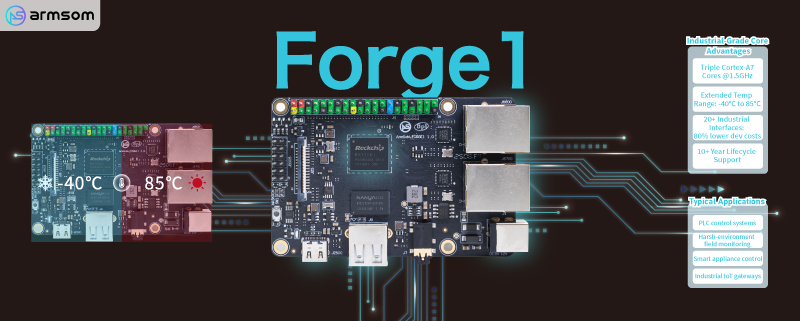
Dual Ethernet and industrial I/O.
A compact platform for control and HMI.
Bring networking, field interfaces and a display into one embedded development platform.
Three Cortex-A7 cores power embedded Linux applications on the RK3506J platform.
Rockchip RK3506JDevelop for industrial environments using the documented operating range, with thermal and enclosure validation for your system.
−40°C to +85°CDual Fast Ethernet ports give your control or gateway project two wired interfaces.
2 × 10/100 EthernetUse the documented CAN and RS485 connections alongside GPIO, UART and other expansion signals.
CAN · RS485 · Flexbus resourcesThe MIPI DSI output and 2D graphics engine provide a foundation for embedded displays and HMI software.
2-lane MIPI DSI · 2D accelerationOnboard DDR3L memory and NAND storage support a Buildroot-based system, with MicroSD expansion.
512MB DDR3L · 512MB NANDOfficial product images and hardware references from the ArmSoM documentation.
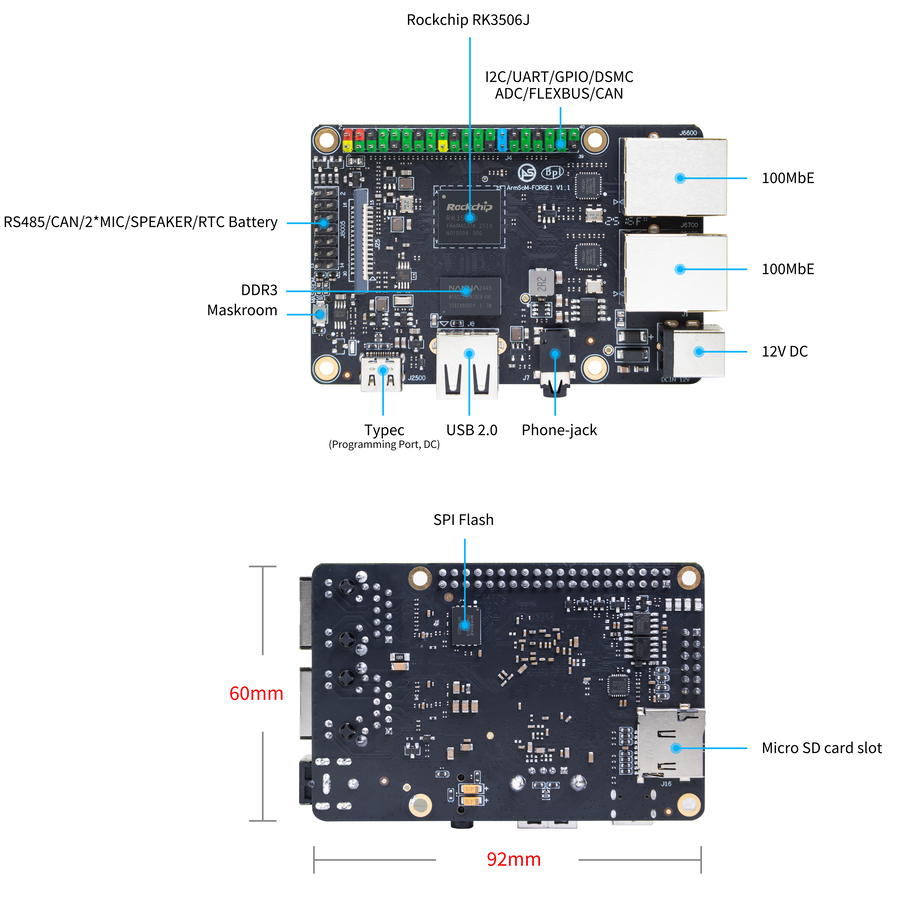
Identify Ethernet, power, GPIO, bus signals and storage connections.
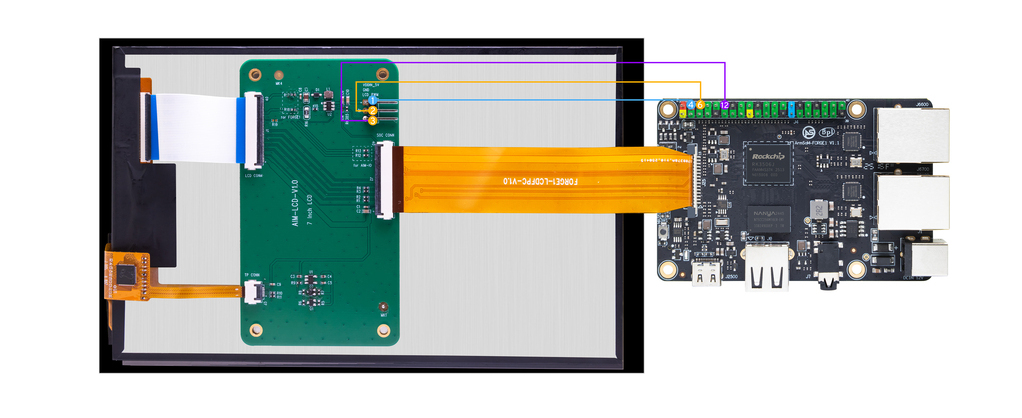
Official display wiring example. Display and connecting accessories are shown for reference.
Select an image to open the full-resolution view.
Compute, display and control in one platform.
Forge1 combines the RK3506J application processor with networking, industrial bus connections and display output on a compact development board.
Use the Buildroot-based software and hardware documentation to bring up your application, configure peripherals and develop your user interface.
Explore the hardware specifications ↗Evaluate industrial communication and a local display on one board.
Two 10/100 Ethernet ports
Connect field peripherals through the documented RS485 and CAN interfaces.
Use MIPI DSI and the graphics resources to develop a device-specific HMI.
Configure networking, drivers and application services in the Buildroot environment.
Supported bus modes and multiplexed signals depend on the image and device-tree configuration. Refer to the documentation for CAN FD setup and pin definitions.
Network, display, audio and expansion signals arranged on a compact industrial SBC.
Dual wired network ports
Documented Linux bus setup
Industrial serial communication
2 lanes, 1.5Gbps
Peripheral connection
Power & programming only
UART / SPI / I²C / I²S / PWM
Speaker, mic and battery signals
Use the processor architecture and the Forge1 pin-definition tables together when planning control, audio and display functions.
The diagram describes the SoC architecture. Use the board pin definitions to identify the signals exposed by this product.
View hardware documentation ↗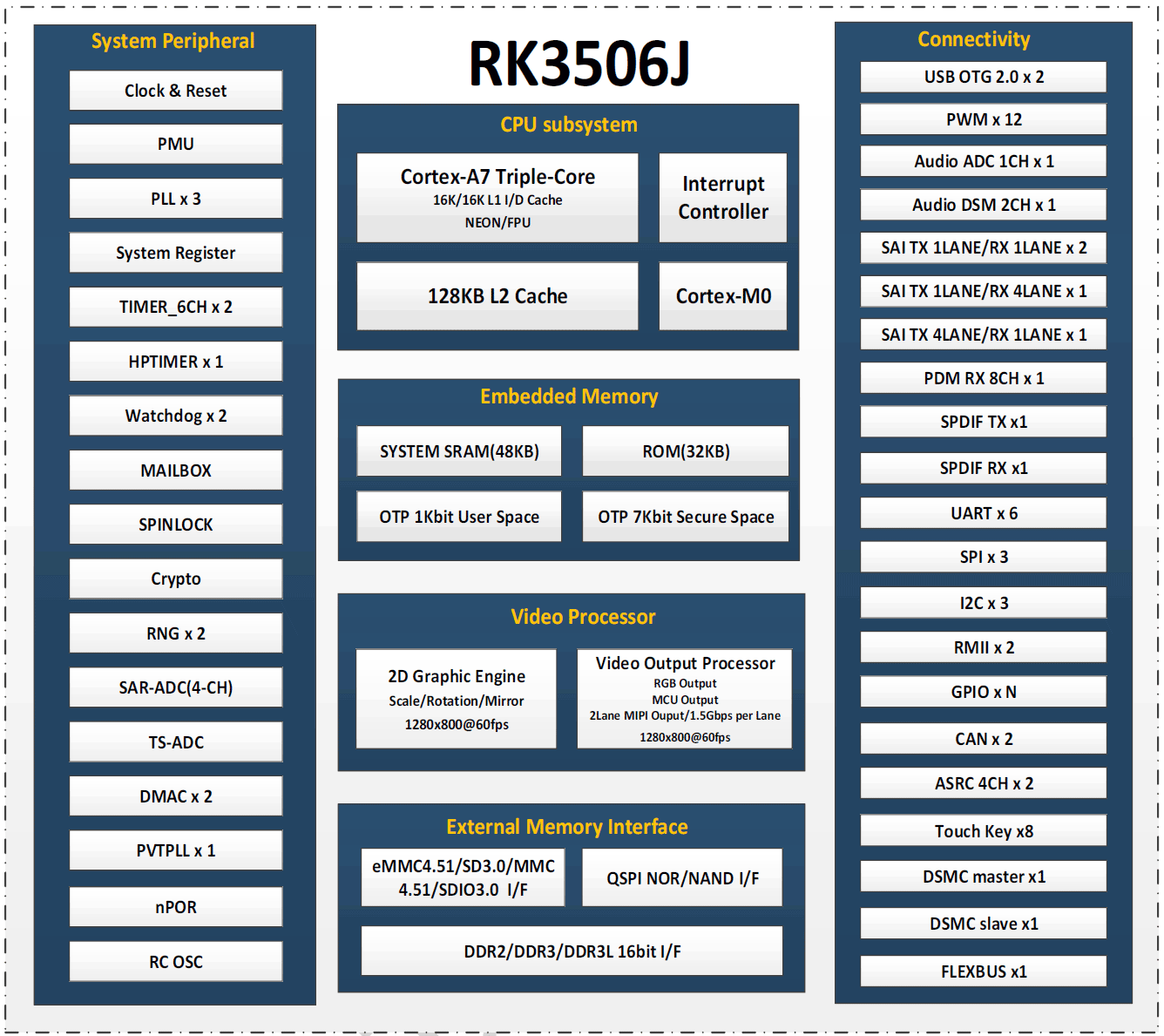
A flexible foundation for developers and embedded product teams.
Connect wired networks and industrial buses in a compact embedded design.
Develop a local control display with MIPI DSI and lightweight UI software.
Combine application logic, communication and display in control products.
Evaluate sensors, bus communication and Linux control software on the workbench.
A practical overview for product selection and development.
| Specification | ArmSoM Forge1 |
|---|---|
| Processor | Rockchip RK3506J |
| CPU | Triple-core Cortex-A7 |
| Graphics | Integrated high-performance 2D acceleration engine |
| Memory | 512MB DDR3L |
| Storage | 512MB NAND; MicroSD card expansion |
| Networking | 2 × 10/100 Ethernet |
| Display | 1 × MIPI DSI, 2 lanes, 1.5Gbps; documented maximum 1280 × 1280 at 60fps |
| USB | 1 × USB 2.0 host; 1 × Type-C for power/programming only |
| Industrial expansion | RS485 and CAN signals; see header definitions and configuration guide |
| GPIO | 40-pin header with partial Raspberry Pi pin compatibility |
| Other expansion | UART / SPI / I²C / I²S / PWM; DSMC / Flexbus signal functions per pin table |
| Audio | Speaker and microphone connections |
| Power | DC IN 12V/1A or Type-C 5V/2A |
| Button | Maskrom programming key |
| Operating system | Buildroot |
| Dimensions | 92 × 62mm (hardware specification) |
| Operating temperature | −40°C to +85°C |
Documented hardware options are shown here. Check the store for available configurations and the product documentation for detailed interface support.
Hardware files, system images and source code, all within reach.
Specifications, interfaces & pin definitions
Tools and steps for system installation
ArmSoM RK3506 development source
Official Forge1 image folder
Schematics and hardware resources
Networking, display and CAN configuration
Use the official Forge1 image and matching RK3506 SDK to check driver, display and bus support.
The documented applications include industrial gateways, HMI, appliance control and industrial data processing. It combines application compute with Ethernet, industrial bus interfaces and a display connection.
No. Forge1 has two 10/100 Ethernet ports. Sige1 is the board in this group with a 2.5G Ethernet port plus a Gigabit Ethernet port.
The documented inputs are DC IN 12V/1A or Type-C 5V/2A. Use the correct connector and a suitable supply for your hardware configuration.
The 40-pin header is only partially compatible with Raspberry Pi pin assignments. Verify every required signal, voltage and driver before connecting an accessory.
The documentation includes MIPI DSI display setup and CAN FD configuration examples. Use the matching image, device tree and documented wiring, then validate your display and bus hardware.
The developer resources link to the official RK3506 SDK, Forge1 system images and hardware files. Begin with the product documentation and flashing instructions.
Explore available configurations or talk to us about your development and integration needs.