

ArmSoM CM7s is an RK3588S compute module to evaluate as a Raspberry Pi Compute Module 5 (CM5) alternative when a product needs an integrated NPU, eight CPU cores or a memory option above 16GB. It suits a new carrier design or a planned platform migration. Reusing an existing Raspberry Pi CM5 carrier requires a separate electrical and mechanical review.
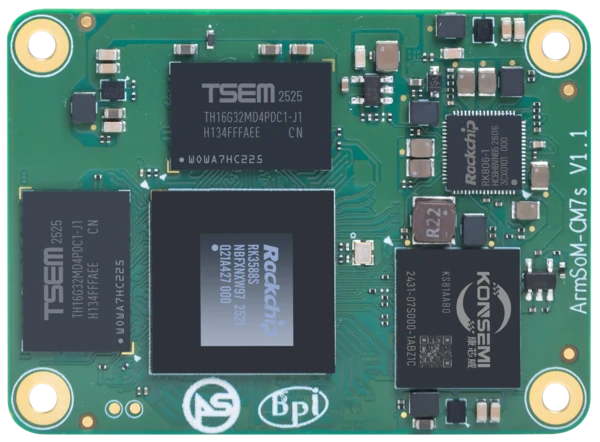
ArmSoM CM7s v1.1. Photograph: ArmSoM product media. Confirm the revision of the supplied module.
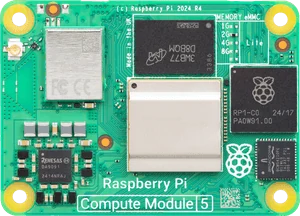
Raspberry Pi Compute Module 5. Photograph: Raspberry Pi. Product photographs are for identification, not mechanical scale drawings; this comparison does not imply affiliation.
A team starting a vision terminal can choose the module and carrier together. A team maintaining a shipped CM5 product already has a working power circuit, boot process and peripheral stack. The cost of changing those systems belongs in the selection decision.
Which module should you evaluate first?
A starting point for evaluation, based on the product's requirements
Your requirement | Evaluate first | What settles the choice |
Local inference without a separate accelerator | CM7s, using its integrated NPU | Convert the actual model with RKNN-Toolkit2, check accuracy, then time the full camera-to-result pipeline |
A measured working set above 16GB | The CM7s 32GB option | Confirm the orderable configuration and peak memory during updates, imports and concurrent services |
An existing CM5 product already meets its targets | Keep Raspberry Pi CM5 as the baseline | Any CM7s benefit must justify carrier changes, driver work, recovery testing and maintenance |
A new carrier with specific display and storage connections | Compare both signal maps before choosing | Resolve multiplexed functions, voltage levels, connector geometry and software support for every required port |
A purchasing plan that needs a published production horizon | Compare the vendors' written commitments | Raspberry Pi states at least January 2036 for CM5; obtain a CM7s supply and revision plan for your order |
For the next engineering step, use the capacity guide, carrier review, Linux migration example oder RKNN evaluation recipe.
What changes when you choose CM7s?
CM7s combines four Cortex-A76 cores with four Cortex-A55 cores, a Mali-G610 MP4 GPU and a 6 TOPS NPU. ArmSoM lists memory configurations up to 32GB. These resources are useful candidates for applications that run a user interface, local services and inference together. They still need to be measured under the intended workload. CM7s product overview.
Published module specifications relevant to platform selection
Criterion | ArmSoM CM7s | Raspberry Pi CM5 |
Verarbeiter | Rockchip RK3588S | Broadcom BCM2712 |
CPU | 4 × Cortex-A76, up to 2.4GHz; 4 × Cortex-A55, up to 1.8GHz | 4 × Cortex-A76 at 2.4GHz |
Published RAM options | 4 / 8 / 16 / 32GB | 2 / 4 / 8 / 16GB |
Published eMMC options | 32 / 64 / 128 / 256GB | Lite without eMMC, or 16 / 32 / 64GB |
Module footprint | 55 × 40mm | 55 × 40mm |
Board-to-board connectors | 3 × 100-pin | 2 × 100-pin |
Local AI path | Integrated 6 TOPS NPU; supported models use the RKNN-Toolkit2 software path | CPU inference or a suitable external accelerator, with its own software and carrier requirements |
Software starting point | A CM7s-compatible image; ArmSoM lists Debian 12 and Ubuntu 22.04 for CM7s-IO | A supported Raspberry Pi image and the product's existing software stack |
Configuration ranges do not mean that every RAM and storage combination is available from stock. Confirm the orderable SKU for either module. Raspberry Pi specifications are from its CM5 product page und CM5 datasheet; ArmSoM specifications are in the CM7s Dokumentation.
Where CM7s deserves a closer look
A vision terminal with local inference
Consider a terminal that captures an image, identifies an object, shows a result and records an event. CM7s gives the design an integrated NPU to evaluate alongside the CPU and graphics resources. If the model converts successfully and meets the accuracy target, that can simplify the hardware architecture compared with adding a separate accelerator.
The useful comparison is the complete terminal: camera driver, preprocessing, inference, display response, storage and cooling. A peak TOPS figure cannot tell you whether a customer sees the answer quickly enough. Start with the CM7s NPU evaluation workflow before choosing an AI configuration.
An application with a growing working set
A local database, browser interface and several services can make memory capacity a selection criterion. The 32GB CM7s option gives such projects a configuration to investigate. Extra RAM is useful when measurements show memory pressure; it will not repair a slow query, an inefficient image pipeline or a storage bottleneck.
Size the system while it is importing data, updating software and serving users, not only while it is idle. Our CM7s memory and storage guide explains how to turn those measurements into a configuration decision.
A new custom carrier
When the carrier is still being designed, the module's display and expansion signals can shape the product. CM7s offers several interface choices through its connectors, but some share the same signal resources. Assign each required display, storage device and USB function before committing the layout. A list of supported protocols is longer than the list that a particular design can use simultaneously.
When staying with Raspberry Pi CM5 makes sense
If the existing product already meets its performance target and depends on a validated Raspberry Pi camera, display or carrier, staying with CM5 can avoid substantial requalification work. The same applies to a fleet with a dependable Raspberry Pi software deployment process. Engineering time belongs in the platform budget.
Raspberry Pi also publishes a CM5 production commitment through at least January 2036. Teams with a long purchasing horizon can use that published date in their procurement planning. Ask ArmSoM for a written supply and revision plan for the proposed CM7s configuration rather than assuming the commitments are identical. Raspberry Pi CM5 production information.
What a CM5-to-CM7s migration includes
The shared 55 × 40mm outline is only one mechanical measurement. Connector placement, pin assignments, component height, power sequencing and cooling all need review. Treat a CM7s migration as a hardware and software project until the exact carrier has been validated.
Software work starts with a CM7s-compatible system image, followed by the application and its dependencies. Application logic may transfer readily; boot files, device-tree configuration, GPIO assignments and hardware acceleration need platform-specific attention. Budget for recovery and update testing as well as the first successful boot.
A useful pilot keeps the application and acceptance criteria fixed. Run the same input data, network load and peripheral set on both candidate systems. Measure response time, peak memory, input power and behavior after a long run inside the intended enclosure. Include carrier changes and software maintenance in the cost comparison.
Questions before choosing a module
Can CM7s replace Raspberry Pi CM5?
It can be an alternative platform for an embedded product, particularly when its compute, memory or integrated AI resources match the workload. A direct plug-in replacement has not been established for an arbitrary Raspberry Pi CM5 carrier.
Do eight CPU cores make CM7s twice as fast?
No such conclusion follows from core count. CM7s uses two CPU core types, and applications differ in how much work they can run in parallel. Compare the actual application at sustained operating conditions.
Is ArmSoM CM7s the same as ArmSoM CM5?
No. CM7s is the RK3588S module discussed here. ArmSoM CM5 is a separate RK3576 product. If that naming caused confusion, see the existing ArmSoM CM5 and Raspberry Pi CM5 comparison.
For a CM7s evaluation, start with the available module configurations and bring your required interfaces, software dependencies and workload targets to ArmSoM. Those details make the platform decision concrete.
Selection guidance based on manufacturer documentation. No comparative hardware benchmark was performed for these articles.