

Choose CM7s memory from the application's peak working set, then choose storage from the operating system, update method and retained data. ArmSoM lists 4GB, 8GB, 16GB and 32GB RAM options for its RK3588S module, with 32GB to 256GB eMMC options. The configuration you order should follow a measured workload.
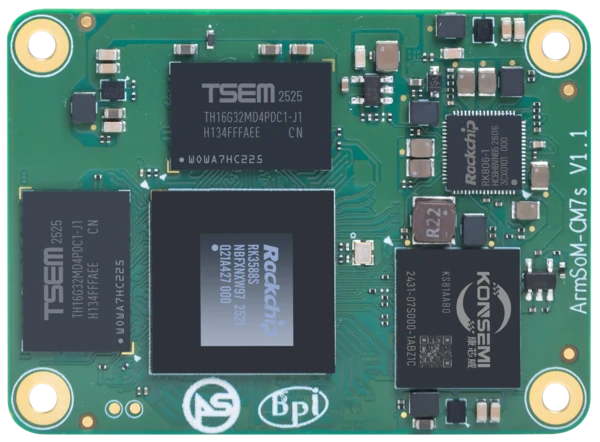
ArmSoM CM7s v1.1. Photograph: ArmSoM product media. Confirm the revision of the supplied module.
For a product migrating from Raspberry Pi Compute Module 5 (CM5), first identify where the existing system runs out of capacity. The CM7s and Raspberry Pi CM5 comparison covers the wider platform decision.
Read the configuration as two separate choices
RAM holds running processes, active buffers and cached data. eMMC holds persistent files. Doubling eMMC capacity does not give the application more working memory, and unused RAM does not increase the number of recordings the product can retain after shutdown.
CM7s capacity choices and the evidence needed to select them
Ressourcen | Published range | Measure before choosing |
LPDDR4 / LPDDR4X RAM | 4 / 8 / 16 / 32GB | Peak application memory, service concurrency, media buffers and update overhead |
eMMC | 32 / 64 / 128 / 256GB | Installed image, recovery/update space, application data and retention policy |
Carrier storage expansion | Depends on the carrier and selected interfaces | Connector wiring, boot support, driver support, sustained transfer and power |
Die CM7s Dokumentation describes the configuration range. Confirm the exact memory type, RAM/eMMC pairing and availability when placing an order. These are module configurations; they should not be treated as user-replaceable memory slots.
Match the capacity to the item you are ordering
On 20 November 2026, the CM7s purchase page described CM7s Basic as 4GB RAM with 32GB eMMC, and CM7s as 8GB RAM with 32GB eMMC. It also listed CM7s-IO and a Maker kit containing CM7s Basic plus CM7s-IO. A carrier-only item is not a compute module.
The documentation's 16GB/32GB RAM and larger eMMC options require configuration confirmation; the range alone does not establish current stock or a selectable shop variant. Check the chosen item and order summary before payment. For another pairing, send ArmSoM the required RAM, eMMC, quantity and delivery date.
Measure a busy system, including unusual busy moments
An idle desktop is a poor guide to an embedded product's peak demand. A vision application may briefly hold old and new model data while updating. A database can consume more memory during an import. A browser interface may retain several large images when a user changes screens quickly.
Record memory during normal operation and during the events that overlap in service: an update arriving during camera capture, a database backup while the display is active, or a burst of client connections. Keep the input size and service configuration with each result so another engineer can repeat the measurement.
Linux file caches also deserve interpretation. A low “free” figure alone does not prove the device needs a larger module. Look at available memory, swapping, process growth and the application's response time together. Repeated growth after identical tasks can indicate a leak that more RAM would only postpone.
A camera-buffer calculation
For a simple planning example, a packed 1920 × 1080 RGB image with three bytes per pixel occupies 6,220,800 bytes, or about 5.93MiB. Four such buffers require about 23.7MiB before alignment, metadata and any copies. This is an arithmetic example, not a measured CM7s allocation.
A pipeline may also keep the camera's original format, a resized tensor, inference outputs and a display surface. Count the buffers that exist at the same time. If several streams or processes copy the same frame, memory consumption can grow well beyond the size of one image.
Camera buffers + Models & tensors + UI & services + Update headroom
Memory planning model. The application determines the size of each part.
When a 32GB RK3588S module is useful
A 32GB CM7s configuration is worth evaluating when the real workload includes a large working database, several substantial services or concurrent processing that cannot fit comfortably in a smaller configuration. It can also be useful for a development system that runs debugging and analysis tools beside the application.
That choice needs a reason that can be measured. If an 8GB prototype finishes its busiest workload with adequate available memory and stable latency, a larger configuration may bring little application benefit. Conversely, a prototype that repeatedly swaps during a required operation needs either a smaller working set or more RAM.
Set the margin according to the product's expected growth and update behavior. A universal rule such as “always buy twice the measured RAM” ignores cost, workload variation and the difference between a development image and a production image.
Translate workload measurements into a configuration decision
Arbeitsbelastung | Record on the prototype | How to use the result |
Browser kiosk with a local service | Lowest available memory and response time during screen changes and updates | Keep the smaller candidate if the full workload meets its target with an agreed margin; extra capacity alone will not improve an unconstrained task |
Local database with bulk imports | Import peak, concurrent queries, swap activity and recovery time | If required work exhausts the current module, reduce the working set or evaluate the next documented RAM option |
Camera and NPU application | Simultaneous frame buffers, model reload peak and display memory | Choose RAM around concurrent allocations, then validate inference latency separately |
Offline recorder or gateway | Data written per day, maximum offline interval, image and update space | Budget eMMC from the retention policy; check endurance and power-loss behavior separately |
Give eMMC a retention and update budget
Start with the installed system and application, then add space for logs, databases, cached assets and recovery. If the product uses two system slots for updates, reserve space for both. If it downloads an update before installing it, account for the temporary package as well.
Retention rules often matter more than the initial image size. Decide how long camera events remain local, what happens when the network is unavailable and which data can be deleted first. Test the “nearly full” condition deliberately; a product should recover predictably when its log or data partition reaches its limit.
Capacity alone says little about write endurance or power-loss behavior. For a product that writes continuously, obtain the relevant storage specifications for the supplied module and validate the application's write pattern. Avoid promising a service lifetime from the eMMC size.
Storage expansion is a carrier decision
CM7s exposes storage-related signals, but an interface in the module documentation does not guarantee a connector on every carrier. PCIe, SATA and USB choices also interact with multiplexed signal groups. An NVMe requirement therefore belongs in the carrier specification, including the slot, lane routing, reset, power and software support.
A design that needs both fast external storage and another function on the same signal group must resolve that allocation before layout. The CM7s carrier migration guide explains this planning step. Do not assume that an RK3588 carrier's PCIe features transfer unchanged to an RK3588S module.
Configuration questions
Will 32GB improve NPU inference speed?
Extra capacity helps when the application is constrained by memory. It does not increase the NPU's peak arithmetic capability. Model structure, runtime support, data movement and the rest of the pipeline still determine latency.
Can I select any RAM and eMMC combination?
The published capacity lists describe supported options, not a promise that every pairing is immediately available. Confirm the specific configuration and delivery requirements with ArmSoM.
What should I send with a configuration enquiry?
Provide the peak working set, system image size, retained-data estimate, update strategy and required external storage. Add a representative workload if possible. Use the CM7s purchase page to review options, or Kontakt ArmSoM for a configuration discussion.
Selection guidance based on manufacturer documentation. No comparative hardware benchmark was performed for these articles.