

A voice terminal should still answer a local request when its internet connection fails. The XiaoRui project shows one way to build that behavior on Rockchip RK3576: keep a complete speech and language pipeline on the board, use a cloud backend when available, and send familiar device commands directly to Home Assistant.
This is ArmSoM's engineering review of piaozhiye's open-source XiaoRui project, introduced in the supplied Chinese project article. The author documents testing on RK3576 EVB1 with a Rockchip Linux 6.1 SDK image. ArmSoM CM5 and Sige5 are discussed below as platforms to evaluate for adaptation; this article does not report a completed port or measurements on those boards.
What the RK3576 voice assistant actually does
XiaoRui is a Chinese-language assistant with wake-word detection, speech recognition, spoken replies and interruption during playback. The project's RK3576 configuration uses a single C frontend to handle microphone input and playback, plus separate local and cloud gateways. Its local conversation path combines Paraformer recognition, Qwen2.5-1.5B through RKLLM and Matcha speech synthesis.
The author reports that conversation, clock queries, timers, alarms and volume control continue without the external network. Cloud conversation uses qwen-flash and cloud speech recognition. In hybrid mode, the frontend switches conversation routes when a gateway becomes unavailable and checks for cloud recovery.
For a developer, this is a concrete reference for a voice terminal that must retain useful local functions during an outage. It also exposes the work behind that behavior: audio routing, process recovery and predictable command handling.
How the local and cloud paths fit together
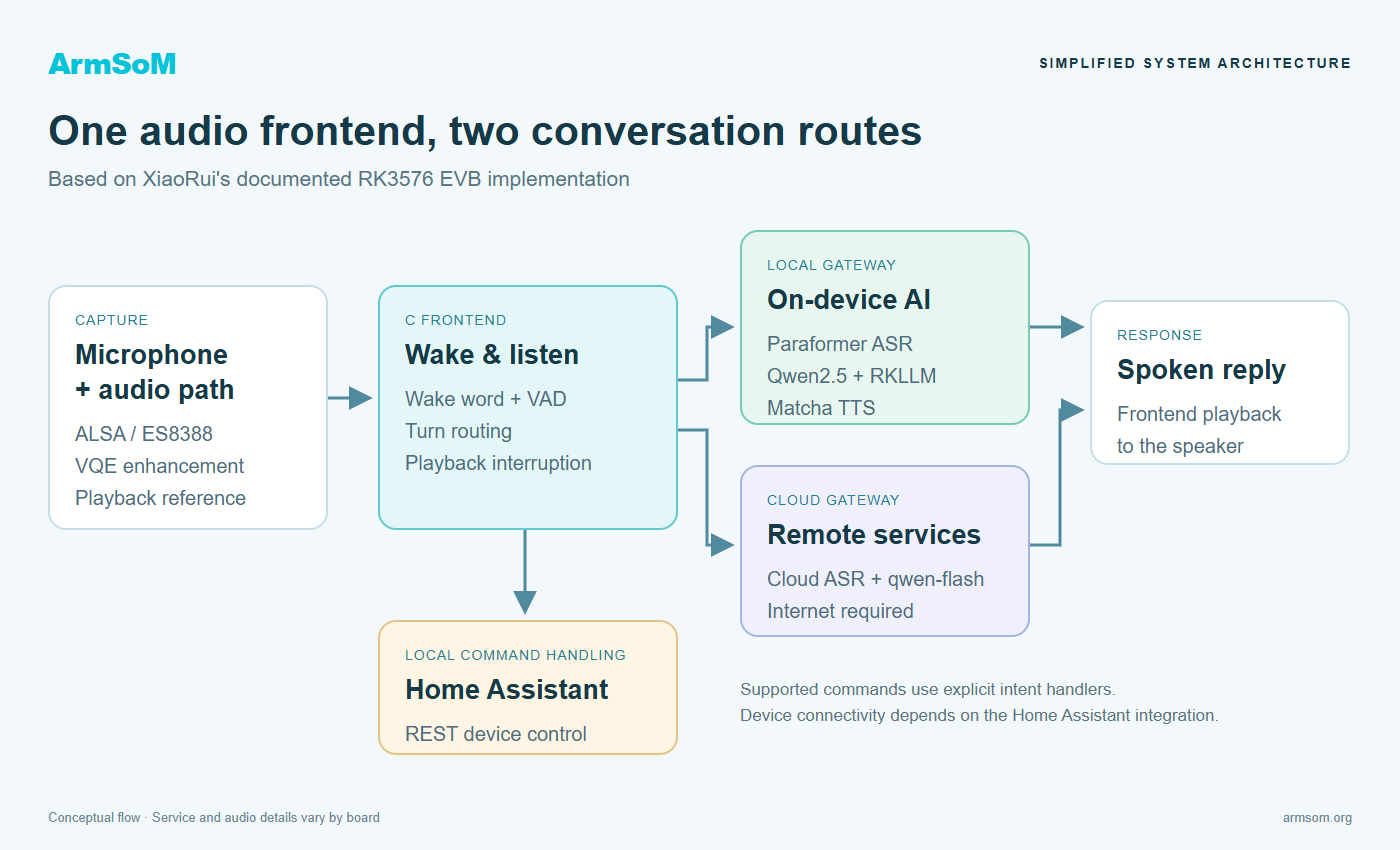
ArmSoM's simplified diagram of the documented RK3576 design. Cloud services require internet access; Home Assistant device availability depends on each integration.
The frontend keeps ownership of audio capture. A wake-word event opens a speech turn, voice activity detection determines when the utterance ends, and the selected backend processes the request. The reply returns to the playback path, where a new user utterance can interrupt it.
Separating the gateways lets the application retain a local route without making every conversation depend on the same remote service. A product implementation should still define what happens to a turn already in progress when a connection fails. Useful tests include a failed connection before speech, a timeout after recognition and a disconnect while a response is playing.
Keep familiar commands predictable
The project routes supported commands such as volume, time and device control through local intent handlers. For its configured Mi Home lights and sockets, it calls Home Assistant's REST interface directly and limits the device targets. General conversation goes to the language model.
That separation gives the application an explicit place to validate a device name and action. Home Assistant documents authenticated service calls through its REST API. For an ArmSoM adaptation, define the permitted entities and services before connecting the voice interface, and check the resulting device state after an action.
Local speech processing and offline device control are separate requirements. A device integration may still depend on its vendor's cloud. Test each required light, socket or other endpoint with the external network disconnected before describing the complete product as offline.
Audio integration deserves its own test plan
The original RK3576 setup uses an ES8388 audio path with one live microphone channel, a spare slot and two digital playback-reference channels. Its enhanced capture route feeds Rockchip VQE for echo cancellation and other audio processing. The repository also describes a capture route without VQE, with weaker protection against the assistant hearing its own speaker.
The playback reference is especially relevant to a hands-free product. While the assistant is speaking, the microphone records a mixture of the user, room noise and the speaker. A usable reference path helps echo cancellation separate those signals. Codec identity alone does not establish that the same channel routing exists on a different carrier board.
For the first ArmSoM prototype, a supported USB microphone can help isolate application work from onboard codec integration. Then qualify the final microphone, speaker and enclosure together. Test interruptions while playing speech and music, quiet speech at the intended distance, background conversation and repeated false-wake attempts. Record the failures as well as the successful commands.
Where ArmSoM CM5 and Sige5 fit
两者皆有 ArmSoM CM5 和 ArmSoM Sige5 use RK3576 with a documented 6 TOPS NPU. Their different board formats suit different development stages. That shared processor makes them relevant candidates for this architecture; it does not make the EVB firmware interchangeable.
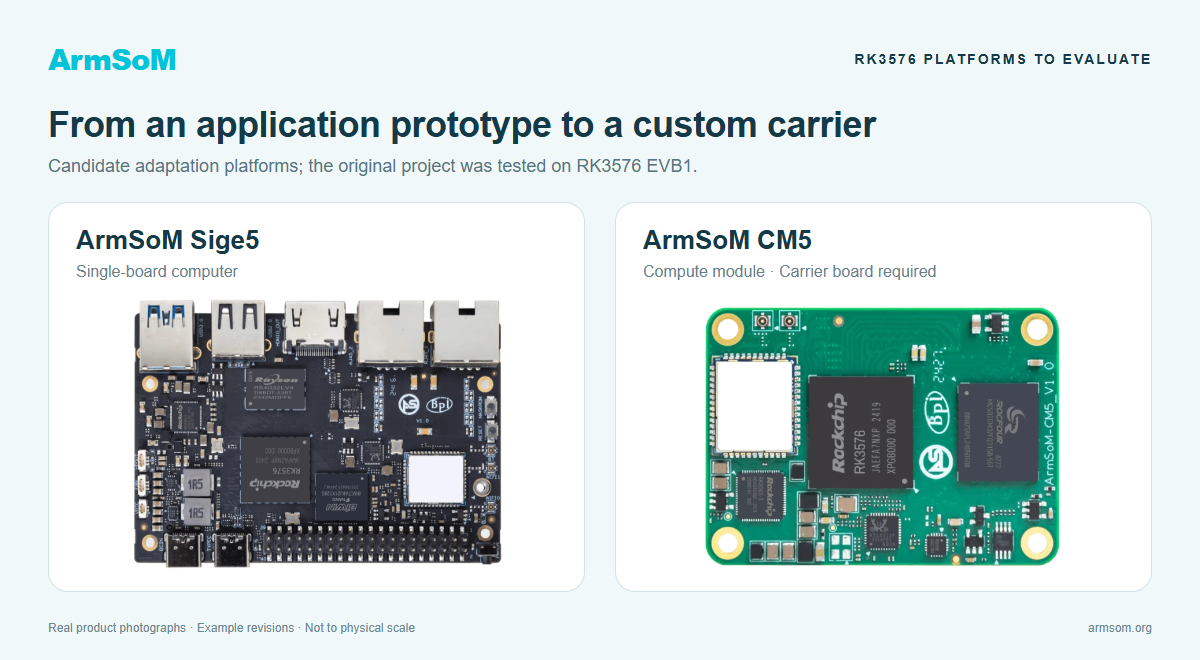
Real ArmSoM CM5 and Sige5 product photographs. These are candidate adaptation platforms, not photographs of the author's tested assembly. Boards are shown independently fitted, not to physical scale.
Design need | ArmSoM starting point | What to qualify |
Application prototype with accessible connectors | Sige5 single-board computer; documented dual Gigabit Ethernet and onboard Wi-Fi 6 | Selected Linux image, USB audio devices, NPU runtime and full speech pipeline |
Voice terminal with a purpose-built carrier | CM5 compute module with CM5-IO for initial development | Carrier power, audio capture and playback, reference channels, thermal design and enclosure |
On-device language inference | RK3576 support in Rockchip's RKLLM software stack | Matched model conversion, runtime and NPU driver versions; measured latency and memory use |
的 CM5 guide includes CM5-IO hardware and audio instructions. Use it to establish the carrier's actual connections. For Sige5, start with its hardware and software documentation, then inspect the devices exposed by the installed image. EVB mixer identifiers and kernel patches need a board-specific review before reuse.
A practical adaptation sequence
1. Establish an audio baseline
Record the board revision, OS image, kernel and audio devices. Verify microphone capture and speaker playback independently. Save short recordings at the intended distance and volume, including a recording made while the speaker is active. These files make it easier to distinguish an acoustic problem from a recognition problem later.
2. Bring up the local speech loop
Start with wake word, recognition and a fixed spoken response. Add the local language model after those steps are reliable. Rockchip's RKLLM project lists RK3576 support and separates model conversion on the host from inference on the board. Preserve the model filename, conversion settings and runtime version with the test results.
Measure from the end of the user's speech to the first audible reply. Also log recognition time, model response time, synthesis time, peak memory and temperature. A language model's first-token result cannot describe the delay of the entire voice interaction.
3. Add device control and cloud recovery
Begin with one explicitly named Home Assistant device and a small action set. Check ambiguous names, repeated commands and a device that is temporarily unavailable. Then add the cloud route and verify that a timeout does not produce two replies or execute the same action twice.
4. Test the finished operating cycle
Repeat cold starts, service restarts and network-loss tests with the intended enclosure and power supply. Confirm that the application reports readiness only after the required local services can accept a request. If the product uses a watchdog, test recovery without losing saved configuration or pending timers.
What the open-source release includes
XiaoRui publishes its own code under MIT, while its third-party notices identify separate terms for dependencies. The repository does not bundle every model, runtime or vendor audio component needed by the documented setup. Teams preparing a product image should check the exact release packages and their redistribution terms, including Rockchip VQE artifacts.
The project is a source and configuration reference. Plan time to assemble the software environment and validate it on the selected ArmSoM hardware. Use the English reproduction guide for the original EVB setup rather than treating this case study as a ready-to-flash ArmSoM image.
常见问题
Can RK3576 run an offline voice assistant?
The XiaoRui author reports a complete local Chinese speech-and-conversation pipeline on RK3576 EVB1. Reproducing it requires the documented models, software and audio setup. Network-dependent services, including some smart-home integrations, remain separate from the local voice loop.
Has this project been validated on ArmSoM CM5 or Sige5?
This article documents the third-party EVB case and a proposed ArmSoM adaptation route. It does not establish a tested CM5 or Sige5 port. Start with the correct board image, then qualify audio, inference and device control on that exact configuration.
Does the same configuration provide English voice interaction?
The documented assistant is designed for Chinese. English interaction needs suitable wake-word, recognition and speech-synthesis models, plus changes to language-specific intent handling and a fresh set of acoustic tests.
Plan an ArmSoM voice terminal
For an application prototype, review Sige5. For a custom carrier and enclosure, review CM5 and the CM5-IO documentation. Bring your required languages, microphone layout, offline functions and target interfaces to ArmSoM so the hardware and software scope can be evaluated together.
For a broader audio design discussion, read 构建离线语音界面:音频捕获只是第一步.
Source and validation scope
Written by jackson for ArmSoM. Sources reviewed on 23 November 2026: the supplied XiaoRui project article, the public project repository, ArmSoM product documentation, Rockchip RKLLM documentation and Home Assistant's API reference. Project behavior is attributed to the original author. The diagrams and ArmSoM adaptation analysis were prepared for this article; no new hardware benchmark was performed.