

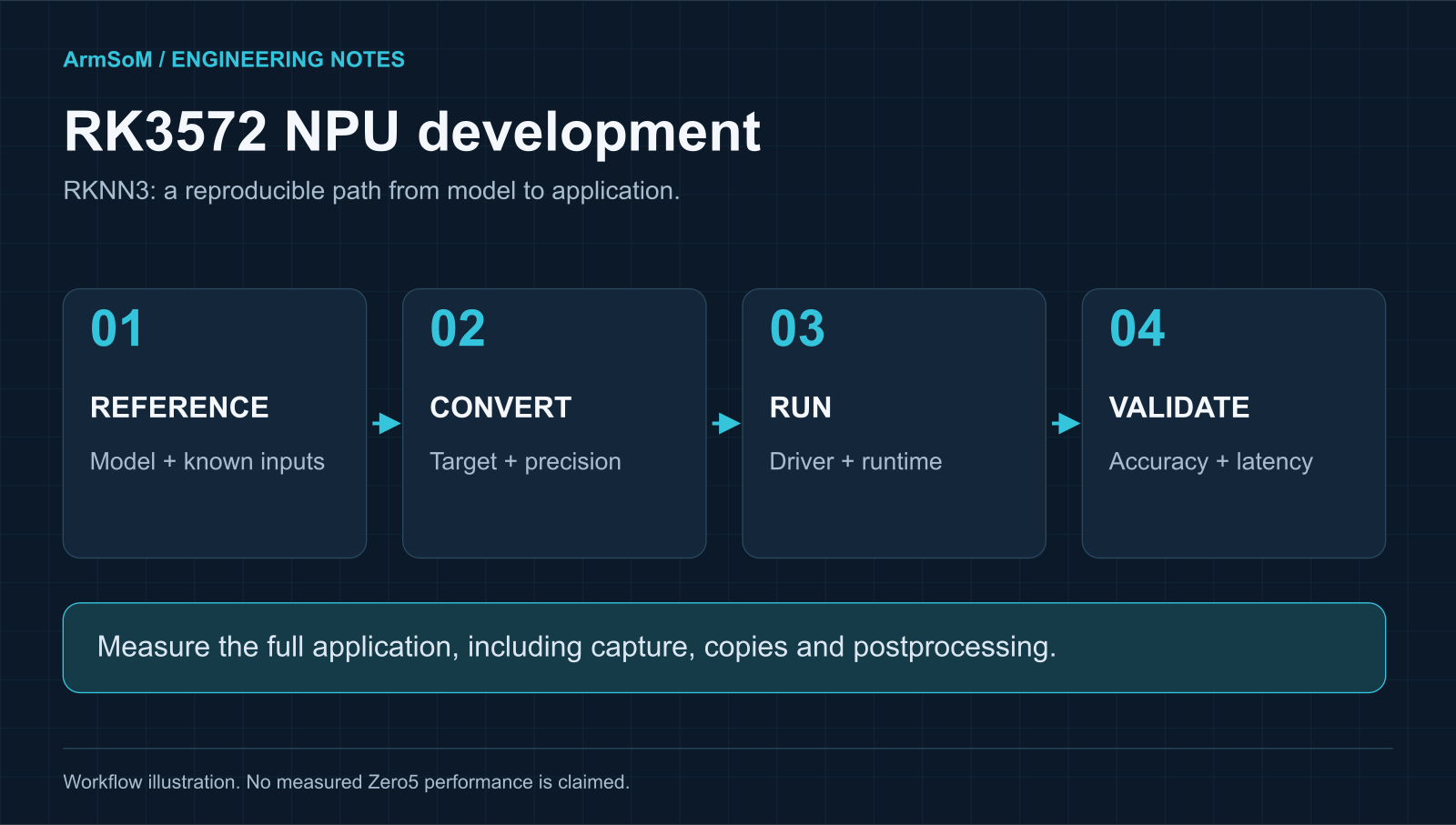
Original ArmSoM workflow illustration. This describes an evaluation process, not a Zero5 benchmark result.
Which toolkit does RK3572 use?
RK3572 is an RKNN3 target. Rockchip’s official toolkit repository lists RK3572 alongside RK1820 and RK1828. It points developers of RK3588, RK3576 and several earlier SoCs to RKNN-Toolkit2 instead. Choose by target chip and the board’s SDK, rather than assuming an older Rockchip tutorial applies unchanged.
The RKNN3 workflow separates model preparation on a development computer from execution on the target. The repository describes conversion tools, a C/C++ runtime and a Python interface through RKNN3 Toolkit-Lite. Keep the converter, board driver and runtime in a compatible set.
This guide explains how to evaluate that path. It does not claim a completed ArmSoM Zero5 test or supply performance numbers from an unavailable test setup.
RK3572 native inference and RK182X coprocessor mode
On an RK3572 board, the application uses the NPU integrated into its own SoC. An RK182X coprocessor arrangement puts an accelerator behind a connection to a host system. Both appear in the RKNN3 ecosystem, but their deployment paths differ.
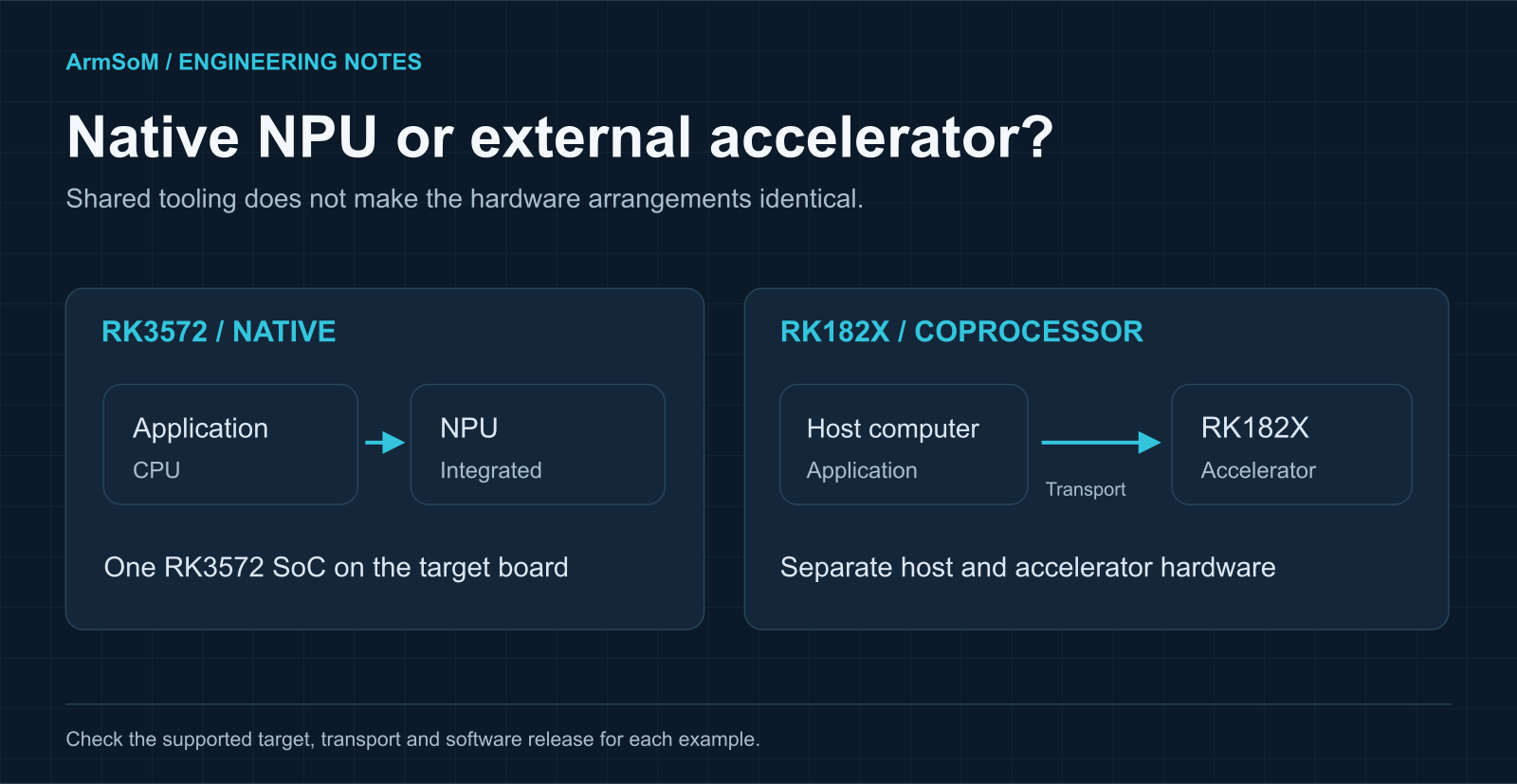
Two execution arrangements in the RKNN3 ecosystem. Transport options and runtime support depend on the hardware and release.
This distinction explains a common source of confusion in release news: a macOS host feature for an external RK182X accelerator does not announce macOS running on an RK3572 board. Likewise, a model demonstrated on an accelerator with its own memory configuration is not proof that it fits a compact RK3572 system.
For RK3572, begin with the board’s native runtime instructions. Bring coprocessor transport settings into the project only when your hardware actually includes that additional device.
Read the 4 TOPS figure with its conditions
的 RK3572 datasheet qualifies the peak NPU figure as 4 TOPS with INT8 sparsity. A deployment has several other variables: precision, supported operators, tensor shapes, memory traffic and the time spent outside the accelerator.
Use that figure to identify the processor class. Use a repeatable test to decide whether the board can run your application. For a detector, record accuracy and latency at the input resolution you will use. For a language model, record the exact model, quantization, context length, memory use and generation settings before comparing results.
A practical RK3572 model-validation workflow
1. Freeze a reference model and inputs
Save the model revision, export settings and a small representative test set. Run the original model first and keep its outputs. For a camera model, record channel order, normalization, resize and padding rules. A successful conversion cannot correct the wrong input preprocessing.
2. Check the actual example target
Open the example’s supported-platform list and read its conversion and deployment instructions. A model name in a shared catalogue is not sufficient. Confirm that the example covers RK3572, the model variant and the SDK version you intend to use.
3. Convert and evaluate accuracy
Use the prescribed export and conversion route for that model family. If calibration is required, use data representative of the deployment. Review unsupported operations and warnings, then compare the converted output with the saved reference. Record any accuracy change before optimizing speed.
4. Run on the board’s matching software stack
Record the board revision, image version, kernel, NPU driver and runtime. Deploy the model artifacts required by the example. Keep a minimal inference application until correctness is established; integrating a camera, UI and network service all at once makes failures harder to isolate.
5. Test the complete application
Add capture, preprocessing, inference and output handling. Test with the intended power supply and enclosure. Check memory use and sustained latency after the board has warmed up, then repeat under the competing workloads expected in service.
Toolchain and example references: RKNN3 Toolkit 和 RKNN3 模型动物园. The validation sequence above is ArmSoM’s proposed engineering workflow, not a report of completed hardware testing.
Which models can you expect to run?
的 RKNN3 模型动物园 is a useful place to locate examples across vision, language, multimodal and speech tasks. Its introductory deployment description emphasizes RK182X coprocessors, which makes checking each example’s target especially important for RK3572.
For a first evaluation, choose a documented RK3572 example close to your intended task. Once it works, change one variable at a time: model, input shape, precision or application integration. Keep a known working example so you can separate a model problem from a driver or environment problem.
Large-model announcements need the same discipline. “Supported by RKNN3” does not answer how much memory a model needs on RK3572, which operators it uses or whether the desired latency is achievable. Look for a target-specific example and reproducible settings before treating a model as a design requirement.
What RKNN3 V1.2.0 changes for this decision
The reviewed V1.2.0 changelog includes an RK3572 MatMul API addition, improvements to large-model support and memory-leak fixes in some scenarios. Other entries concern RK182X host connectivity or broader model and tooling features. Track the target named in each change rather than applying every headline to RK3572.
Read the versioned release notes alongside your board vendor’s package. Upgrading a development-computer toolkit without checking the target runtime can leave the project with a combination that was never validated together.
Measure inference and end-to-end latency separately
Measurement | What it answers | Record with the result |
Model accuracy | Does the converted model still make useful predictions? | Model revision, test data, preprocessing and precision |
Inference latency | How long does the model execution take? | Warm-up, sample count, batch and timing boundary |
End-to-end latency | How long until an input produces a usable result? | Capture, resize, copies, postprocessing and output |
Sustained behavior | Does the result hold during real operation? | Run duration, temperature, cooling and competing tasks |
Memory / power | Will the full application fit the product? | Peak use, measurement point and active peripherals |
A low inference time can coexist with poor responsiveness if frames queue faster than the application consumes them. Report both throughput and latency, including variation, and decide whether dropping an old frame is preferable to processing stale input.
For product comparisons, use the same model revision, accuracy target and workload. Otherwise, a faster number may describe a different test rather than a better fit.
常见问题
Can I reuse an RK3588 RKNN model unchanged?
Do not assume the artifact is portable. Start from the source model and the RK3572-supported RKNN3 workflow. Review target, conversion and runtime compatibility explicitly.
Does 4 TOPS mean a guaranteed YOLO frame rate?
No fixed frame rate follows from TOPS alone. The model size, resolution, precision and complete camera pipeline have to be measured on the target board.
Does a supported model name guarantee that all its variants work?
No. A different model revision, export graph, input shape or quantization can change compatibility. Use the exact variant and settings documented by the relevant example.
Does RKNN3 support prove that Zero5 is ready for an AI deployment?
It establishes a toolchain route for the SoC. A Zero5 deployment still needs a released board configuration, a compatible image and a validated application. See the current Zero5 design context and the Linux support guide.
Sources and scope
Public references reviewed on 19 November 2026. Product capabilities and software status should be checked against the linked version and target board. Diagrams are original ArmSoM explanatory illustrations.
Discuss your RK3572 project
Tell us the interfaces, software and workload you need. We can help assess the fit for your design.
Continue reading
Rockchip RK3572: specifications, software and board choices →RK3572 Linux support: board images, upstream work and validation →