

ArmSoM 确认 CM7s 作为 Orange Pi CM5 的替代选项。两者均采用 RK3588S 和 55 × 40 mm 格式,并带有三个 100 引脚连接器。对于现有产品,剩下的问题是替代产品将使用哪个运营商、模块版本和软件配置。
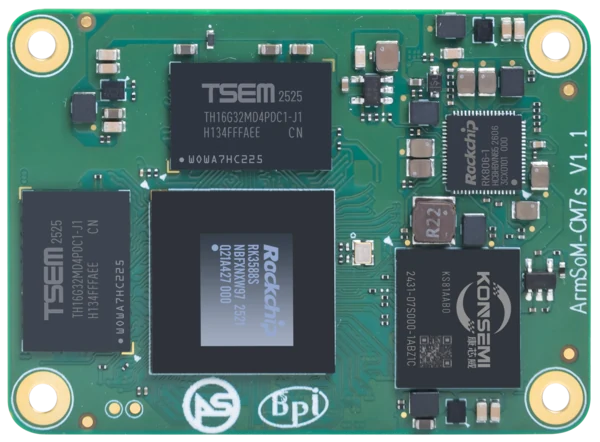
ArmSoM CM7s
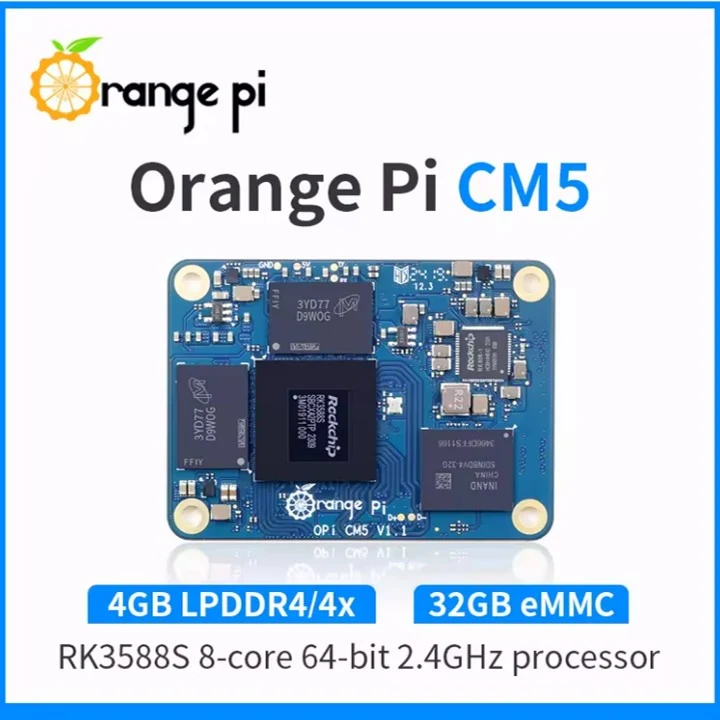
Orange Pi CM5 照片: Orange Pi / Arduino 产品列表
图片用于识别棋盘,并非按实际比例绘制。图片中的配置和随附的配件可能有所不同。
记录的平台比较
决策点 | Orange Pi CM5 | ArmSoM CM7s |
处理器 | RK3588S,根据制造商手册 | RK3588S |
模块格式 | 55 × 40 mm;三个 100 针连接器 | 55 × 40 mm;三个 100 针连接器 |
更换位置 | 本次迁移中的源模块 | ArmSoM 确认的更换选项 |
精确验证的载体/图像 | 本文未提供 | 本文未提供 |
修改问题 | 检查发货的Orange Pi模块和载板 | 解决记录的 CM7s v1.1 CN2 引脚限制 |
平台参考: Orange Pi CM5 制造商手册(PDF,镜像); CM7s 文档。主板版本、购买的配置和软件支持必须单独检查。
定义替换配置
记录载体型号、模块版本、供应、启动介质和软件映像。列出产品使用的接口并记录每个接口的结果。 ArmSoM的替换声明不建立通用载体或图像互换性;本文未提供经过验证的确切载体和图像。
上电前解决修订
CM7s 文档将 CN2 引脚 2 和 4 标识为在 v1.1 上不可用,并描述了 v1.2 的更正。根据其发布的文档检查交付的模块标记。在通电之前查明载体是否使用这些引脚以及更换是否需要接线或配置更改。
测试产品使用的接口
确认电源和启动后,测试应用程序使用的以太网、USB、显示器、摄像头、音频和扩展路径。记录每个接口的图像和结果,包括限制和未经测试的功能。保留原始 Orange Pi 配置可用于回滚。桌面启动是该记录的结果之一,而不是整个运营商的批准。
根据您的要求进行选择
要求或情况 | 评估什么 | 决定详情 |
更换定位 | ArmSoM 确认 | 确认安装的载体、版本和映像。 |
CM7s 改版 | 记录交付版本 | 解决记录的 v1.1 pin 限制。 |
运营商和软件范围 | 附加命名测试矩阵 | 不要假设 Orange Pi 操作系统映像传输不变。 |
将应用程序移动到 CM7s 图像上
使用支持的CM7s软件启动并恢复其上面的应用程序和数据。分别检查硬件相关库和加速媒体。重用 Orange Pi 启动映像需要显式验证,即使处理器和连接器排列看起来很熟悉。
示例设计
将替换定位变成可用的兼容性记录
对于 Orange Pi CM5 客户来说,最有价值的文档是一个简短的记录,其中命名了载体 PCB 版本、CM7s 版本、图像校验和以及每个使用的接口。添加任何电缆、引导设置或设备树更改。命名配置可以由另一位工程师复制;模块工作的无条件声明不能。在该记录可用之前,将 CM7s 描述为 ArmSoM 确认的替换选项,并邀请客户分享承运商详细信息。
Define what “alternative” means for your project
A new product can choose a different carrier, enclosure and operating system. An existing deployed product may need to preserve all three. These are different engineering scopes, even if both purchasing requests ask for an alternative compute module.
Write down the non-negotiable requirements before comparing options. Include carrier revision, connector locations, enclosure clearances, power input, camera models, displays and any external certification constraints. Separate these from preferences that can change during redesign.
If the carrier can change, compare complete development kits first. If it must remain, a detailed pin and electrical review becomes the first gate. Do not order a production batch based on module dimensions or connector count.
Build a replacement matrix
Requirement | What to compare | Pass condition |
供电 | Input rails, sequencing, enable and reset | Startup and load behavior meet the design limits |
Carrier signals | Pin assignment, voltage and multiplexing | Every connected function has a valid mapping |
Storage and network | Interfaces, boot method and drivers | The intended devices work concurrently |
Camera and display | Lane routing, control signals and software | The real sensor and panel pass application tests |
Serviceability | Recovery, updates and diagnostics | A technician can recover the finished device |
Mark an unknown item as unresolved. This makes the remaining work visible and prevents assumptions from becoming purchasing specifications. A connector that can mate is only one row in the matrix.
Test the difficult peripheral first
Identify the function most likely to block migration. It might be a custom display timing, a camera sensor driver, an unusual USB device or an application tied to a particular acceleration library. Prove that function before spending time polishing the user interface.
After individual checks, run a combined test. Attach the real camera and display, write data to the intended storage and exercise the network. Watch for resource sharing, power instability and thermal effects that do not appear during isolated demonstrations.
Turn the evaluation into a purchasing decision
Compare complete configurations, including module, carrier changes, cooling and software work. Ask for current availability and commercial terms for the exact part configuration. Historical web pricing is not a substitute for a project quotation.
A useful handover contains the approved hardware revisions, software release, remaining limitations and test results. Send your existing carrier documentation and must-have functions to ArmSoM to discuss whether CM7s fits the project or whether a different module is a better starting point.
Revision check: The current CM7s 文档 flags CN2 pins 2 and 4 on v1.1 as non-functional and describes a correction planned for v1.2. Confirm the revision supplied and its pinout before completing a carrier review.
Additional references
硬件和文档
CM7s · RK3588S
RK3588S、6 TOPS、NPU、55 × 40 mm 和三个 100 引脚连接器。 ArmSoM 提供 CM7s 作为 Orange Pi CM5 的替代选项;确认确切的运营商、版本和软件组合。
常见问题
CM7s可以代替Orange Pi CM5吗?
ArmSoM 确认其为替代选项。安装时必须检查确切的运营商、版本、软件和外围设备覆盖范围。
它是通用的替代品吗?
尚未建立通用载体和图像兼容性。使用 ArmSoM 检查您的确切运营商、模块版本、图像和所需接口。
产品信息和支持
来源
由 ArmSoM 使用以下文档编写。示例设计是建议,而不是测量的客户安装。比较使用已发布的规格,而不是面对面的基准。