
Sisoog has published a Persian-language guide to embedded Linux using the ArmSoM CM1 and its CM1-IO carrier board. Written by Seyed Mohammad Esmaeil Madani (سیدمحمداسماعیل مدنی), the article introduces the hardware and follows a Buildroot workflow through to a Linux serial console. We thank the author and Sisoog for sharing the process with their readers.
Read the original guide on Sisoog (Persian).
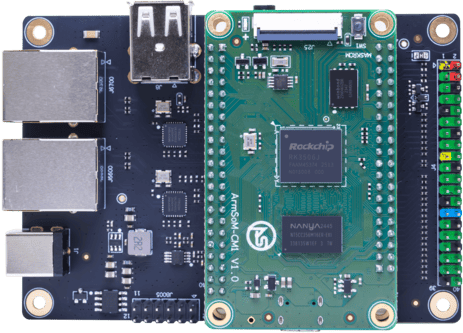
ArmSoM CM1 with the CM1-IO carrier board. Product photograph supplied by ArmSoM.
From SDK source to a running board
The tutorial connects an introduction to embedded Linux with a practical CM1 setup. It covers preparing the build environment, obtaining ArmSoM's RK3506 SDK, selecting an SD-card configuration, building the image, writing it with SDDiskTool, and connecting over UART. Screenshots accompany the configuration and boot steps.
Readers can follow the complete walkthrough and discuss it with its author on Sisoog.
A closer look at the CM1 platform
CM1 is a 70 × 42 mm compute module based on Rockchip's RK3506J, with three Cortex-A7 cores and a Cortex-M0. Its documented options include 256 MB or 512 MB DDR3L memory and NAND flash, alongside a MIPI DSI display connection and MicroSD expansion.
For evaluation, CM1-IO adds physical connections including two 10/100 Ethernet ports, two USB 2.0 host ports, Wi-Fi and audio. These carrier-board features are separate from the standalone module. Developers planning a custom carrier should use the CM1 documentation to check the signals, power requirements and interface assignments their product needs.
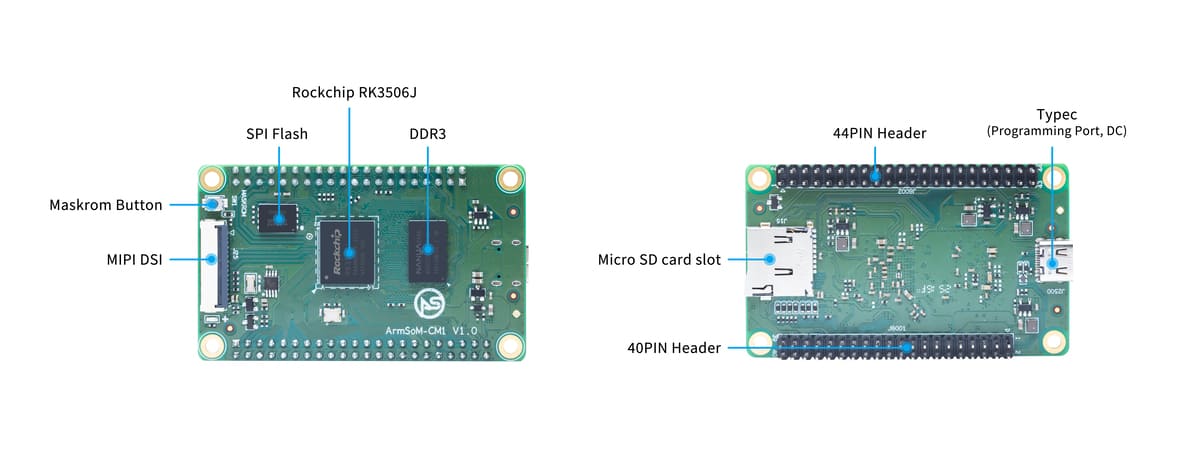
CM1 module views and connector locations. See the documentation for detailed pin definitions.
Building an image for your application
Buildroot generates embedded Linux systems through cross-compilation. It can build the toolchain, bootloader, kernel and root filesystem, giving developers control over the software included in an image.
Our suggested next exercise is to add one application or peripheral to a working baseline. Save the original configuration, make the change, rebuild, and compare the results. Keeping the SDK revision and build settings with the project makes a later failure easier to reproduce.
Начните с ArmSoM RK3506 SDK and the current board documentation. Match the configuration to your storage target and hardware revision; host dependencies and menu choices can change between SDK releases.
Share what you build
Have you brought up a display, connected an industrial interface, or built a small Linux application on CM1? Share your project and the steps that worked for you in the ArmSoM community forum. A board revision, SDK version and a short boot log make technical discussions much easier to follow.
If you are still choosing hardware, explore the CM1 platform или свяжитесь с ArmSoM with your application and interface requirements.
The original tutorial and its screenshots belong to their respective creators. This community news article links to Sisoog's work; the product photographs shown here are ArmSoM assets.