

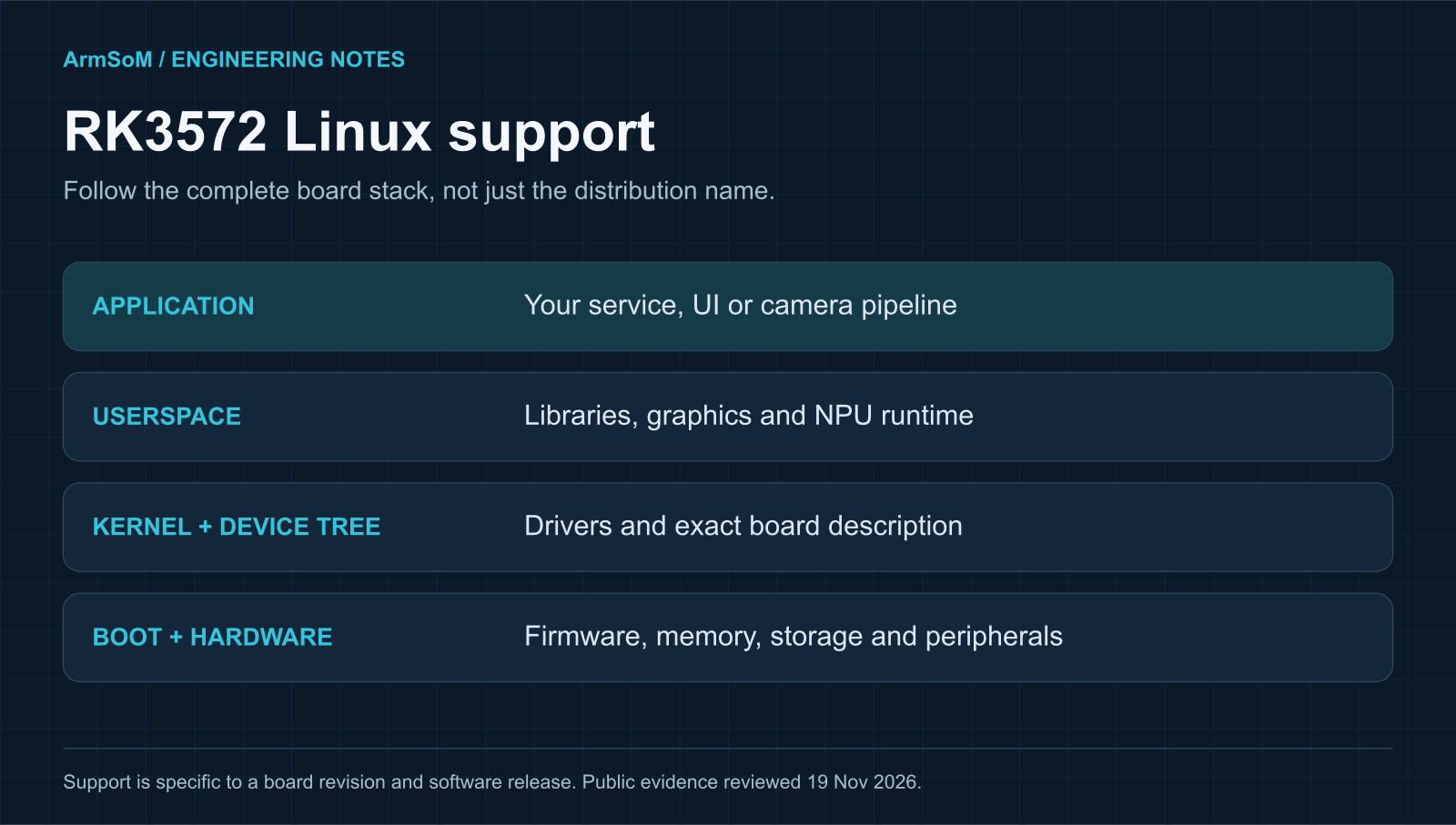
Original ArmSoM software-stack illustration. A functioning product depends on the complete stack for its exact board.
Does RK3572 support Linux?
Linux support is documented on RK3572 vendor boards. Forlinx publishes an OK3572-C manual for Linux 6.12.58, covering board interfaces, media tests and image installation. That is specific evidence for a vendor software stack. It does not establish that every RK3572 board runs a generic mainline image with every peripheral enabled. Read the board-specific manual.
This review is dated 19 November 2026. The distinction matters for a buying decision: a usable vendor image, a patch submitted upstream and a complete board validated on a released upstream kernel are different milestones. Public evidence for one should not be reported as evidence for all three.
BSP, distribution and mainline: what each tells you
A board support package (BSP) contains the platform-specific work needed to bring up hardware. It may include boot firmware, kernel changes, device trees and supporting tools. Its version and maintenance policy matter as much as the distribution name.
A distribution supplies packages and the user environment. Debian or Ubuntu userspace can run on a vendor kernel; seeing that distribution name does not identify which hardware drivers have reached upstream Linux.
Mainline support refers to work integrated into the upstream kernel. Even then, a complete board depends on the right device tree, boot chain and userspace components. GPU acceleration, camera processing and NPU inference should each be checked.
When requesting an image, ask for its exact download, release notes, board revision and source references. “Linux supported” is the start of the conversation.
What the public evidence currently establishes
Evidence reviewed | What it establishes | What remains separate |
A documented Linux package for that board, including peripheral and media tests | ArmSoM images and results on other hardware | |
Linux 6.12 and Android 16 listed; Desktop 24.04 / Debian 13 marked in development | A released download for every listed OS option | |
Public submission of RK3572 clock/reset work | Merge status in a specific tree and release | |
Public submission of power-domain binding work | A complete tested board power-management path | |
Public submission of RK3572 Ethernet driver work | Working networking on a chosen board and kernel | |
RK3572 named as a toolchain target | Matching board driver, runtime and tested model |
These patch links are dated evidence of upstream work, not a claim that they are the newest revisions. This review has not verified a complete RK3572 board against a particular released upstream kernel, so it does not label full mainline support as complete or absent.
How to judge an upstream support claim
Start with the proposed change, then look for the actual commit and the release containing it. A mailing-list patch is a request for review. A maintainer’s acceptance message is useful progress, but it still needs to be connected to the tree you intend to build.
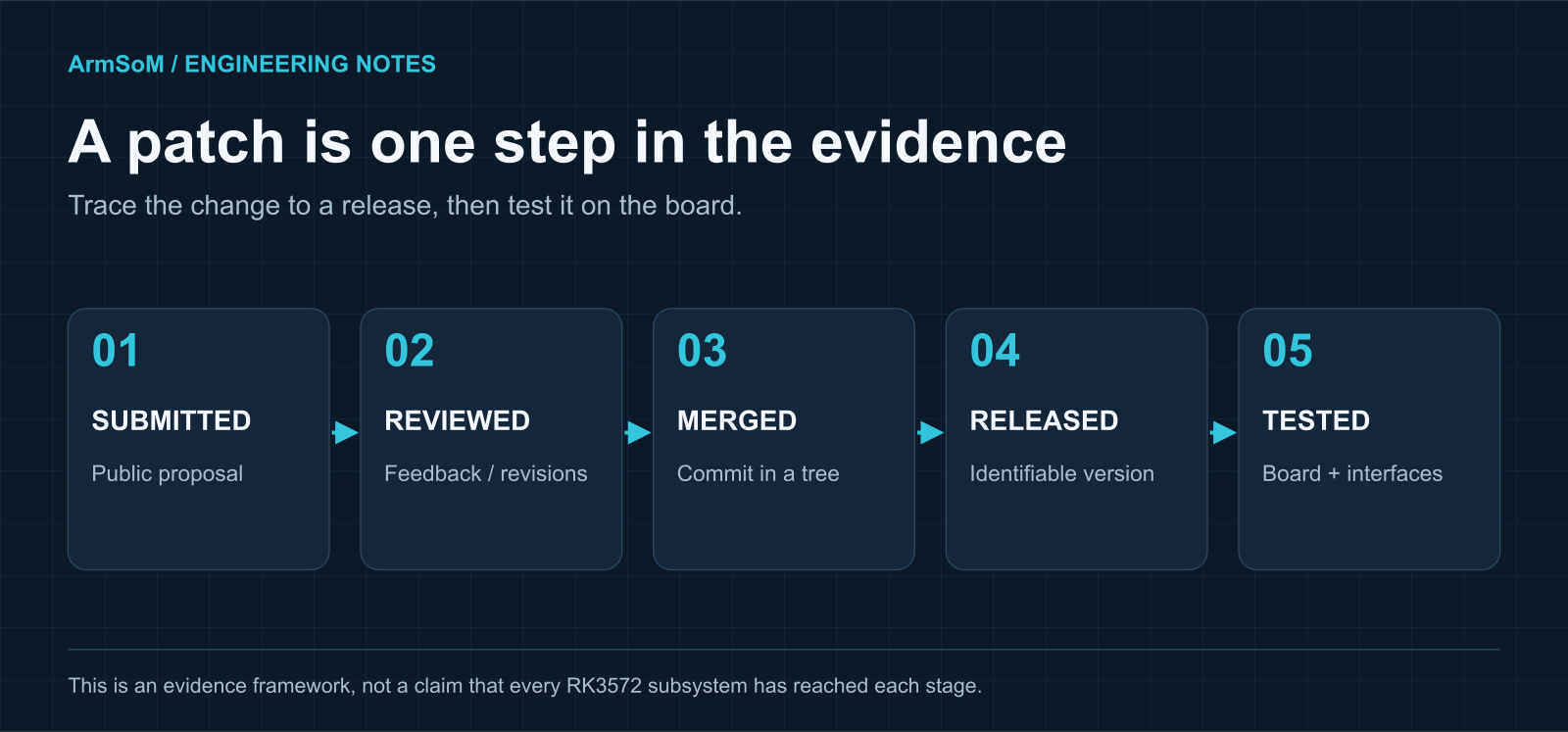
Each stage answers a different question. A patch submission alone cannot establish a complete, working board.
For a meaningful board result, record the kernel tag or commit, configuration, device tree and bootloader. List what was exercised. Booting to a serial shell is a useful milestone; it does not verify video acceleration, camera tuning, suspend or NPU inference.
If a supplier advertises mainline support, ask which features were tested, on which image and hardware revision, and where the source changes can be inspected. That makes the claim reproducible.
A practical RK3572 Linux validation matrix
Use this as an acceptance checklist for the target board. It describes tests to request or perform, rather than results already measured on Zero5.
Район | Useful acceptance evidence | A weak substitute |
Boot and recovery | Repeated cold boots, correct storage and documented recovery | A single successful boot photograph |
Ethernet / wireless | Sustained traffic, reconnects and the fitted PHY or radio driver | A network interface appearing in a list |
Display / GPU | Correct panel timing plus verified rendering path under the application | A desktop that may use software rendering |
Camera / ISP | Exact sensor, format, tuning and sustained capture at the required mode | An unqualified statement that MIPI CSI exists |
Video processing | Required codec, resolution, frame rate and recording/playback duration | A decoder limit copied from the SoC datasheet |
NPU | Matching driver/runtime, model accuracy and full pipeline latency | A model conversion that only ran on a PC |
Storage / USB / expansion | The actual device and simultaneous interface combination | A connector or controller listed in hardware specs |
Power / thermal | Temperature, throttling, sleep/wake and intended enclosure conditions | A short benchmark on an open bench |
Keep the evidence tied to an image release. A later kernel or runtime update can alter behavior, so rerun the tests that matter to your product after such changes.
Capture a useful baseline from a running board
If you already have access to a board, these standard read-only Linux commands can help identify its software and device tree. Availability and permissions vary by image. They are inspection examples, not tested Zero5 output.
uname -a
cat /etc/os-release
cat /proc/device-tree/model
tr '\0' '\n' < /proc/device-tree/compatible
ip -br link
lsblk -o NAME,SIZE,TYPE,MOUNTPOINTS
Save the image filename or checksum separately. Add bootloader, NPU runtime and driver versions from the board’s own release tools or logs. These command outputs establish identity and basic enumeration; they do not establish accelerated graphics or model correctness.
For an issue report, include the exact peripheral, power arrangement, reproduction steps and expected result. A failure that can be repeated is easier to diagnose than “Linux is unstable.”
What this means for ArmSoM Zero5
The published Zero5 concept describes a compact RK3572 board direction. The sources reviewed for this article do not establish a released, validated Zero5 Linux image. Third-party RK3572 images should not be presented as substitutes for it.
For a Zero5 software evaluation, the useful release information will be the hardware revision, supported memory and boot storage, image version, kernel and device-tree source, enabled peripherals and known limitations. A downloadable image should be accompanied by a clear recovery path.
If your design depends on a specific camera, display, accelerator workload or industrial bus, include it in the support request. ArmSoM can then assess the required combination against the board design and available software rather than answering at the processor-family level.
Часто задаваемые вопросы
Is RK3572 fully supported by mainline Linux?
The public patch activity demonstrates upstream work. This review has not verified complete board support on a specified upstream release. Check the merged commits and test the exact functions you require before making that claim.
Does a newer kernel guarantee better peripheral support?
No. A vendor kernel may contain board-specific changes that are absent from a newer upstream release. Compare the required drivers, device tree and userspace support.
Can I install Debian or Ubuntu with a generic ARM64 image?
The userspace architecture is only one requirement. You also need a matching bootloader, kernel, device tree and drivers. Follow the board vendor’s supported installation route.
Does the NPU work as soon as Linux boots?
NPU inference needs a compatible driver, runtime and model. Follow the RK3572 RKNN3 deployment guide and evaluate a supported example on the exact image.
Where should I start when choosing an RK3572 board?
List the interfaces and software functions you need simultaneously, then request evidence for that combination. The RK3572 specifications and board-selection guide provides the chip-level reference.
Sources and scope
Public references reviewed on 19 November 2026. Product capabilities and software status should be checked against the linked version and target board. Diagrams are original ArmSoM explanatory illustrations.
Discuss your RK3572 project
Tell us the interfaces, software and workload you need. We can help assess the fit for your design.
Continue reading
Rockchip RK3572: specifications, software and board choices →RK3572 NPU development: choosing RKNN3 and validating a model →