

ArmSoM Sige7s is an Orange Pi 5 Pro alternative for compact terminals that need Wi-Fi 6, two USB 3.0 Type-A ports or USB-C DisplayPort. Both use RK3588S, but their peripheral layouts differ. Compare those connections with the devices your finished product must support.
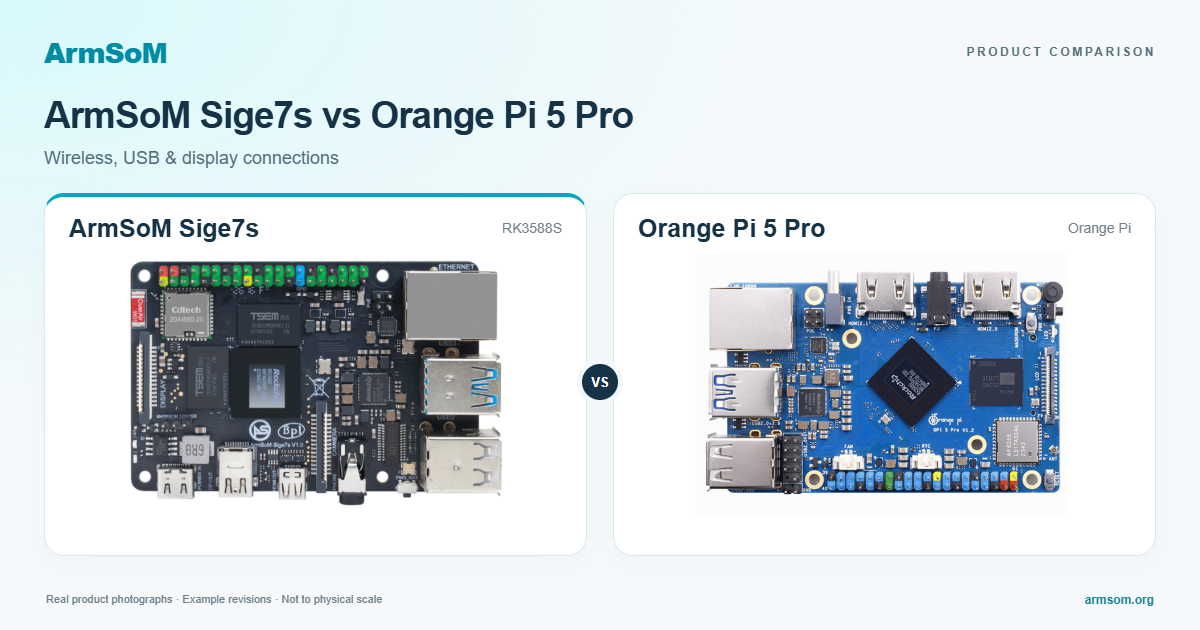
Product photographs: ArmSoM; Orange Pi product photo via CircuitPython. Example hardware revisions are shown independently fitted, not to physical scale. The comparison does not imply a partnership between the brands.
Specifications at a glance
Design question | ArmSoM Sige7s | Orange Pi 5 Pro |
Процессор | RK3588S | RK3588S |
След | 85 × 56 mm | 89 × 56 mm |
Memory type | LPDDR4/4x | LPDDR5 |
Беспроводная связь | Wi-Fi 6 + Bluetooth 5 | Wi-Fi 5 + Bluetooth 5.0 |
USB Type-A | 2 × USB 3.0 + 2 × USB 2.0 | 1 × USB 3.x + 3 × USB 2.0 |
SSD socket | No onboard M.2 listed | M.2 M-key, PCIe 2.0 ×1 / SATA path |
Display emphasis | HDMI + USB-C DisplayPort + DSI | Two HDMI outputs + DSI |
What makes Sige7s a relevant alternative?
A customer searching for an Orange Pi 5 Pro alternative usually has a particular constraint: the board must fit a small enclosure, connect a set of USB devices, support a monitor, or run a local application without a separate computer. Sige7s addresses the same broad class of compact RK3588S systems, with a different balance of connectors.
Both boards have eight CPU cores, Mali-G610 graphics and a nominal 6 TOPS NPU. These common elements do not establish equal application speed, but they explain why comparing the I/O is more useful than treating either board as a completely different computing platform.
ArmSoM advantages for a peripheral-heavy terminal
Two directly accessible USB 3.0 Type-A ports
Sige7s lists two USB 3.0 and two USB 2.0 Type-A ports. The Orange Pi 5 Pro manual lists one high-speed USB Type-A port and three USB 2.0 Type-A ports. If a terminal uses both a USB camera and a high-speed storage peripheral, Sige7s offers a convenient physical connection arrangement.
Two sockets do not guarantee twice the aggregate bandwidth. Test both devices concurrently, including their power demand and the software path used by the camera. A hub may still be appropriate, but it should be an intentional design choice.
Integrated Wi-Fi 6 and a DisplayPort option
Sige7s has a newer listed Wi-Fi generation than the Wi-Fi 5 module in Orange Pi 5 Pro. This is worth evaluating on a Wi-Fi 6 network, especially when the access point and antenna installation are already specified. Actual throughput, latency and roaming behaviour require measurement.
The USB-C DisplayPort connection also gives Sige7s a useful option for a display terminal. It is a different connection path from the two HDMI outputs on Orange Pi 5 Pro. Check the monitor and cable combination rather than assuming all USB-C displays and docks work alike.
SSD and dual-HDMI requirements
Orange Pi 5 Pro includes an M.2 SSD path and LPDDR5 memory. Sige7s instead focuses on integrated wireless, USB peripherals and display connectivity. If the product needs onboard NVMe within the ArmSoM range, review Sige7 or the RK3576-based Sige5 alongside the compact Sige7s.
For a kiosk with two HDMI monitors, direct dual HDMI may simplify cabling. For a single-monitor terminal with several USB devices, Sige7s may be easier to integrate. In both cases, the required display modes and software acceleration need confirmation on the selected operating-system image.
A simple selection worksheet
Write down the devices that must be connected at the same time. Separate boot storage from application data, and separate development-only peripherals from parts that will remain in the product. This prevents a temporary keyboard or programming cable from driving the final board choice.
Then build one complete prototype of the preferred layout. Check cold boot, display reconnect, USB camera recovery and wireless reconnect. Record the board revision, image version, power supply and cooling configuration. These details make the result repeatable when the product moves beyond a single prototype.
Which board should you shortlist?
Shortlist Sige7s for its compact outline, Wi-Fi 6, two USB 3.0 Type-A connections and DisplayPort path. Start with the Документация Sige7s, then send ArmSoM the display model, USB devices and storage requirement. The comparison table identifies the SSD, memory and HDMI differences to account for during that review.
Часто задаваемые вопросы
Does the word Pro mean Orange Pi 5 Pro is faster in every application?
No. Memory, software, cooling and the workload determine application performance. This article reports specification differences, not head-to-head benchmark results.
Which ArmSoM board should I consider if I need built-in NVMe?
Consider Sige7 for PCIe 3.0 ×4 NVMe and dual 2.5GbE, or Sige5 for an RK3576 design with PCIe 2.1 ×1 NVMe.
Evaluate ArmSoM Sige7s for your product
Send ArmSoM your required RAM, storage, interfaces, operating system and expected volume. Start with the product and hardware guide below to discuss an appropriate sample configuration.
Sources and comparison method
Published by ArmSoM. This selection guide compares documented hardware features; it is not a head-to-head benchmark. References reviewed on 23 November 2026. Confirm the supplied revision, configuration and software support when ordering.