

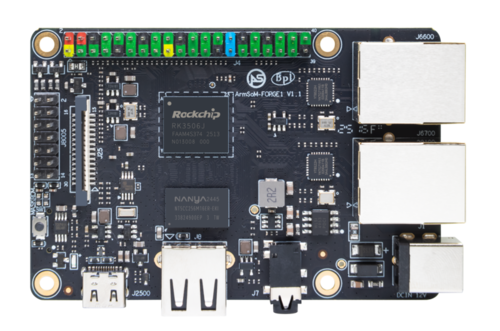
ArmSoM Forge1 product photograph.
A human-machine interface succeeds when an operator can understand the machine state and complete the next action without waiting or guessing. For an embedded Linux design, that depends on the display, touch input, application behavior and boot sequence working together.
ArmSoM Forge1 and CM1 provide RK3506J-based starting points for this kind of development. Their documentation describes a Buildroot software route and lightweight UI support. Choose the evaluation platform around the final device's interfaces and mechanical requirements.
Specify the panel and touch controller together
Record the panel model, resolution, interface, supply rails, backlight requirements and timing information. Add the touch-controller model, bus, interrupt and reset wiring. A panel showing an image does not establish touch support, and a compatible connector does not establish matching electrical signals.
Review cable direction and pin numbering carefully. Flexible cables can look identical while connecting contacts differently. Bring up the display with a known static pattern first, then validate touch coordinates, orientation and edge accuracy.
Use the carrier's actual routing and software configuration as the reference. If the product changes the panel or cable, keep that change with the device-tree and initialization information it requires.
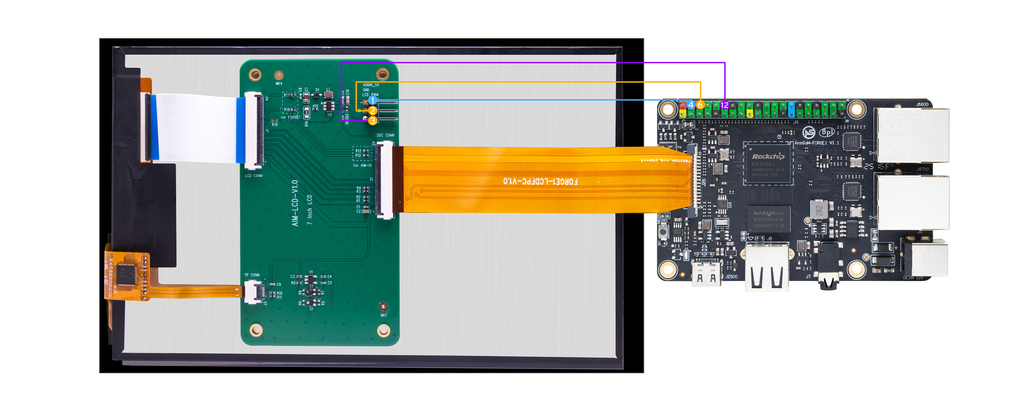
A real Forge1 display setup. The panel, cable, power supply and software configuration need to be evaluated together. Image: ArmSoM.
Budget memory around the interface
Calculate framebuffer storage before filling the interface with large assets. An illustrative 800 × 480 image at 32 bits per pixel occupies 1,536,000 bytes. Two such full buffers require about 3.07 MB, before application memory, decoded images, fonts, caches or operating-system use.
This arithmetic is a planning example, not a claim that a particular panel or buffering mode is supported. It helps explain why UI design decisions matter on a compact embedded platform.
Prefer assets sized for their display area. Limit unnecessary full-screen transitions and benchmark the actual redraw pattern. A simple menu can be responsive while a large animated dashboard using the same hardware may need a different rendering approach.
Select a UI framework by application needs
A lightweight framework such as LVGL can be appropriate for controls, status screens and compact dashboards. Evaluate fonts, language support, input handling, graphics backend and the exact version integrated into the image.
If your application needs a browser engine or a larger desktop-style framework, measure its memory and startup requirements on the target instead of assuming a desktop prototype will transfer unchanged. The framework decision affects the build, update size and long-term maintenance workload.
Design the startup sequence
Define what the operator sees between power-on and a usable screen. Avoid displaying controls that appear active before the machine data is ready. A startup state can show progress and identify an unavailable subsystem without presenting stale values as current.
Measure separate milestones: bootloader start, kernel start, userspace readiness, first visible frame and first valid data. These timestamps show where optimization will help. Removing a service only makes sense after its role in the product is understood.
For a control panel, test application restart separately from a full reboot. Recovering the interface should not unintentionally resend an operator command or reset a machine state that is managed elsewhere.
Make failure states understandable
Show loss of communication explicitly. Distinguish an unchanged measurement from a measurement that has stopped updating. If the screen loses its connection to the controller, disable or qualify actions according to the product's defined behavior.
Keep logs bounded and protect configuration changes from incomplete writes. Include a service method that remains available when the graphical application fails, such as a documented debug connection or controlled recovery mode.
Validate the finished interaction
Test the UI with representative users and the real display. Include gloves if relevant, poor viewing angles, rapid touches and prolonged operation. Check brightness, readability and thermal behavior in the intended enclosure.
Start with Forge1 for a ready-made board evaluation or review CM1 and its carrier resources when the product needs a different integration route. Share the panel model and interaction requirements early; those details are central to a useful HMI design.