

ArmSoM Sige7 is a compact NanoPC-T6 LTS alternative for RK3588 products needing dual 2.5GbE, onboard Wi-Fi 6 and one NVMe drive. Its 92 × 62 mm outline reduces the board area needed for that combination. This guide compares T6 LTS specifically, including its additional video connections.
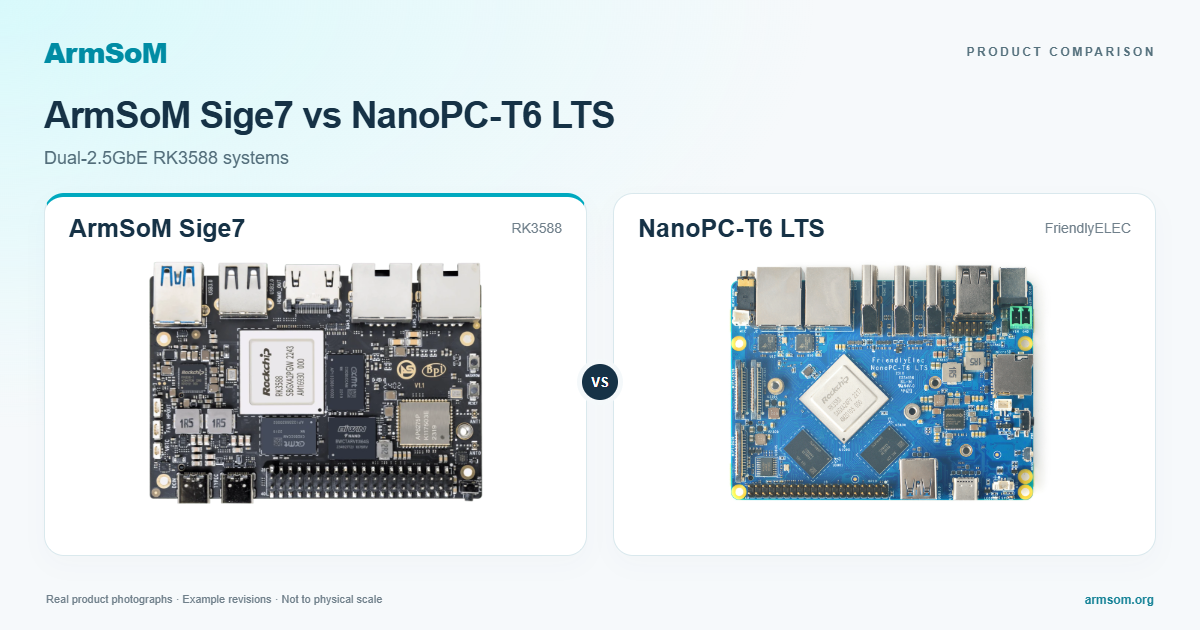
Product photographs: ArmSoM; FriendlyELEC. Example hardware revisions are shown independently fitted, not to physical scale. The comparison does not imply a partnership between the brands.
Specifications at a glance
Design question | ArmSoM Sige7 | FriendlyELEC NanoPC-T6 LTS |
Verarbeiter | RK3588 | RK3588 |
Fußabdruck | 92 × 62 mm | 110 × 80 mm |
Ethernet | 2 × 2.5GbE | 2 × 2.5GbE |
NVMe | M.2 M-key, PCIe 3.0 ×4 | M.2 M-key, PCIe 3.0 ×4 |
drahtlos | Onboard Wi-Fi 6 + Bluetooth | M.2 E-key expansion |
HDMI layout | 1 output | 2 outputs + 1 input |
Power arrangement | Dedicated USB-C power input | Documented DC input; follow LTS guide |
Header | 40-pin | 40-pin |
Two boards that already meet the network requirement
A dual-2.5GbE design narrows the SBC shortlist quickly. Sige7 and NanoPC-T6 LTS both provide the required network ports alongside RK3588 and a four-lane PCIe 3.0 NVMe connection. If those are the first three requirements, either deserves evaluation.
The next question is what surrounds them. A compact gateway may need wireless setup and a single status display. A video appliance may need HDMI input, multiple outputs and several camera connections. The boards allocate physical space differently to serve those needs.
Sige7's case for a compact gateway
Sige7 combines onboard Wi-Fi 6 with its two wired network ports on a 92 × 62 mm board. NanoPC-T6 LTS uses a larger 110 × 80 mm outline and provides an E-key wireless expansion route. A design that needs wireless can therefore start with fewer separately selected components on Sige7.
That integration may simplify assembly and antenna planning, but it is not an automatic cost or reliability win. Confirm the antenna arrangement, power supply, cooling and replacement procedure. The finished enclosure needs room for two network cables, an SSD and service access regardless of PCB size.
For a team already using ArmSoM products, the Sige7 Dokumentation keeps hardware resources and interface instructions in the same documentation system. That is a practical workflow benefit when the selected image supports the application.
Additional video connections and software choices
The T6 LTS hardware specification lists two HDMI outputs and HDMI input. Those connections make it more suitable for some capture, monitoring and multi-display products. Adding comparable functions externally can consume more space and engineering effort than accepting the larger board.
FriendlyELEC documents FriendlyWrt, OpenMediaVault, Debian and Android options. For a migration, identify the functions used by the existing software and reproduce them on the intended Sige7 image. Include network services, display acceleration and attached devices in that review.
A network link rate is not an application benchmark
Neither board should be described as a guaranteed line-rate router from its Ethernet labels alone. NAT, packet filtering, VPN encryption, packet size and the image's driver configuration affect the result. A file server is also constrained by storage, filesystem behaviour and the client network.
Test the production workload with both ports active and the SSD in use. Record throughput, latency under load, temperature and recovery after a network interruption. If the system also performs AI inference or video capture, run those functions during the same test. That is the relevant load for the buying decision.
Pay attention to T6 revisions
Die FriendlyELEC T6 documentation contains information for multiple revisions, while T6 Plus has a separate page. Use the LTS layout and power information for the photographed LTS board. Do not combine an older board's connector layout with a newer model's specification.
The same discipline applies to Sige7: check the revision and the intended power connector. Do not transfer a supply assumption from one board to another merely because both use RK3588.
Which should be evaluated first?
Start with Sige7 for a space-constrained dual-network appliance with onboard wireless and one SSD. Share the application, network topology and display requirements with ArmSoM. If HDMI capture or two direct HDMI outputs are required, record that explicitly: those are T6 LTS connections that Sige7 does not provide.
Request comparable assembled configurations before choosing by price. Include storage, wireless accessories, antennas, power, cooling and the enclosure. The better product platform is the one that meets the complete requirement with the fewest unresolved integration tasks.
Häufig gestellte Fragen
Does Sige7 provide a faster NVMe interface than T6 LTS?
Both list PCIe 3.0 ×4 NVMe. Actual storage performance needs testing with the same drive, workload and suitable cooling.
Is this a comparison with NanoPC-T6 Plus?
No. The article and product image refer to NanoPC-T6 LTS. T6 Plus specifications should be evaluated separately.
Evaluate ArmSoM Sige7 for your product
Send ArmSoM your required RAM, storage, interfaces, operating system and expected volume. Start with the product and hardware guide below to discuss an appropriate sample configuration.
Sources and comparison method
Published by ArmSoM. This selection guide compares documented hardware features; it is not a head-to-head benchmark. References reviewed on 23 November 2026. Confirm the supplied revision, configuration and software support when ordering.